
JOLY JOY JH-DL2A-BK
JOLY JOY LED Desk Lamp User Manual
Model: JH-DL2A-BK
1. Introduction
Thank you for purchasing the JOLY JOY LED Desk Lamp. This manual provides detailed instructions for the safe and efficient operation of your new desk lamp. Please read this manual thoroughly before use and retain it for future reference.

Figure 1: The JOLY JOY LED Desk Lamp in a typical desk setup, showcasing its sleek design and illumination.
2. Product Features
- Eye-Friendly LED Light Source & Eye Care: Features flat light emission, preventing direct light exposure and multiple shadows, providing gentle illumination that is easy on the eyes. Ideal for desk lamps, table lamps, and general lighting.

Figure 2: The lamp provides eye-friendly illumination, reducing eye strain during reading or work.
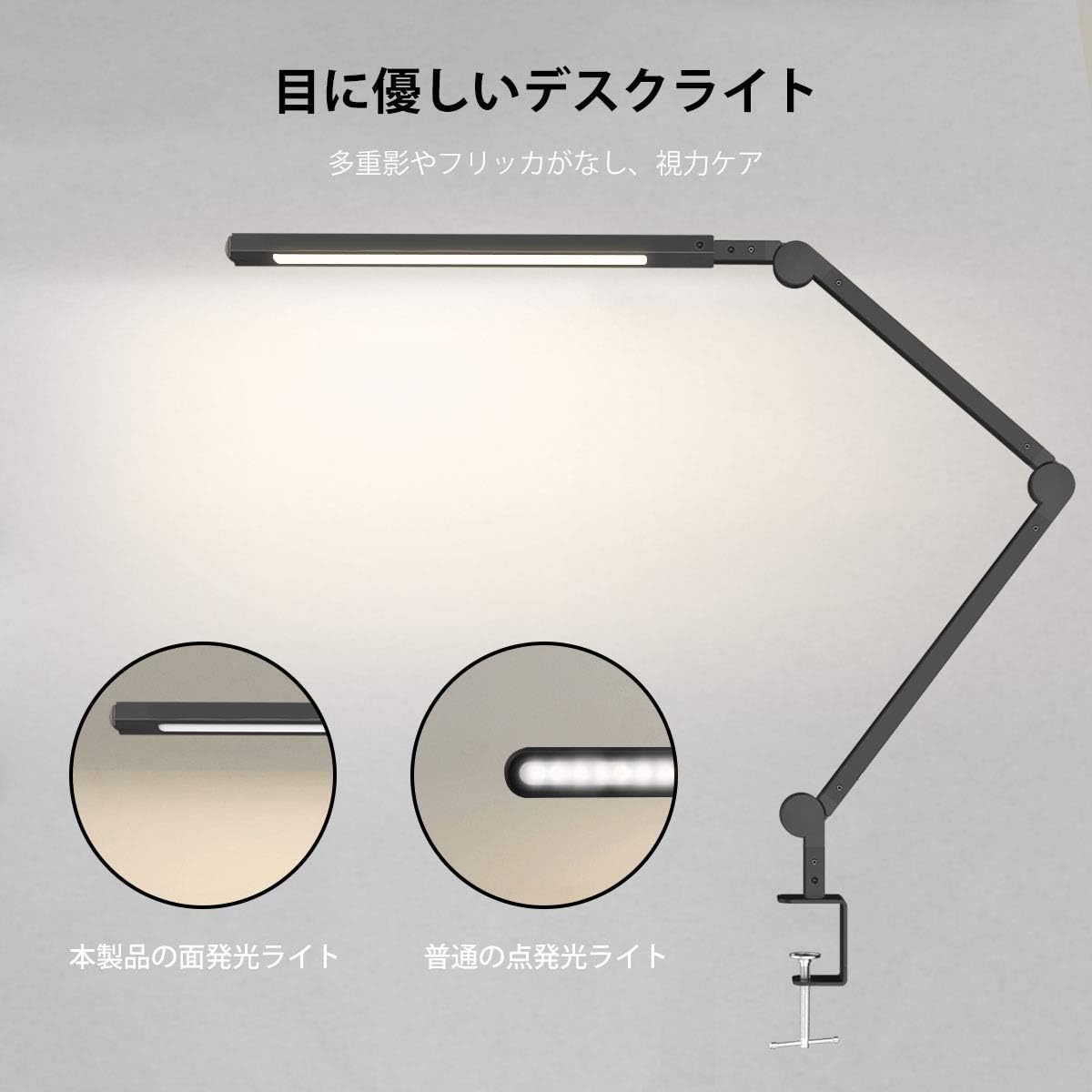
Figure 3: Illustration of the flat light emission technology, which provides uniform and glare-free lighting compared to traditional point-source lights.
- Swing Arm Clamp Lamp & Wide Area Illumination: The head can rotate 300° horizontally and vertically, and the arm can be freely moved to adjust the light direction, making it optimal for work and reading.

Figure 4: The lamp features a highly adjustable design, allowing for precise positioning of light with multiple pivot points.
- Clamp-on & Space-Saving: The aluminum clamp securely attaches to surfaces up to 6cm thick, allowing easy fixation vertically or horizontally on table surfaces, saving space.

Figure 5: The clamp-on design frees up desk space, making it ideal for compact workstations.
- Stepless Dimming, Timer, & Memory Function: Press the touch switch to freely adjust brightness and color temperature steplessly. Features 10-minute and 40-minute timer settings for energy saving. The memory function automatically recalls the last used mode when restarted.
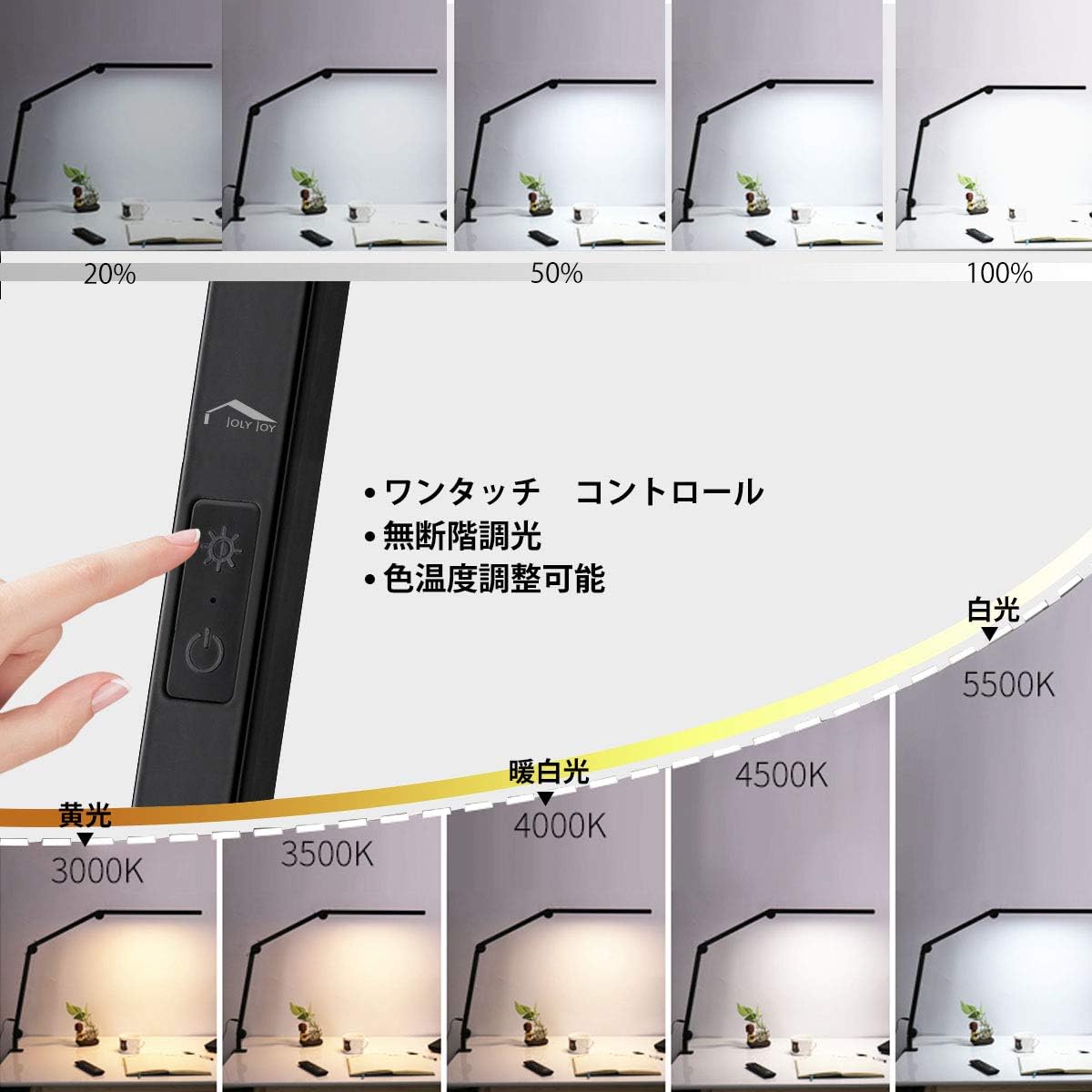
Figure 6: The intuitive touch control panel allows for seamless adjustment of brightness and color temperature.
- Energy-Saving Desk Lamp: Equipped with 98 high-brightness LEDs, consuming only 1/4 the power compared to ordinary lights, with a lifespan of 50,000 hours. No need for long-term replacement, making it energy-efficient.
3. Package Contents
Please check that all items are present and undamaged upon opening the package.
- JOLY JOY LED Desk Lamp (Main Unit)
- Clamp Base
- AC Power Adapter
- User Manual (This document)
4. Setup Instructions
- Attach the Clamp Base: Insert the lamp's main arm into the hole on the clamp base. Ensure it is securely seated.
- Mount the Lamp: Choose a suitable surface (desk, shelf, etc.) with a thickness of up to 6cm. Loosen the screw on the clamp base, slide the clamp onto the edge of the surface, and tighten the screw firmly to secure the lamp.
Figure 7: Securely attach the lamp to your desk using the robust clamp.
- Connect Power: Plug the AC power adapter into the power input port located on the lamp's base. Then, plug the adapter into a standard electrical outlet (100V AC).
- Adjust Position: Adjust the lamp head and arm to your desired position. The head can rotate 300°, and the arm joints allow for flexible movement. The base also rotates 360°.
5. Operating Instructions
The JOLY JOY LED Desk Lamp features intuitive touch controls for easy operation.
Figure 8: The touch-sensitive control panel for adjusting lamp settings.
- Power On/Off: Lightly touch the Power button (①) to turn the lamp on or off.
- Brightness Adjustment (Stepless Dimming):
- When the lamp is on, touch and hold the Brightness button (☀) to increase or decrease the brightness steplessly. Release when desired brightness is reached.
- Color Temperature Adjustment:
- When the lamp is on, lightly touch the Color Temperature button (🌞) to cycle through different color temperature modes (e.g., Warm White, Natural White, Cool White).
- The lamp offers a range from 3000K (warm) to 5500K (cool).
- Timer Function:
- To activate the timer, press the Timer button (⏱).
- One press activates the 10-minute timer. The lamp will turn off automatically after 10 minutes.
- Two presses activate the 40-minute timer. The lamp will turn off automatically after 40 minutes.
- Memory Function: The lamp is equipped with a memory function. When you turn the lamp off and then on again, it will automatically resume the last used brightness and color temperature settings.
6. Maintenance
Proper maintenance ensures the longevity and optimal performance of your JOLY JOY LED Desk Lamp.
- Cleaning: Disconnect the power before cleaning. Use a soft, dry cloth to wipe the lamp. Do not use abrasive cleaners, solvents, or harsh chemicals, as they may damage the finish or electronic components.
- Storage: If storing the lamp for an extended period, ensure it is clean and dry. Store it in a cool, dry place away from direct sunlight and extreme temperatures.
- LED Lifespan: The integrated LED light source has a lifespan of approximately 50,000 hours and is not user-replaceable.
7. Troubleshooting
If you encounter any issues with your lamp, please refer to the following common problems and solutions:
| Problem | Possible Cause | Solution |
|---|---|---|
| Lamp does not turn on. |
|
|
| Brightness or color adjustment not working. |
|
|
| Lamp flickers. |
|
|
If the problem persists after trying these solutions, please contact JOLY JOY customer support for assistance.
8. Specifications
| Feature | Detail |
|---|---|
| Brand | JOLY JOY |
| Model Number | JH-DL2A-BK |
| Color | Black |
| Wattage | 9 W |
| Voltage | 100 Volts (AC) |
| Bulb Type | LED |
| Package Dimensions | 44.6 x 34.6 x 5.2 cm |
| Package Weight | 0.96 Kilograms |
| Finish Type | Polished |
| Base Material | Aluminum |
| Product Dimensions | 42D x 61H cm |
| Shade Color | Black |
| Shade Material | Aluminum |
9. Warranty and Support
JOLY JOY provides a 1-year warranty for this product from the date of purchase. This warranty covers manufacturing defects and material flaws under normal use.
For warranty claims, technical support, or any inquiries regarding your JOLY JOY LED Desk Lamp, please contact our customer support team. Please have your purchase receipt and product model number (JH-DL2A-BK) ready when contacting support.
Contact information for support can typically be found on the product packaging or the official JOLY JOY website.
Ask a question about this manual
Ask about setup, troubleshooting, compatibility, parts, safety, or missing instructions. Manuals+ will review the question and use this page’s manual context to help answer it.