
1. Introduction
This manual provides essential instructions for the safe and effective use of your RICOH GR III Premium Compact Camera. Please read this manual thoroughly before using the camera and keep it for future reference.

Figure 1.1: Front view of the RICOH GR III camera, showing the lens and GR branding.
2. Setup
2.1 Unboxing and Initial Inspection
Verify that all components are present in the box:
- RICOH GR III Camera Body
- Accessory (e.g., USB cable, strap)
Inspect the camera for any visible damage before proceeding.
2.2 Battery Installation and Charging
Insert the battery into the battery compartment located at the bottom of the camera. Ensure it clicks into place. Connect the camera to a power source using the supplied USB Type-C cable for charging. The charging indicator will illuminate during charging.
2.3 Memory Card Insertion
The RICOH GR III uses SD memory cards. Open the memory card slot cover and insert the SD card with the contacts facing the correct direction until it locks. Close the cover securely.
2.4 Initial Power On and Basic Settings
Press the ON/OFF button to power on the camera. Upon first use, you may be prompted to set the language, date, and time. Follow the on-screen instructions.

Figure 2.1: Top view of the RICOH GR III, showing the ON/OFF button and mode dial.
3. Operating the Camera
3.1 Power On/Off
To turn the camera on or off, press the ON/OFF button located on the top panel.
3.2 Basic Photography Modes
The mode dial allows selection of various shooting modes:
- P (Program AE): Camera sets aperture and shutter speed automatically.
- A (Aperture Priority AE): You set the aperture, camera sets shutter speed.
- M (Manual Exposure): You set both aperture and shutter speed.
- U1/U2/U3 (User Modes): Customizable settings for quick recall.
3.3 Focusing
The GR III features a Hybrid AF system. You can select focus modes via the menu or assign them to a function button. The touchscreen allows for touch-to-focus and touch-to-shoot operations.
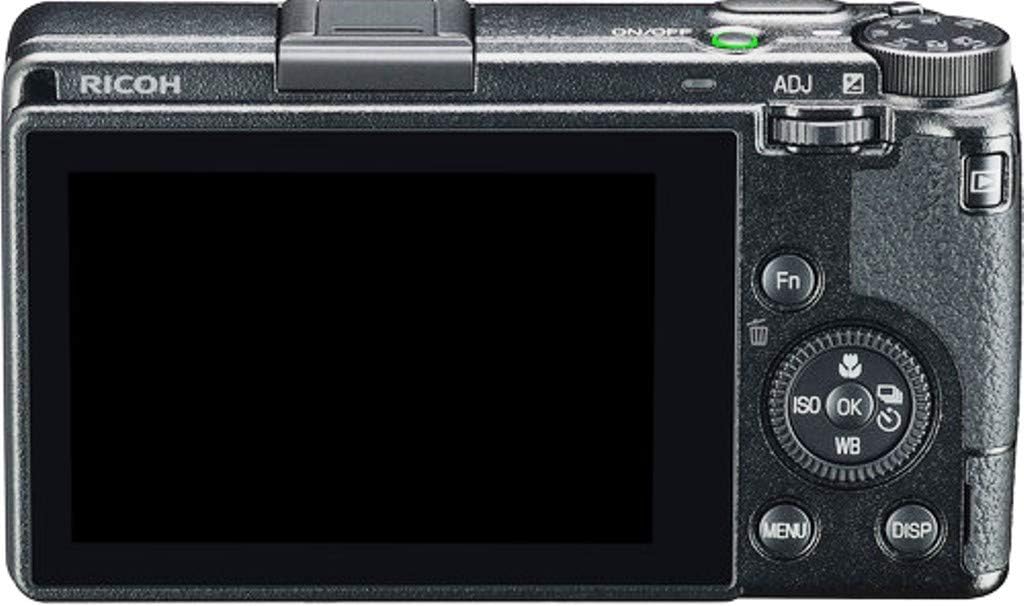
Figure 3.1: Back view of the RICOH GR III, showing the LCD touchscreen and control buttons.
3.4 Image Stabilization
The camera incorporates a built-in Shake Reduction (SR) mechanism to minimize blur caused by camera shake, effective up to 4 shutter speed steps.
3.5 Macro Mode
For close-up photography, activate Macro Mode. The camera can focus as close as 6 cm from the front of the lens, achieving a magnification of 0.35x.
3.6 Monotone Filters
Explore creative expression with three preset monotone filter options, each with adjustable parameters, accessible through the camera's menu.
3.7 Video Recording
The RICOH GR III supports video capture in MP4 format. Select video mode and press the shutter button to start/stop recording.
3.8 Connectivity
- USB Type-C: Used for battery charging, power supply, and data transfer.
- Bluetooth: For wireless connection to smart devices.
- HDMI: For video output to external displays.
4. Maintenance
4.1 Sensor Cleaning
The camera features a Dust Removal II system, which uses ultrasonic vibrations to shake dust off the image sensor. For persistent dust, professional cleaning may be required.
4.2 Firmware Updates
Regular firmware updates are released to enhance camera functionality and performance. Visit the official Ricoh website for the latest firmware and installation instructions.
4.3 General Cleaning and Storage
Wipe the camera body with a soft, dry cloth. Use a lens brush or blower to remove dust from the lens. Store the camera in a dry, cool place away from direct sunlight and extreme temperatures.
4.4 Battery Care
To prolong battery life, avoid fully discharging the battery frequently. Store batteries in a cool, dry place when not in use. Consider carrying spare batteries for extended shooting sessions.
5. Troubleshooting
If you encounter issues with your RICOH GR III, refer to the following common solutions:
- Camera does not power on: Ensure the battery is fully charged and correctly inserted.
- Images are blurry: Check focus settings, ensure image stabilization is active if needed, and verify shutter speed is appropriate for lighting conditions.
- Memory card error: Reinsert the memory card, try a different card, or format the card (note: formatting erases all data).
- Connectivity issues: Ensure Bluetooth/Wi-Fi is enabled on both devices and that the camera is within range. For USB, check cable connection.
For more detailed troubleshooting, consult the full user guide available on the Ricoh support website.
6. Specifications
| Feature | Specification |
|---|---|
| Model Name | Ricoh GR III |
| Image Sensor | APS-C CMOS, 24.24 Megapixels effective |
| Lens | GR Lens 18.3mm f/2.8 (28mm equivalent in 35mm format) |
| Image Stabilization | Sensor-shift Shake Reduction (SR) |
| ISO Sensitivity | ISO 100 - 102400 (extended) |
| Shutter Speed | 1/4000 sec. to 30 sec. |
| Display | 3.0-inch TFT color LCD, approx. 1,037,000 dots, Touch Screen |
| Autofocus System | Hybrid AF (Image phase-matching and Contrast detection) |
| Video Format | MP4 (H.264) |
| Connectivity | USB Type-C, Bluetooth, HDMI |
| Weight | 9.07 Ounces (approx. 257g) |
7. Warranty and Support
7.1 Warranty Information
The RICOH GR III camera comes with a 1-year warranty from the date of purchase. Please retain your proof of purchase for warranty claims. The warranty covers manufacturing defects but does not cover damage caused by misuse, accidents, or unauthorized repairs.
7.2 Customer Support
For technical assistance, service, or further information, please visit the official Ricoh website or contact your local Ricoh customer support center. You can also find additional user guides and FAQs online:


