
Introduction
This manual provides detailed instructions for the Donner Extreme Driver Analog Turbo Distortion Guitar Pedal, Model EC1177. This pedal is designed to deliver a powerful and rich distorted sound with flexible tone shaping capabilities. Please read this manual thoroughly to ensure proper use and to maximize your experience with the product.
What's in the Box
- 1 x Donner Extreme Driver Guitar Pedal
- 1 x User’s Manual
Note: A 9V DC power adapter is not included and must be purchased separately.
Product Overview
The Donner Extreme Driver is an analog distortion pedal featuring three distinct modes and true bypass circuitry. Its robust aluminum-alloy construction ensures durability.
Controls and Features

Figure 1: Top-down view of the Donner Extreme Driver pedal, highlighting the Level, Gain, and Tone knobs, along with the 3-mode switch and footswitch.
- 1. DC 9V Jack: Power input for a 9V DC center-negative power adapter (not included).
- 2. Mode Switch: Selects between three distortion modes:
- TUBE: Provides a smooth, tube-like distortion sound.
- ULTRA: Delivers a powerful, edgy distortion sound.
- NORMAL: Offers a classic, natural distortion sound reminiscent of 80's tones.
- 3. LEVEL Knob: Adjusts the output volume of the effect.
- 4. TONE Knob: Controls the tonal characteristics, from darker to brighter.
- 5. GAIN Knob: Adjusts the amount of distortion.
- 6. Input/Output Jacks: 1/4" Monaural Jacks for connecting your guitar and amplifier.
- 7. Footswitch: Engages or bypasses the effect. Features true bypass for signal integrity.

Figure 2: Side view of the pedal, illustrating the 1/4" input and output jacks for guitar and amplifier connections.
Setup
- Power Connection: Connect a 9V DC center-negative power adapter (500mA minimum) to the DC 9V jack on the pedal. Ensure the power supply meets these specifications to prevent damage. This pedal does not operate on batteries.
- Input Connection: Connect your guitar to the input jack (typically on the right side of the pedal) using a standard 1/4" instrument cable.
- Output Connection: Connect the output jack (typically on the left side of the pedal) to your amplifier or the next pedal in your signal chain using a standard 1/4" instrument cable.
- Initial Settings: Before powering on, set the LEVEL, GAIN, and TONE knobs to their middle positions (12 o'clock). Set the Mode Switch to 'NORMAL'.
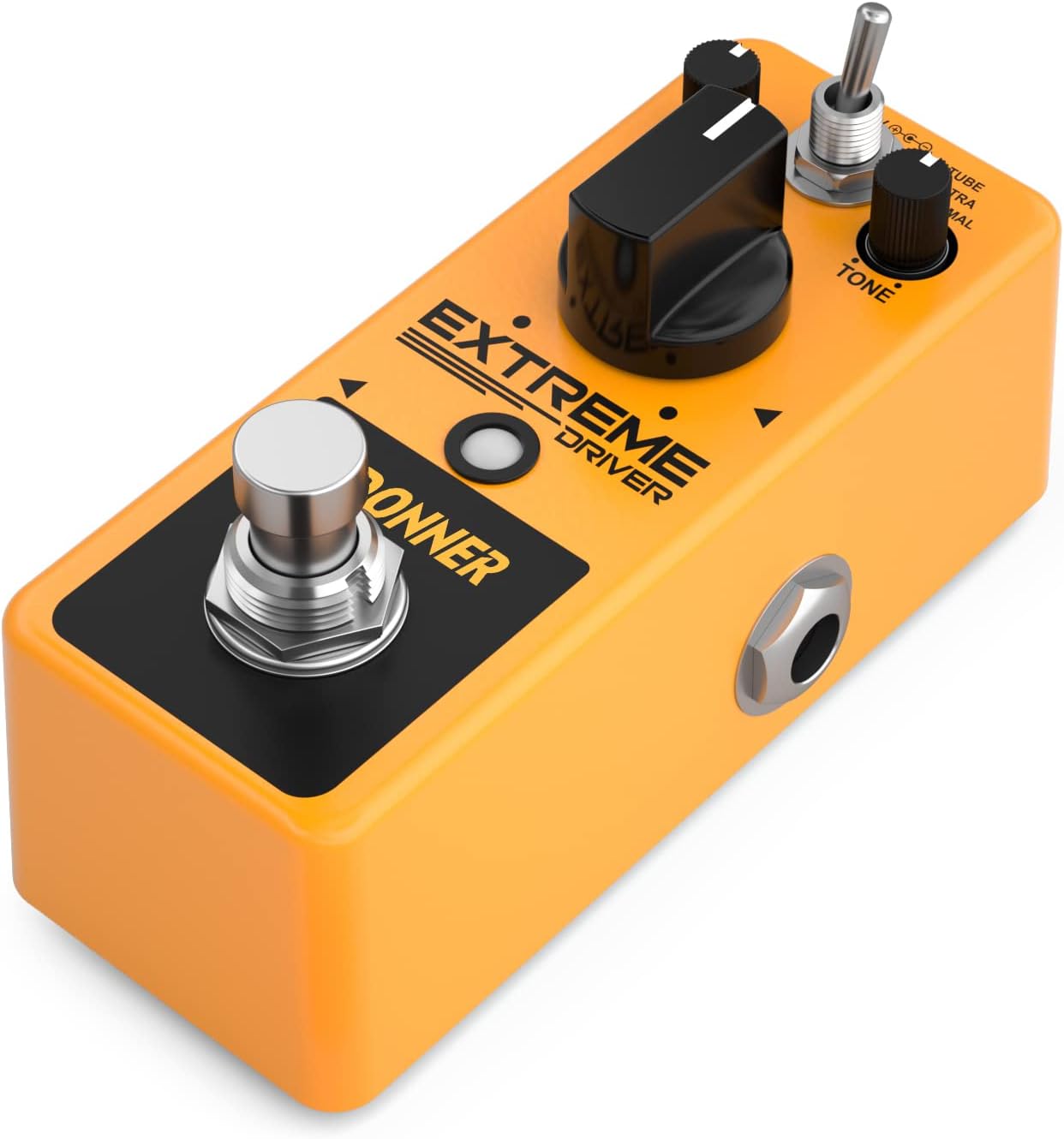
Figure 3: Angled view showing the power input and audio jacks, illustrating proper connection points.
Operating Instructions
Once the pedal is connected and powered, you can begin to explore its distortion capabilities.
- Engaging the Effect: Press the footswitch to toggle the effect on or off. The indicator light will illuminate when the effect is active.
- Adjusting Gain: Use the GAIN knob to control the amount of distortion. Turning it clockwise increases the distortion, while turning it counter-clockwise reduces it.
- Adjusting Tone: The TONE knob shapes the frequency response. Turn it clockwise for brighter tones and counter-clockwise for darker, warmer tones.
- Adjusting Level: The LEVEL knob controls the overall output volume of the pedal. Adjust this to balance the volume between the effect on and off states, or to boost your signal.
- Selecting Distortion Mode: Use the 3-way Mode Switch to select your desired distortion character:
- TUBE: For a classic, smooth, and harmonically rich tube-like overdrive.
- ULTRA: For a more aggressive, high-gain, and edgy distortion.
- NORMAL: For a balanced, natural distortion, ideal for classic rock sounds.
Experiment with different combinations of GAIN, TONE, and LEVEL settings in each mode to find your preferred sound.
Maintenance
- Keep the pedal clean by wiping it with a soft, dry cloth.
- Avoid exposing the pedal to extreme temperatures, humidity, or direct sunlight.
- Do not attempt to disassemble or modify the pedal, as this will void the warranty and may cause damage.
- Disconnect power when the pedal is not in use for extended periods.
Troubleshooting
| Problem | Possible Cause | Solution |
|---|---|---|
| No sound when pedal is engaged. |
|
|
| Weak or distorted sound (unintended). |
|
|
| Excessive noise or hum. |
|
|
Specifications
| Feature | Detail |
|---|---|
| Model | EC1177 |
| Effect Type | Distortion |
| Material | Aluminum Alloy |
| Power Requirement | 9V DC Center Negative (Adapter not included) |
| Current Draw | 500mA (recommended minimum) |
| Dimensions (L x W x H) | 3.7" x 1.7" x 2" (9.4 cm x 4.3 cm x 5.1 cm) |
| Item Weight | 8.8 ounces (0.25 kg) |
| Input/Output | 1/4" Monaural Jack |
| Bypass Mode | True Bypass |
Official Product Video
Video: An official product video demonstrating the features and sound of the Donner Extreme Driver Distortion Pedal. This video provides a visual and auditory guide to the pedal's capabilities and operation.
Warranty and Support
Donner products are designed for reliability and performance. This product comes with a standard manufacturer's warranty against defects in materials and workmanship. For specific warranty terms and conditions, please refer to the warranty card included with your purchase or visit the official Donner website.
For technical support, troubleshooting assistance, or any questions regarding your Donner Extreme Driver pedal, please contact Donner customer service through their official website or the retailer where the product was purchased. Please have your model number (EC1177) and purchase information ready when contacting support.
Online Resources:
- Visit the Donner Store on Amazon
- Refer to the official Donner website for the latest product information and support.


