
1. Product Overview
The Douk Audio Nobsound NS-15G PRO is a compact 2-channel stereo power amplifier designed for home audio systems. It features Bluetooth 5.0 with APTX-HD support for high-quality wireless audio streaming, alongside a traditional AUX input. Equipped with dual TPA3116 amplifier chips, it delivers up to 200W output power, suitable for driving various passive speakers. The amplifier includes bass and treble tone controls, with a bypass function for a pure audio signal.

Image 1.1: Front view of the Nobsound NS-15G PRO amplifier, showcasing its compact design and Bluetooth 5.0 with aptX HD capability, positioned between two speakers.

Image 1.2: The Nobsound NS-15G PRO amplifier held in a hand, illustrating its small size and portability.
2. Package Contents
Verify that all items are present in the package:
- Nobsound NS-15G PRO Amplifier Unit
- Power Adapter (19V)
- Bluetooth Antenna
- User Manual (this document)

Image 2.1: Illustration of the typical items included in the Nobsound NS-15G PRO package, such as the amplifier, power adapter, and antenna.
3. Setup Instructions
Follow these steps to set up your NS-15G PRO amplifier:
- Connect the Bluetooth Antenna: Screw the provided Bluetooth antenna into the antenna port on the rear panel of the amplifier. Ensure it is securely tightened for optimal signal reception.
- Connect Speakers: Connect your passive speakers to the speaker output terminals on the rear of the amplifier. Ensure correct polarity (positive to positive, negative to negative) for each channel. The amplifier supports 2-channel stereo output.
- Connect Audio Source (AUX): If using a wired audio source, connect it to the RCA input jacks on the rear panel using an appropriate RCA cable.
- Connect Power: Connect the power adapter to the DC 12V-24V input port on the rear panel of the amplifier. Then, plug the power adapter into a suitable electrical outlet.
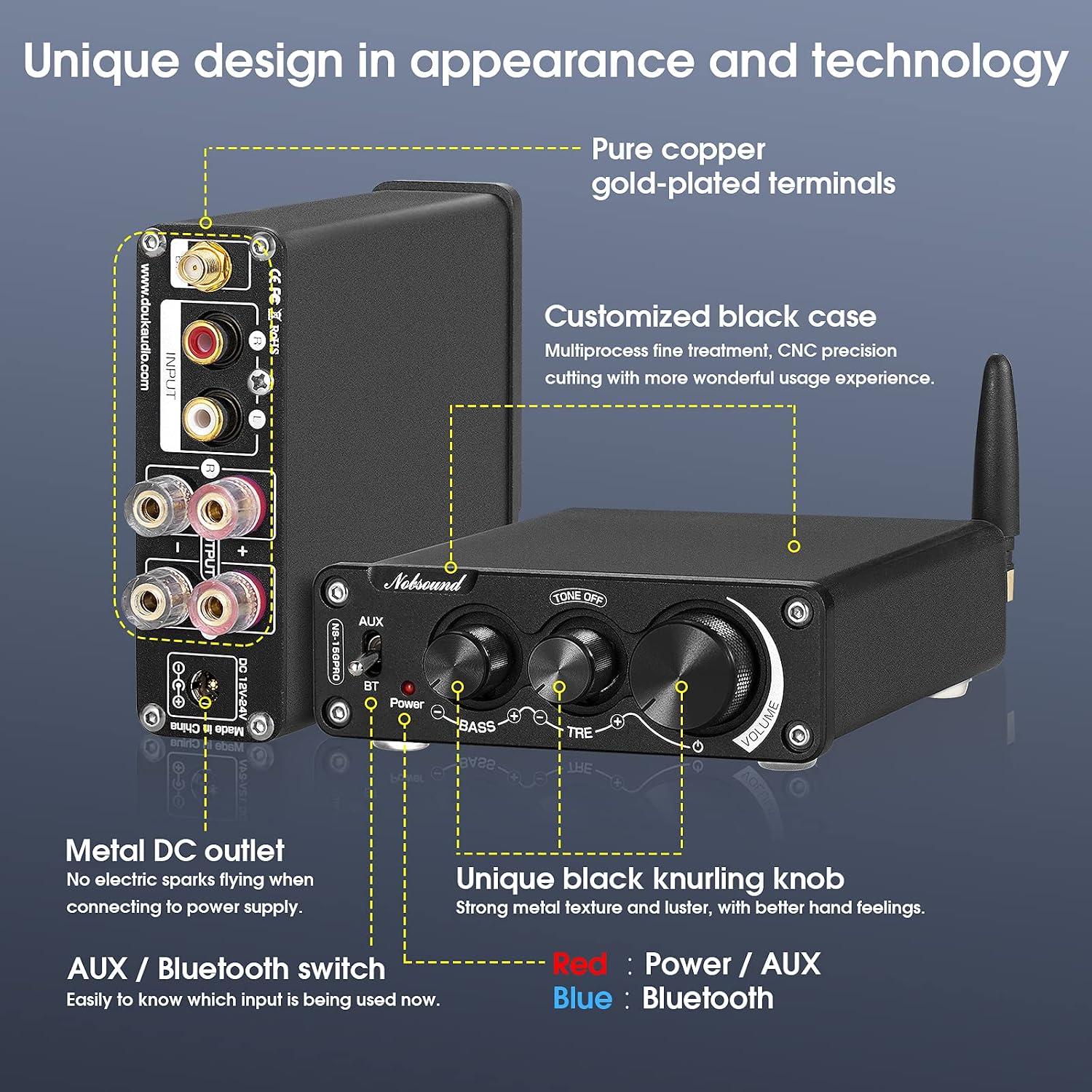
Image 3.1: Detailed view of the rear panel of the Nobsound NS-15G PRO, showing the input (RCA), output (speaker terminals), DC power input, and Bluetooth antenna connection points.

Image 3.2: Diagram illustrating both the front and rear panels of the amplifier, highlighting all input/output ports and controls for easy identification during setup.
4. Operating Instructions
This section details how to operate your NS-15G PRO amplifier.
4.1 Power On/Off
- To power on, rotate the VOLUME knob clockwise from the 'OFF' position. The power indicator light will illuminate.
- To power off, rotate the VOLUME knob counter-clockwise until it clicks into the 'OFF' position. The power indicator light will turn off.
4.2 Input Selection
Use the AUX/BT switch on the front panel to select your desired audio input:
- Switch to AUX for wired audio sources connected via the RCA input.
- Switch to BT for Bluetooth wireless audio.

Image 4.1: Close-up of the AUX/BT input selection switch on the amplifier's front panel.
4.3 Bluetooth Pairing
When the input switch is set to BT, the amplifier is ready for pairing:
- Ensure the amplifier is powered on and the input switch is set to BT.
- On your Bluetooth-enabled device (e.g., smartphone, tablet), open the Bluetooth settings.
- Search for available devices and select "Nobsound NS-15G PRO" (or similar name) from the list.
- Once connected, the Bluetooth indicator light on the amplifier may change status (refer to specific model indicator behavior). You can now stream audio wirelessly.

Image 4.2: Diagram highlighting the Bluetooth 5.0 with aptX HD chip, indicating advanced wireless audio capabilities.
4.4 Volume and Tone Control
Adjust audio output using the front panel knobs:
- VOLUME: Rotate clockwise to increase volume, counter-clockwise to decrease.
- BASS: Adjusts the low-frequency response.
- TREBLE: Adjusts the high-frequency response.
- TONE OFF: This switch bypasses the bass and treble controls, providing a direct, unaltered audio signal.

Image 4.3: Close-up of the amplifier's front panel, detailing the volume, bass, and treble control knobs, along with the tone bypass switch.

Image 4.4: Diagram illustrating the tone control functionality, including bass and treble adjustments.
5. Maintenance
Proper maintenance ensures the longevity and performance of your amplifier:
- Cleaning: Use a soft, dry cloth to clean the exterior of the amplifier. Avoid using liquid cleaners or solvents, as they may damage the finish or internal components.
- Ventilation: Ensure the amplifier is placed in a location with adequate ventilation to prevent overheating. Do not block any ventilation openings.
- Storage: When not in use for extended periods, disconnect the power adapter and store the amplifier in a cool, dry place.
- Connections: Periodically check all cable connections (speakers, audio sources, power) to ensure they are secure and free from corrosion.
6. Troubleshooting
If you encounter issues with your NS-15G PRO, refer to the following common problems and solutions:
| Problem | Possible Cause | Solution |
|---|---|---|
| No power | Power adapter not connected or faulty; Volume knob in 'OFF' position. | Ensure power adapter is securely connected and plugged into a working outlet. Rotate VOLUME knob clockwise to power on. |
| No sound | Incorrect input selected; Speaker wires loose or incorrectly connected; Audio source issue; Volume too low. | Verify AUX/BT switch is set to the correct input. Check speaker wire connections and polarity. Ensure audio source is playing and volume is up. Increase amplifier volume. |
| Bluetooth not connecting | Amplifier not in pairing mode; Device too far; Interference; Previously paired device connected. | Ensure input switch is on BT. Move device closer to amplifier. Turn off Bluetooth on other nearby devices. Disconnect from previously paired device if applicable. |
| Sound distortion | Volume too high; Speaker impedance mismatch; Faulty audio source. | Reduce volume. Ensure speakers are within the recommended impedance range (e.g., 4-8 ohms). Test with a different audio source. |
| Popping sound on power-up/down | Normal operation for some amplifier designs. | This is often a characteristic of certain amplifier circuits and may not indicate a fault. Ensure speakers are connected before powering on. |
7. Specifications
Key technical specifications for the Nobsound NS-15G PRO amplifier:
| Feature | Detail |
|---|---|
| Model | NS-15G PRO |
| Brand | Douk Audio / Nobsound |
| Number of Channels | 2.0 |
| Output Power | 200W (Max) |
| Bluetooth Version | 5.0 (with APTX-HD) |
| Amplifier Chip | 2x TPA3116D2 |
| Decoding Chip | ES9018K2M (Independent) |
| Input Interfaces | Bluetooth, RCA (AUX) |
| Output Interface | Speaker Terminals |
| Tone Control | Bass, Treble (with Tone Off bypass) |
| Power Supply | DC 12V-24V (19V adapter typically included) |

Image 7.1: Close-up view of the dual TPA3116D2 amplifier chips, central to the unit's power output.

Image 7.2: Diagram illustrating the TPA3116 amplifier chip, emphasizing its role in delivering high output power.

Image 7.3: Detailed internal component diagram of the amplifier, highlighting key features like the TPA3116 chips, ES9018K2M decoding chip, and power purification system.
8. Warranty and Support
For warranty information and technical support, please refer to the documentation included with your purchase or contact Douk Audio directly through their official website or customer service channels. Warranty periods may vary by region and retailer.


