
1. Product Overview
The Southwire 50A Wireless Surge Guard Portable Surge Protector provides comprehensive electrical protection for your RV. It continuously monitors power conditions and safeguards against various electrical issues, ensuring the safety of your vehicle's electrical system and appliances.
Key Features:
- Continuously monitors and displays Voltage and Amp Draw (RMS).
- Offers low and high frequency protection.
- Includes an anti-theft lock ring on the cord.
- Features patent-pending RV side open neutral protection (50A only).
- Incorporates multi-mode surge suppression.
- Equipped with a commercial-grade, brass receptacle.
- Provides automatic reset on power restoration.
- Initiates a 10-second start-up sequence.
- Includes a 128-second reset delay to protect A/C compressors.
- Features an LCD display for clear information (English).
- Designed with Easy-T-Pull handles for convenient use.
2. Setup Instructions
Follow these steps to properly set up your Southwire 50A Wireless Surge Guard Portable Surge Protector:
- Inspect the Power Pedestal: Before connecting, visually inspect the campground power pedestal for any visible damage or hazards.
- Turn Off Breaker: Ensure the circuit breaker at the power pedestal is in the "OFF" position.
- Connect Surge Protector: Plug the Southwire 50A Wireless Surge Guard directly into the 50A receptacle on the power pedestal. The unit features a plastic piece designed to bear the weight, preventing strain on the plug itself.
- Secure the Unit (Optional): Utilize the integrated anti-theft lock ring on the cord to secure the surge protector to the power pedestal using a cable lock (not included).
- Connect RV Power Cord: Plug your RV's 50A power cord into the receptacle on the bottom of the Surge Guard unit. The Easy-T-Pull handles on the RV power cord (if applicable) facilitate a secure connection and easy disconnection.
- Turn On Breaker: Flip the circuit breaker at the power pedestal to the "ON" position.
- Monitor Indicators: The Surge Guard will immediately begin its diagnostic sequence. Observe the LED indicators and LCD display for status.

Figure 1: The Southwire 50A Wireless Surge Guard Portable Surge Protector. This image shows the complete unit, highlighting its robust design and the integrated plug for connecting to a power pedestal. The unit is black with an orange label, featuring an LCD screen and LED indicators.

Figure 2: Close-up view of the Easy-T-Pull™ plug handles. These handles are designed for ergonomic grip, making it easier to plug in and unplug the power cord without straining or damaging the connection.
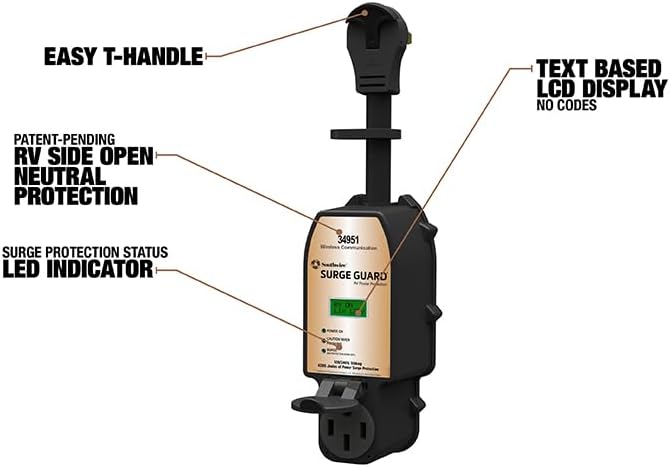
Figure 3: The Southwire 50A Wireless Surge Guard with key features labeled. This image points out the Easy T-Handle, Text-Based LCD Display, Patent-Pending RV Side Open Neutral Protection, and Surge Protection Status LED Indicator, providing a visual guide to the unit's components.
3. Operating the Surge Guard
The Surge Guard continuously monitors your RV's electrical connection, providing real-time feedback and protection.
Indicator Lights and Display:
- Power On (Green LED): Indicates that the unit is receiving power from the pedestal.
- Good Connection (Green LED): Confirms that the electrical connection is correctly wired (e.g., proper ground, neutral, and line connections).
- Surge Protection (Green LED): Lights up when the surge protection is active and functioning correctly.
- Caution When Flashing (Yellow LED): A flashing yellow light indicates a potential issue that requires attention but may not immediately disconnect power. Refer to the LCD display for details.
- Error/Fault (Red LED/LCD Code): A red light or specific error code on the LCD display indicates a critical fault (e.g., open ground, open neutral, low/high voltage, overheating). The unit may automatically disconnect power to protect your RV.
- LCD Display: Provides detailed information such as voltage, amp draw (RMS), and specific error codes in English.
Protective Functions:
- Voltage Protection: Safeguards against low voltage (<102V) and high voltage (>132V) conditions that can damage appliances.
- Wiring Fault Protection: Detects and protects against open ground, open neutral, and reversed polarity.
- Overheating Protection: Monitors for overheating of the plug or receptacle, preventing potential fire hazards.
- Multi-Mode Surge Suppression: Absorbs and dissipates power surges to protect sensitive electronics.
- Automatic Reset: If power is temporarily lost or a fault is corrected, the unit will automatically re-evaluate the connection and restore power after a safe delay (128 seconds for A/C compressor protection).
4. Maintenance
Regular maintenance ensures the longevity and effectiveness of your Surge Guard.
General Care:
- Keep the unit clean and free from dirt, dust, and debris.
- Store the unit in a dry place when not in use.
- Periodically check the connections for tightness and signs of wear or corrosion.
Surge Module Replacement:
The Southwire Surge Guard features a replaceable surge module. If the unit experiences a significant power surge and the surge protection is compromised, the module can be replaced without needing to purchase an entirely new unit. Consult the manufacturer's website or contact customer support for details on obtaining and replacing the surge module.
5. Troubleshooting
If your Surge Guard indicates a fault or is not functioning as expected, refer to the following common issues and solutions:
| Symptom/Indicator | Possible Cause | Solution |
|---|---|---|
| No lights or LCD display | No power from pedestal or unit malfunction. | Check the circuit breaker at the pedestal. Ensure the unit is securely plugged in. If still no power, try a different pedestal or contact campground management. |
| Flashing Yellow LED (Caution) | Minor power anomaly or condition requiring monitoring. | Check the LCD display for specific caution messages. Monitor the situation; if it escalates to a red light, disconnect power. |
| Red LED / Error Code on LCD | Critical wiring fault (e.g., open ground, open neutral, low/high voltage, overheating). | Note the error code from the LCD. Immediately disconnect your RV from the power pedestal. Do NOT reconnect until the fault is resolved by campground staff or a qualified electrician. |
| Unit disconnects power unexpectedly | Protective shutdown due to unsafe power conditions. | This is the unit performing its intended function. Check the LCD for the reason for shutdown. Follow the steps for "Red LED / Error Code" above. |
For persistent issues or if you are unsure about an error code, please refer to the full user manual or contact Southwire customer support.
6. Specifications
- Brand: Southwire
- Model Number: 34951
- Current Rating: 50 Amps
- Circuit Breaker Type: Standard
- Mounting Type: Tabletop (Portable)
- Number Of Poles: 2
- Voltage: 120/240 Volts (RMS)
- Product Dimensions: 24.25 x 5.75 x 5.75 inches
- Item Weight: 4.99 pounds
- UPC: 032886711916
- Manufacturer: Southwire Company
- Included Components: SURGEGUARD unit
7. Warranty and Support
Warranty Information:
Southwire offers an amazing warranty program for its Surge Guard products. For specific details regarding your product's warranty coverage, including terms, conditions, and how to file a claim, please refer to the documentation included with your purchase or visit the official Southwire website.
Customer Support:
For any technical inquiries, troubleshooting assistance, or warranty claims, please contact the manufacturer directly. Contact information can typically be found on the product packaging or the official Southwire website.
Proposition 65 Warning:
WARNING: This product can expose you to chemicals including lead, which is known to the State of California to cause cancer and birth defects or other reproductive harm. For more information go to www.P65Warnings.ca.gov.


