
1. Product Overview
The AZUNO Digital Tire Inflator with Pressure Gauge is a heavy-duty accessory designed for accurate and easy tire pressure management. It features a digital display, robust construction, and versatile compatibility with various vehicle types.

Figure 1: AZUNO Digital Tire Inflator with Pressure Gauge and included accessories.
2. What's in the Box
Your AZUNO Digital Tire Inflator package includes the following components:
- 1 x Digital Tire Inflator with Pressure Gauge
- 1 x Brass Air Chuck
- 1 x Dual Head Air Chuck
- 1 x Thread Seal Tape Roll
- 4 x Spare Valve Caps
- 1 x Storage Bag

Figure 2: All items included in the product packaging.
3. Setup
- Install Batteries: The digital gauge requires 2 AAA batteries (included). Open the battery compartment, insert the batteries according to the polarity indicators, and close the compartment.
- Connect to Air Compressor: The inflator features a quick-connect 1/4" NPT fitting. Attach it securely to your air compressor hose. Ensure a tight connection to prevent air leaks. If needed, use the provided thread seal tape on the threads of the air chucks for a leak-free seal.
- Choose Air Chuck: Select either the brass air chuck or the dual head air chuck based on your vehicle's tire valve stem access. The dual head air chuck is particularly useful for dually tires or those with hard-to-reach inner valve stems.

Figure 3: The inflator features a quick-connect 1/4" NPT fitting for easy attachment to an air compressor.
4. Operating Instructions
4.1 Checking Tire Pressure
- Ensure the inflator is connected to an air compressor.
- Press the 'ON' button to activate the digital display.
- Press the 'UNIT' button to cycle through the desired pressure units (PSI, KPA, Bar, or Kg/cm²).
- Firmly press the air chuck onto the tire's valve stem. The digital display will show the current tire pressure.
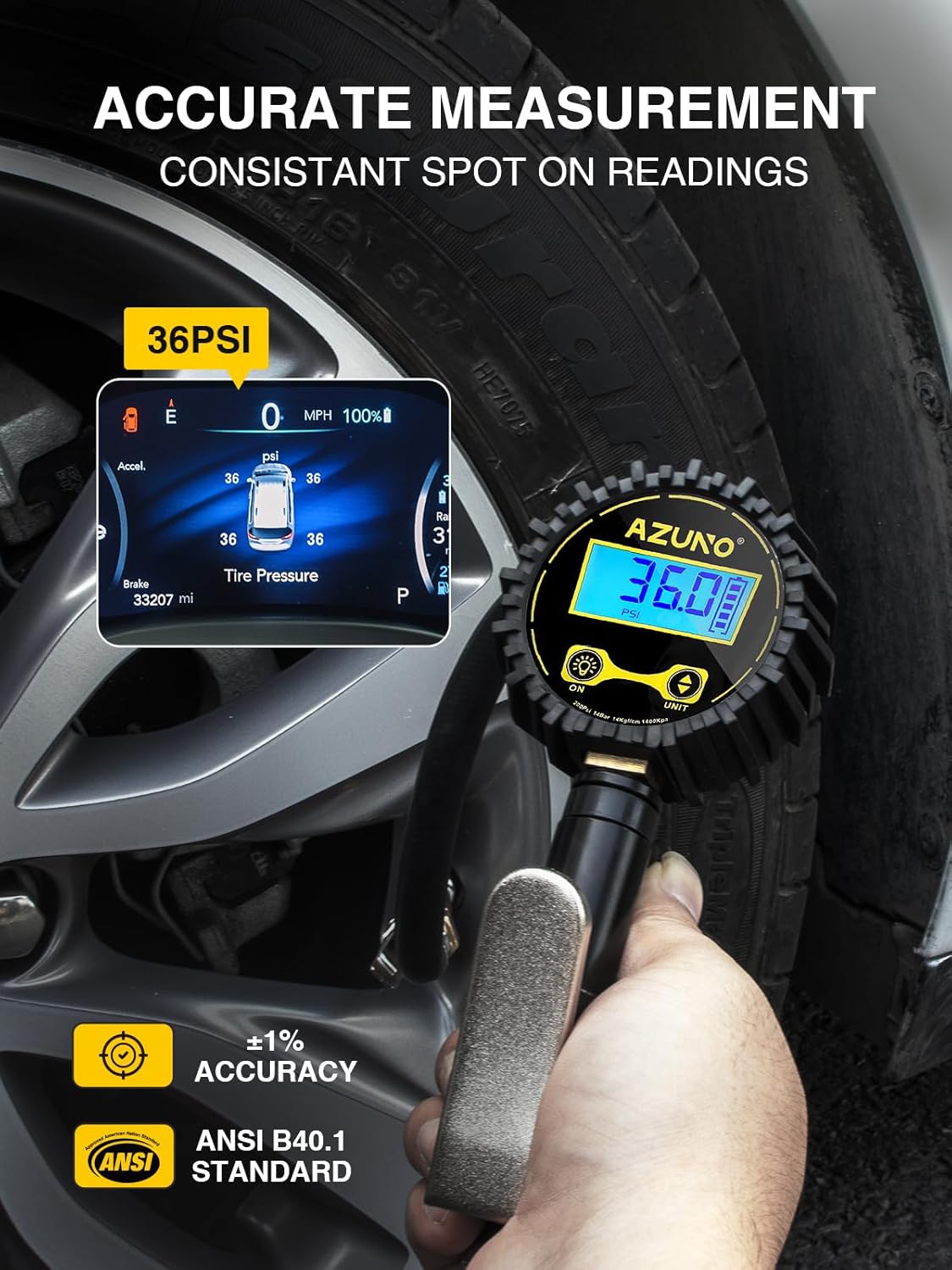
Figure 4: The digital gauge provides accurate and consistent readings.
4.2 Inflating Tires
- After checking the current pressure (as above), keep the air chuck firmly attached to the valve stem.
- Press and hold the trigger on the inflator handle to begin inflating the tire. The digital display will update in real-time as the pressure increases.
- Release the trigger once the desired tire pressure is reached.

Figure 5: Simple steps for accurate pressure check, quick connection, and fast inflation.
4.3 Deflating Tires
If the tire pressure is too high, use the built-in air bleeder valve to release air. Press the small button located near the trigger to slowly decrease the pressure. The digital display will update as air is released.
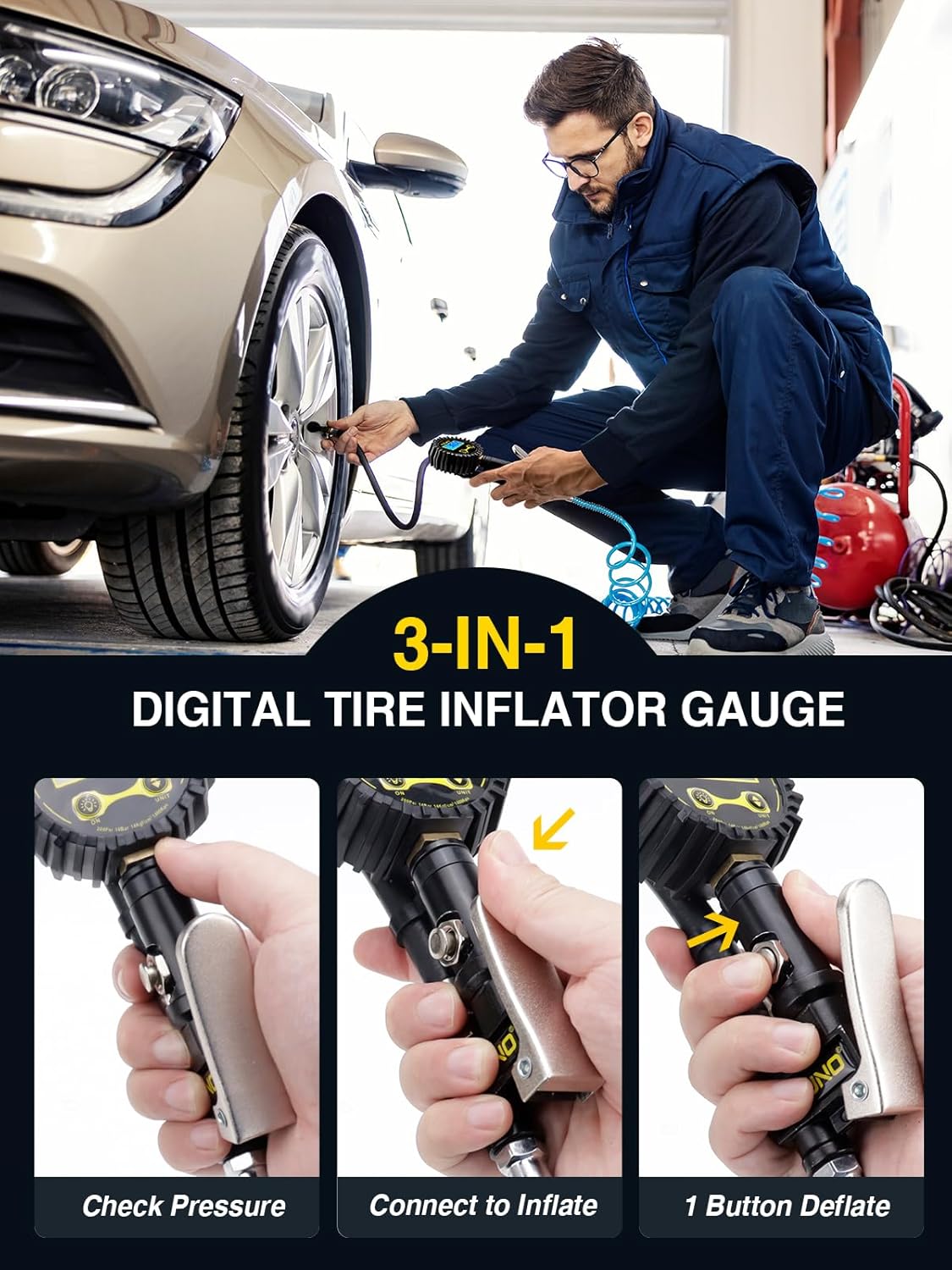
Figure 6: The inflator allows for checking pressure, connecting to inflate, and one-button deflation.
4.4 Unit Conversion
The digital gauge supports four different pressure units: PSI, KPA, Bar, and Kg/cm². To switch between units, simply press the 'UNIT' button on the display. The display will automatically update to the selected unit.
Video 1: Official product video demonstrating the features and usage of the AZUNO Digital Tire Inflator, including unit conversion and inflation/deflation.
5. Maintenance
- Cleaning: Wipe the gauge and hose with a clean, damp cloth. Do not use abrasive cleaners or solvents.
- Storage: Store the inflator in the provided storage bag in a dry, cool place away from direct sunlight and extreme temperatures.
- Battery Replacement: Replace the AAA batteries when the low battery indicator appears on the display.
- Check Connections: Periodically inspect all connections (air chucks, hose fittings) for wear or damage. Replace any worn parts to maintain a leak-free seal.
6. Troubleshooting
| Problem | Possible Cause | Solution |
|---|---|---|
| Inaccurate pressure reading | Loose connection; Low batteries; Gauge malfunction | Ensure air chuck is firmly attached; Replace batteries; Contact customer support |
| Air leaks during inflation | Loose fittings; Worn O-rings/seals; Improperly applied thread tape | Tighten all connections; Inspect and replace worn seals; Reapply thread seal tape |
| Display not turning on | Dead batteries; Unit not activated | Replace batteries; Press the 'ON' button firmly |
| Cannot inflate tire | Air compressor not supplying air; Air chuck not properly seated | Check air compressor functionality; Re-attach air chuck firmly to valve stem |
7. Specifications
- Model: 13
- Pressure Range: 10-200 PSI
- Accuracy: ±1% of exact pressure
- Display Resolution: 0.1 PSI
- Units: PSI, KPA, Bar, Kg/cm²
- Material: Alloy Steel, Brass, Rubber
- Power: 2 x AAA batteries (included)
- Product Dimensions: 8.3 x 3.4 x 2.9 inches
- Weight: 1.08 Pounds
8. Warranty and Support
AZUNO products are designed for durability and performance. For warranty information, technical support, or assistance with your Digital Tire Inflator, please visit the official AZUNO store on Amazon or contact their customer service directly.
AZUNO Official Store: https://www.amazon.com/stores/AZUNO/page/45FA2489-2A97-4822-B968-7993FC5BA8EB
Please retain your purchase receipt for warranty claims.
