
Product Overview
The Laney A-SOLO is a professional, compact, and portable acoustic instrument combo amplifier designed to deliver a clean and clear amplified acoustic tone. It is suitable for various settings, from studio recording to live stage performances.
This amplifier features two completely independent channel strips, offering flexibility for connecting a microphone and an instrument, two different acoustic instruments, or a blend of separate mic and pickup connections from a single instrument. Equally at home or on the biggest stages in the world, the A-SOLO can be your main sound source on an intimate stage or your personal monitor on bigger stages. The A-SOLO includes professional-grade features such as feedback elimination and a DI output, making it a versatile solution.

Figure 1: Front view of the Laney A-SOLO Acoustic Instrument Combo Amplifier. This image shows the compact brown cabinet with a black speaker grille and the Laney logo.
Setup Guide
1. Unpacking and Placement
- Carefully remove the amplifier from its packaging.
- Place the A-SOLO on a stable, flat surface. Ensure adequate ventilation around the unit.
- Keep the amplifier away from direct sunlight, heat sources, and excessive moisture.
2. Power Connection
- Ensure the amplifier's power switch is in the OFF position.
- Connect the supplied Power Supply Unit (PSU) to the POWER input on the rear panel of the amplifier.
- Plug the PSU into a suitable mains power outlet.
3. Instrument and Microphone Connection
The A-SOLO features two independent channels, each with a combination XLR/Jack input.
- Channel 1 (CH1): Connect your primary acoustic instrument (e.g., guitar, violin) or a microphone using a standard 1/4" jack cable or an XLR cable. This channel supports phantom power for condenser microphones.
- Channel 2 (CH2): Connect a second instrument or microphone. This channel also supports phantom power.
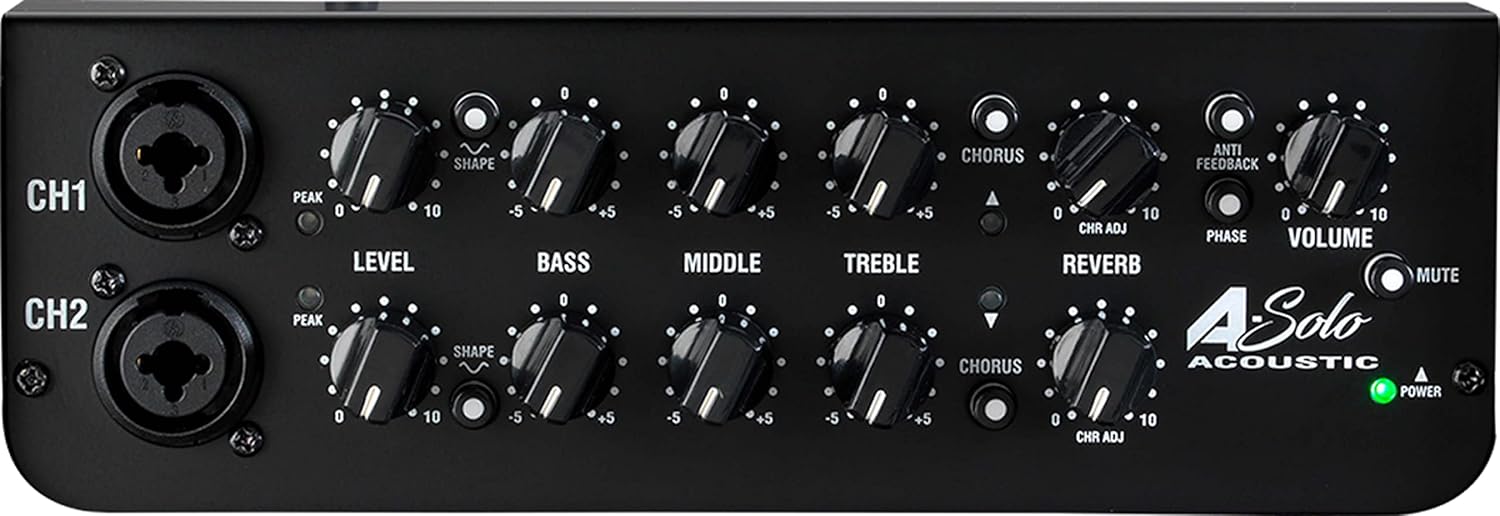
Figure 2: Top panel view of the Laney A-SOLO showing the control knobs and input jacks for Channel 1 and Channel 2.
Operating Instructions
Front Panel Controls
- CH1 / CH2 Inputs: Combination XLR/Jack inputs for connecting instruments or microphones.
- PEAK LED: Illuminates when the input signal is too high, indicating potential clipping. Adjust the LEVEL control to prevent this.
- LEVEL: Controls the input gain for each channel.
- SHAPE: Provides a pre-set EQ curve for quick tonal adjustments.
- BASS, MIDDLE, TREBLE: 3-band equalizer for precise tone shaping on each channel.
- CHORUS: Adds a modulation effect to the sound. The CHR ADJ knob adjusts the intensity.
- REVERB: Adds spatial ambience to the sound.
- ANTI-FEEDBACK: Helps to reduce unwanted feedback.
- PHASE: Inverts the phase of the input signal, which can help with feedback reduction or tonal shaping.
- VOLUME: Master volume control for the entire amplifier output.
- MUTE: Silences the amplifier output.
- POWER LED: Indicates the amplifier is powered on.
Rear Panel Connections
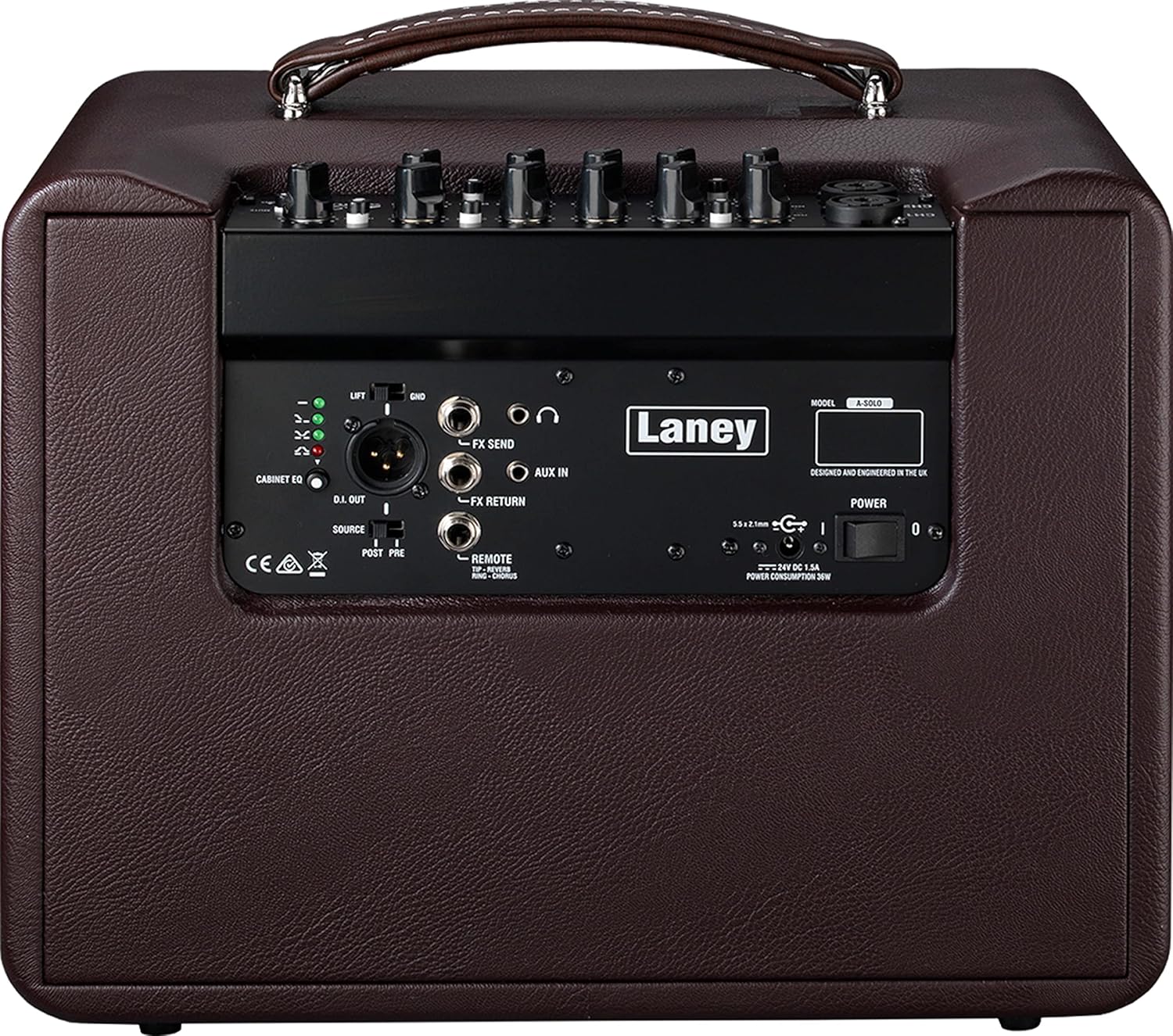
Figure 3: Rear panel view of the Laney A-SOLO, showing various input/output connections and controls.
- DI OUT (XLR): Balanced XLR output for connecting to a PA system or recording interface. Can be set to PRE (before EQ) or POST (after EQ) using the SOURCE switch.
- LIFT/GND Switch: Ground lift switch for the DI output to eliminate hum.
- CABINET EQ: Provides different tonal characteristics for the amplifier output.
- FX SEND / FX RETURN: Loop for connecting external effects pedals.
- AUX IN (3.5mm): Stereo input for connecting external audio devices like MP3 players or phones.
- HEADPHONES: Stereo output for private monitoring.
- REMOTE: Input for an optional footswitch (FS2-MINI) to control certain functions.
- POWER Switch: Turns the amplifier on or off.
Maintenance
- Cleaning: Use a soft, dry cloth to clean the exterior of the amplifier. Do not use abrasive cleaners, solvents, or waxes.
- Ventilation: Ensure that the ventilation openings are not blocked. Overheating can damage the unit.
- Storage: When not in use for extended periods, store the amplifier in a cool, dry place, away from extreme temperatures and humidity.
- Transportation: Always disconnect all cables before moving the amplifier. Use the integrated handle for carrying.
Troubleshooting
| Problem | Possible Cause | Solution |
|---|---|---|
| No Sound |
|
|
| Feedback (High-pitched squeal) |
|
|
| Distorted Sound |
|
|
If you encounter issues not listed here or if the suggested solutions do not resolve the problem, please contact Laney customer support for further assistance.
Specifications
| Feature | Detail |
|---|---|
| Model | A-SOLO |
| Output Wattage | 60 Watts |
| Speaker | 8 Inch Coaxial Woofer |
| Channels | 2 Independent Channels |
| Inputs | Combination XLR/Jack (x2), Aux In (3.5mm) |
| Outputs | DI Out (XLR), Headphones |
| Effects | Chorus, Reverb |
| Special Features | Anti-Feedback, Phase Switch, Phantom Power, FX Loop |
| Power Source | Corded Electric (PSU supplied) |
| Dimensions (L x W x H) | 10.16 x 10.43 x 13.66 inches |
| Item Weight | 14.74 pounds (6.7 Kilograms) |
| Color | Brown |
| Compatible Devices | Guitar, Microphone, other acoustic instruments |
Warranty and Support
Laney products are manufactured to high standards and come with a manufacturer's warranty. For specific warranty terms and conditions, please refer to the documentation included with your purchase or visit the official Laney website.
For technical support, service, or inquiries regarding your Laney A-SOLO amplifier, please contact Laney customer support directly. Contact information can typically be found on the official Laney website or in your product's packaging.
Optional protection plans may be available for extended coverage. Please check with your retailer or Amazon for details on available protection plans.


