
Introduction
This manual provides detailed instructions for the safe and effective operation of your SENLAN 40W Double White/Cool White & Warm White Par LED Stage Light. Please read this manual thoroughly before use and retain it for future reference. This stage light is designed for various applications including stage performances, weddings, parties, theaters, and studios, offering versatile white light options and quiet operation.
Product Features
- Light Source: 1x 40W COB LED (Cool White & Warm White 2-in-1).
- Color Temperature: Adjustable from 3000K (Warm White) to 6000K (Cool White).
- Quiet Operation: Features a special thin aluminum reflector that acts as the primary cooling component, reducing noise by eliminating the need for a large fan.
- Beam Angle: 45 degrees.
- Operating Modes: DMX512, Automatic Operation, Sound Action, Master/Slave.
- Dimming: 0-100% linear dimming.
- Flash Effects: Multi-flash effects with adjustable rate (1-10 times/second), including gradual fade-in and fade-out.
- Adjustable Wattage: Output wattage can be adjusted from below 10W up to 45W or more.
- Power Input: AC90V-240V / 50-60Hz.
- Fuse Protection: Equipped with a replaceable 3A fuse for enhanced safety.
Setup
1. Unpacking and Inspection
Carefully remove the light fixture from its packaging. Inspect the unit for any signs of damage during transit. If any damage is found, do not operate the device and contact your supplier immediately.
2. Mounting the Fixture
The fixture comes with a mounting bracket for versatile installation. Ensure the mounting surface or truss is capable of supporting the weight of the fixture. Use appropriate clamps and safety cables (not included) when suspending the unit.
- Floor Mount: Place the fixture on a stable, level surface using the integrated bracket as a stand.
- Truss Mount: Securely attach the mounting bracket to a truss using a suitable clamp. Always use a safety cable as a secondary attachment.

Image: The SENLAN 40W LED Par Light shown mounted on a lighting stand, demonstrating a typical setup for illuminating a subject or stage area.
3. Power Connection
Connect the power cable to the AC input on the back of the fixture and then to a compatible power outlet (AC90V-240V, 50-60Hz). Ensure the power source matches the fixture's requirements.
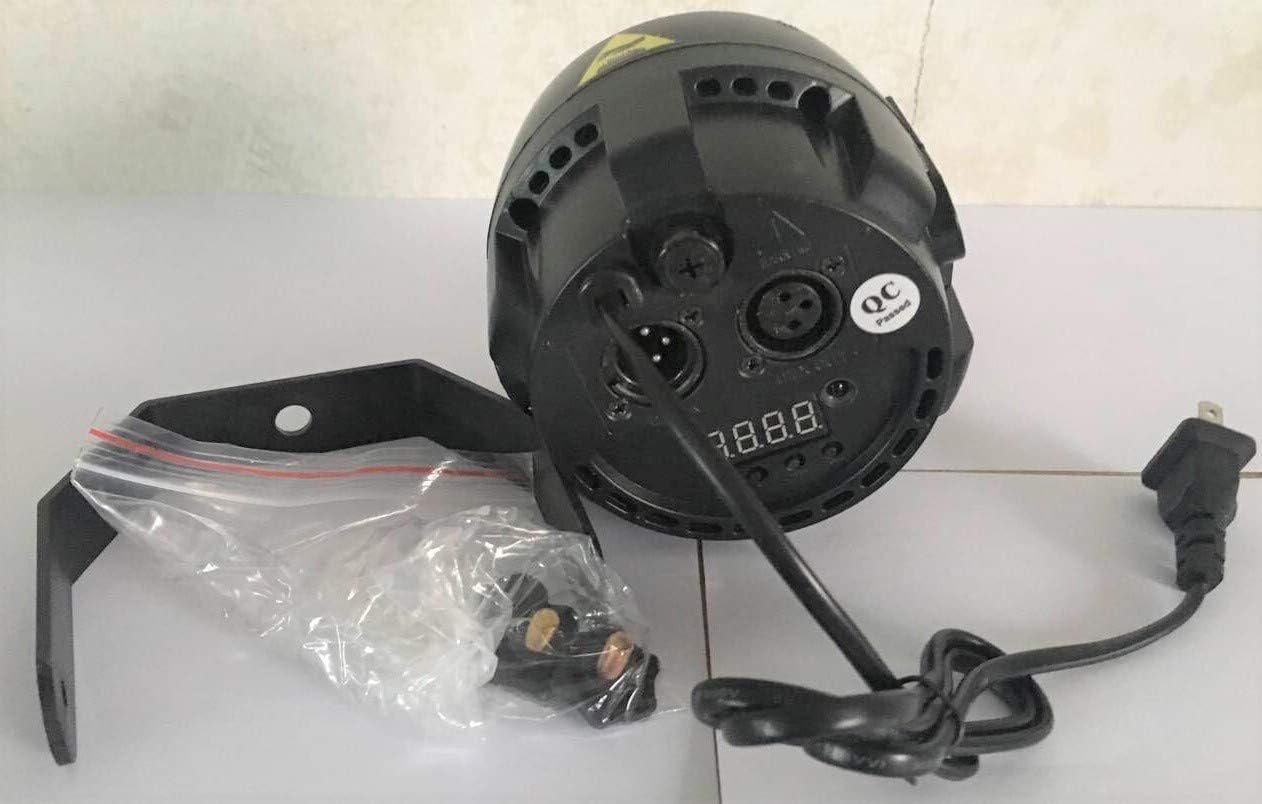
Image: A detailed view of the rear panel of the SENLAN 40W LED Par Light, highlighting the power input, DMX in/out ports, and the digital control display with buttons.
4. DMX Connection (Optional)
For DMX control, connect a DMX cable from your DMX controller's output to the DMX IN port of the first fixture. For multiple fixtures, daisy-chain them by connecting the DMX OUT of the first fixture to the DMX IN of the next, and so on.
Operating Instructions
The fixture can be operated in several modes: DMX512, Automatic, Sound Action, and Master/Slave. Use the digital display and buttons on the rear panel to navigate menus and select modes.
1. Control Panel Overview
The rear panel features a digital display and four buttons (Menu, Up, Down, Enter) for configuration.
2. DMX512 Mode
To operate the light via a DMX controller, set the fixture's DMX address. This fixture typically uses 4 DMX channels.
- Press the Menu button until you see the DMX address setting (e.g., "A001").
- Use the Up and Down buttons to adjust the DMX address.
- Press Enter to confirm the setting.
3. Automatic Operation Mode
This mode cycles through pre-programmed light sequences without external control.
- Press the Menu button to select an automatic program (e.g., "P01", "P02").
- Use Up and Down to select different programs.
- Press Enter to activate the selected program.
4. Sound Action Mode
The light will react to ambient sound, changing patterns and intensity based on audio input.
- Press the Menu button to select the sound action mode (e.g., "Snd").
- Press Enter to activate. The light will now respond to sound.
5. Master/Slave Mode
Connect multiple fixtures via DMX cables. Set one fixture as the Master and the others as Slaves. The Slave units will mirror the Master's operation.
- Master Unit: Set the desired operating mode (Automatic or Sound Action) on the Master fixture.
- Slave Units: Set each Slave fixture to "Slave" mode via the menu.
6. Wattage Adjustment
The light's wattage can be adjusted for specific output requirements.
- Press the Menu button until the display shows "d001".
- Press the Menu button and Enter button simultaneously for 5 seconds.
- The fixture will enter wattage adjustment mode. Use the Up and Down buttons to set the desired wattage (from less than 10W up to 45W or more).
- Press Enter to save the setting.

Image: A composite image illustrating the SENLAN 40W LED Par Light and its ability to produce both warm white and cool white illumination, demonstrating its versatility.
Maintenance
1. Cleaning
To maintain optimal light output and cooling, regularly clean the lens and the aluminum reflector. Use a soft, lint-free cloth and a mild glass cleaner. Ensure the fixture is powered off and disconnected before cleaning.
2. Fuse Replacement
The fixture is equipped with a replaceable 3A fuse located on the rear panel. If the unit fails to power on, check and replace the fuse if necessary.
- Disconnect the power cable from the fixture.
- Locate the fuse holder on the rear panel.
- Twist and pull out the fuse holder.
- Replace the old fuse with a new 3A, 250V fuse of the same type.
- Insert the fuse holder back into its position and twist to secure.
Troubleshooting
| Problem | Possible Cause | Solution |
|---|---|---|
| Fixture does not power on. | No power supply; Blown fuse; Faulty power cable. | Check power connection; Replace fuse (3A); Test with a different power cable. |
| No DMX control. | Incorrect DMX address; Faulty DMX cable; Incorrect DMX mode selected. | Verify DMX address setting; Check DMX cable connections; Ensure DMX mode is active. |
| Light output is dim or inconsistent. | Wattage set too low; Dimmer channel on DMX controller is low; Lens/reflector is dirty. | Adjust wattage setting; Check DMX dimmer channel; Clean lens and reflector. |
| Sound action mode not responding. | Ambient sound too low; Microphone sensitivity issue. | Increase sound volume; Ensure sound action mode is correctly selected. |
Specifications
| Feature | Detail |
|---|---|
| Model Number | LED par38W |
| Light Source | 1x 40W COB LED (Cool White & Warm White 2-in-1) |
| Color Temperature | 3000K - 6000K |
| Beam Angle | 45 Degrees |
| Operating Modes | DMX512, Automatic, Sound Action, Master/Slave |
| Dimming | 0-100% Linear |
| Flash Effects | 1-10 times/second, gradual fade-in/fade-out |
| Adjustable Wattage | Adjustable from <10W to >45W (Standard: ~30W) |
| Input Voltage | AC90V-240V, 50-60Hz |
| Power Consumption | 50W (Max) |
| Fuse | 1A (3A fuse holder) |
| Material | Aluminum |
| Product Dimensions | 4.72"L x 4.72"W x 4.72"H (12cm x 12cm x 12cm approx.) |
| Item Weight | 1.15 pounds (0.52 kg) |
| UPC | 781520537565 |
Warranty Information
Specific warranty details are not provided in the product information. Please refer to your purchase documentation or contact the seller/manufacturer for warranty terms and conditions.
Support
For further assistance, technical support, or inquiries regarding your SENLAN 40W Double White/Cool White & Warm White Par LED Stage Light, please contact your retailer or the manufacturer directly. Contact information can typically be found on the product packaging or the seller's website.