
Logitech G 910-005638
Logitech G703 Lightspeed Wireless Gaming Mouse
Model: 910-005638 | Brand: Logitech G
Introduction
The Logitech G703 Lightspeed gaming mouse features the next-gen Hero 25K sensor, offering precise gameplay with up to 25,600 Max DPI and zero smoothing. It provides enhanced wireless performance with 10x the battery efficiency of previous generation sensors, allowing up to 35 hours of gameplay with Lightsync RGB enabled. Compatible with Powerplay for infinite gameplay. A comfortable design meets advanced button technology for supreme comfort and crisp, clean clicks. G703 Lightspeed lets you play like the pros — and play to win.
What's in the Box
- G703 LIGHTSPEED Wireless Gaming Mouse
- LIGHTSPEED™ USB receiver
- Charging/data cable
- Optional 10g weight

Figure 1: Contents of the Logitech G703 package, including the mouse, USB receiver, and charging cable.
Setup
1. Connecting the Wireless Receiver
- Locate the LIGHTSPEED™ USB receiver in the packaging.
- Plug the USB receiver into an available USB port on your computer.
- Turn on the mouse using the ON/OFF switch located on the underside of the mouse.

Figure 2: The underside of the G703 mouse, highlighting the power switch and sensor.
2. Installing Optional Weight
- The G703 mouse comes with an optional 10g weight.
- To install, remove the magnetic cover on the underside of the mouse.
- Place the 10g weight into the designated slot and reattach the magnetic cover.

Figure 3: Illustration of the 10g removable weight for customizing mouse feel.
3. Charging the Mouse
- Connect the charging/data cable to the front port of the mouse.
- Plug the USB end of the cable into a USB port on your computer or a USB power adapter.
- The mouse can be used while charging.
- For infinite gameplay, consider the Powerplay wireless charging system (sold separately).

Figure 4: The G703 mouse is compatible with the PowerPlay wireless charging system.
Operating the Mouse
Button Functions
- Left/Right Click: Standard mouse buttons for primary actions.
- Scroll Wheel: For vertical scrolling. Can also be clicked for middle-click functionality.
- Side Buttons: Two programmable buttons on the left side, typically for forward/back navigation.
- DPI Cycle Button: Located below the scroll wheel, used to cycle through DPI settings.

Figure 5: Key programmable buttons on the G703 mouse.
Adjusting DPI and Lightsync RGB
The G703 features the HERO 25K sensor, offering a wide DPI range from 100 to 25,600. You can customize DPI settings and Lightsync RGB lighting effects using the Logitech G HUB software. This software allows for personalized profiles, button assignments, and lighting synchronization.
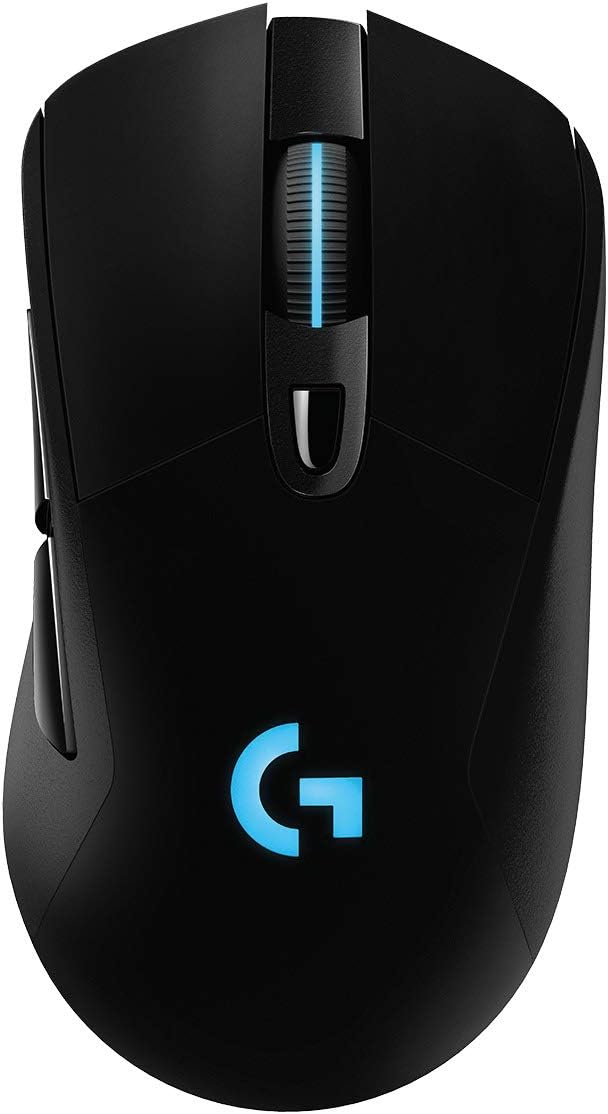
Figure 6: The G703 mouse features customizable Lightsync RGB lighting.
Official Product Videos
Video 1: Logitech G703 Lightspeed Gaming Mouse, What you should know? This video provides an overview of the G703 mouse's features and performance.
Video 2: Sound Test + Why this One's a Winner. This video demonstrates the mouse's click sounds and discusses its advantages.
Video 3: Logitech G703 Lightspeed Wireless Gaming Mouse W/He. A detailed review of the Logitech G703 wireless gaming mouse.
Video 4: My first decent wireless mouse. A user's perspective on their experience with the G703 mouse.
Video 5: Logitech G703 Actual User Review Test Video - It Works good. A practical demonstration and review of the mouse's functionality.
Video 6: Logitech G703 X Logitech G603 Comparison #thisorthat. A comparison between the G703 and G603 Logitech mice.
Video 7: Love it!!! A short testimonial video expressing satisfaction with the product.
Video 8: Got this mouse yesterday. A brief video showcasing the mouse after purchase.
Video 9: Logitech G604 and G703 #thisorthat. Another comparison video featuring the G703 mouse.
Maintenance
Cleaning
To maintain optimal performance, regularly clean your mouse. Use a soft, lint-free cloth slightly dampened with water to wipe the surface. Avoid using harsh chemicals or abrasive materials. For the sensor, use a dry cotton swab to gently remove any dust or debris.
Battery Care
The G703 mouse uses a Lithium Polymer battery. To prolong battery life, avoid fully discharging the mouse frequently. Charge it when the battery indicator shows low. Store the mouse in a cool, dry place when not in use for extended periods.
Troubleshooting
| Problem | Possible Solution |
|---|---|
| Mouse not responding |
|
| Lag or intermittent connection |
|
| Lightsync RGB not working |
|
Specifications
| Feature | Detail |
|---|---|
| Brand | Logitech G |
| Model Number | 910-005638 |
| Connectivity Technology | LIGHTSPEED Wireless (2.4 GHz), Bluetooth |
| Sensor | HERO 25K |
| DPI Range | 100 - 25,600 DPI |
| Tracking Speed | 400+ IPS |
| Acceleration | >40G |
| Battery Life | Up to 35 hours (with Lightsync RGB) |
| Weight | 95g (3.35 oz) + optional 10g |
| Dimensions (LxWxH) | 124mm x 68mm x 43mm (4.88 x 2.68 x 1.69 inches) |
| Color | Black |
| Operating System | Microsoft Windows |
Warranty & Support
For detailed warranty information and further support, please refer to the official Logitech G website or the comprehensive user guide PDF.
Related documents910-005638


Ask a question about this manual
Ask about setup, troubleshooting, compatibility, parts, safety, or missing instructions. Manuals+ will review the question and use this page’s manual context to help answer it.