
1. Introduction
This manual provides essential information for the safe and efficient operation of your Strong SRT 32HB3003 32-inch HD LED TV. Please read these instructions carefully before using the television and retain them for future reference.
2. Safety Information
Always observe the following safety precautions to prevent electric shock, fire, or damage to the television:
- Do not expose the TV to rain or moisture.
- Do not open the TV casing; refer all servicing to qualified personnel.
- Ensure proper ventilation around the TV.
- Unplug the TV during lightning storms or when unused for long periods.
- Keep the TV away from heat sources and direct sunlight.
3. Package Contents
Verify that all items are present in the packaging:
- Strong SRT 32HB3003 LED TV
- Remote Control
- 2x AAA Batteries
- TV Stand
- User Manual

Image: The Strong SRT 32HB3003 TV packaging, highlighting key features such as DVB-T2/C/S2 tuner, HDMI, USB, and Dolby Audio.
4. Setup
4.1 Stand Installation
To install the TV stand:
- Carefully place the TV face down on a soft, clean surface to prevent screen damage.
- Align the stand bases with the corresponding slots on the bottom of the TV.
- Secure the stands using the provided screws.
4.2 Connections
Connect your external devices to the TV using the appropriate ports.
- Antenna/Cable: Connect your DVB-T2 or DVB-C antenna/cable to the 'ANT IN' port.
- Satellite: Connect your satellite dish to the 'SATELLITE IN' port for DVB-S2 reception.
- HDMI Devices: Use HDMI ports for high-definition devices like Blu-ray players, game consoles, or set-top boxes. HDMI 1 supports ARC (Audio Return Channel).
- USB Devices: Insert USB drives into the USB 2.0 ports for media playback.
- CI+ Module: Insert a CI+ module (Common Interface) into the CI+ slot for encrypted channels.
- Audio Output: Use the Headphone jack for private listening or the Digital Optical Output (TOS-Link) for external audio systems.
- AV IN: For older devices, use the AV IN port.

Image: Rear view of the Strong SRT 32HB3003 TV, illustrating the placement of connection ports including HDMI, USB, and antenna inputs.

Image: A diagram detailing the Common Interface (CI) slot and other connectivity options such as USB, headphone jack, AV IN, HDMI 1, HDMI 2, Satellite IN, and S/PDIF (digital optical audio out).
4.3 First Time Installation
After connecting the power cable and turning on the TV, the First Time Installation wizard will guide you through initial setup steps, including language selection, country, and channel scanning for DVB-T2, DVB-C, or DVB-S2.
5. Operating
5.1 Remote Control Overview
The remote control allows you to access all TV functions. Insert the two AAA batteries into the remote control, ensuring correct polarity.

Image: The remote control for the Strong SRT 32HB3003 TV, featuring buttons for power, numerical input, volume control, channel selection, menu access, source input, and media playback functions.
5.2 Basic Functions
- Power: Press the red power button to turn the TV on or off.
- Volume: Use the VOL +/- buttons to adjust the volume.
- Channel: Use the CH +/- buttons to change channels.
- Mute: Press the MUTE button to temporarily silence the audio.
5.3 Source Selection
Press the SOURCE button on the remote control to select the desired input source (e.g., HDMI 1, HDMI 2, DVB-T2, DVB-C, DVB-S2, AV).
5.4 Menu Navigation
Press the MENU button to access the main menu. Use the arrow buttons to navigate and OK to confirm selections. The BACK button returns to the previous menu or exits the current menu.
5.5 Media Playback (USB)
Insert a USB storage device into one of the USB ports. The TV supports playback of photos, videos, and music files. Access the media player through the main menu or by selecting the USB source.
5.6 Electronic Program Guide (EPG)
Press the EPG button to view the Electronic Program Guide, which displays program schedules for digital channels.
5.7 Hotel Mode
The TV features a Hotel Mode, which allows for restricted access to certain settings and functions, ideal for hospitality environments. Consult the advanced settings menu for Hotel Mode configuration.
6. Maintenance
6.1 Cleaning
- Always unplug the TV before cleaning.
- Use a soft, dry cloth to wipe the screen and cabinet.
- For stubborn marks, lightly dampen the cloth with water or a mild, non-abrasive cleaner specifically designed for electronics.
- Never spray cleaning liquids directly onto the TV.
6.2 Storage
If storing the TV for an extended period, ensure it is kept in a cool, dry place, protected from dust and extreme temperatures. It is recommended to use the original packaging for storage.
7. Troubleshooting
If you encounter issues with your TV, refer to the following common solutions:
| Problem | Possible Cause / Solution |
|---|---|
| No power | Check if the power cable is securely connected. Ensure the power outlet is functional. |
| No picture, but sound is present | Check the input source selection. Ensure external devices are powered on and connected correctly. |
| No sound, but picture is present | Check volume level and mute status. Verify audio settings in the menu. |
| Remote control not working | Check and replace batteries. Ensure no obstructions between remote and TV sensor. |
| Poor picture quality | Check antenna/cable connection. Adjust picture settings in the menu. |
8. Specifications
Detailed technical specifications for the Strong SRT 32HB3003 HD LED TV:
| Feature | Specification |
|---|---|
| Model Number | SRT 32HB3003 |
| Screen Size | 32 inches (80 cm) |
| Resolution | 1366 x 768 pixels (HD-Ready) |
| Display Technology | LED |
| Refresh Rate | 60 Hz |
| Tuner Technology | DVB-C, DVB-S2, DVB-T2 |
| HDMI Ports | 2 (1x HDMI ARC) |
| USB 2.0 Ports | 2 |
| Other Interfaces | Headphone, Digital Optical Out (TOS-Link), CI+ interface, AV IN |
| Special Features | Electronic Program Guide (EPG), USB Media Playback, Parental Control, Hotel Mode |
| Power Consumption | 50 Watt |
| Energy Efficiency Class | A+ |
| Annual Energy Consumption | 45 kWh/annum |
| Product Dimensions (W x H x D) | 73.2 x 43.5 x 7.78 cm |
| Weight | 4.15 kg |

Image: The energy efficiency label for the Strong SRT 32HB3003, indicating an A+ rating and an annual energy consumption of 45 kWh.
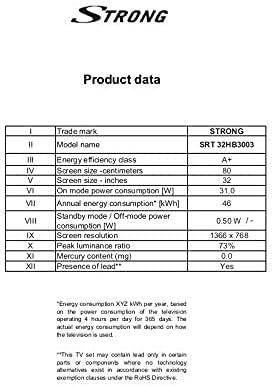
Image: A product data table providing detailed specifications for the Strong SRT 32HB3003, including screen size, resolution, and power consumption.
9. Warranty and Support
Your Strong SRT 32HB3003 TV comes with a limited warranty. For specific warranty terms and conditions, please refer to the warranty card included in your product packaging or visit the official Strong website. For technical support, troubleshooting assistance, or service inquiries, please contact Strong customer service through their official channels.
For further assistance, please visit the Strong official website.


