
1. Introduction
Thank you for choosing the SHNITPWR 12V 5A 60W Power Supply Adapter. This product is designed to convert standard AC household current to a stable 12V DC output, making it suitable for a wide range of electronic devices. Please read this manual carefully before use to ensure proper operation and safety.
2. Safety Information
- This power supply is certified by FCC, CE, and RoHS standards.
- It features built-in safety protections including automatic overload cut-off, over voltage cut-off, automatic thermal cut-off, and short circuit protection.
- Important: Never overload the adapter. The maximum output is 5A (60W). If your connected device attempts to draw more than 5A, the adapter will only supply 5A, which can lead to damage to the power supply.
- For optimal performance and longevity, it is recommended that the maximum continuous load on the adapter does not exceed 80% of its full capacity (i.e., 48W). Exceeding this can cause the unit to overheat and shorten its service life.

This image displays the various safety protections integrated into the power supply, including safeguards against short circuits, over voltage, overcurrent, over temperature, electromagnetic interference, and a quality microchip for stable operation.

This image provides professional advice, recommending that the maximum use of the power supply should not exceed 80% of its full load (48W for a 60W adapter) to prevent overheating and extend product life.
3. Package Contents
Please check the package for the following items:
- 1x SHNITPWR 12V 5A Power Supply Adapter
- 1x AC Input Power Cable
- 1x DC Female Connector
4. Specifications
| Model Number | SNT-1205 |
| Input Voltage | AC 100-240V, 50/60Hz |
| Output Voltage | DC 12V |
| Max Output Current | 5A |
| Max Output Wattage | 60W |
| DC Connector Size | 5.5mm x 2.5mm |
| Product Dimensions | 106.69 x 1.97 x 1.18 inches (approx. 11cm x 5cm x 3cm) |
| Item Weight | 10.9 ounces |
| Special Features | Automatic overload cut-off, over voltage cut-off, automatic thermal cut-off, short circuit protection |

This image illustrates the physical dimensions of the power adapter unit and the lengths of its connected cables, including the DC output plug size.
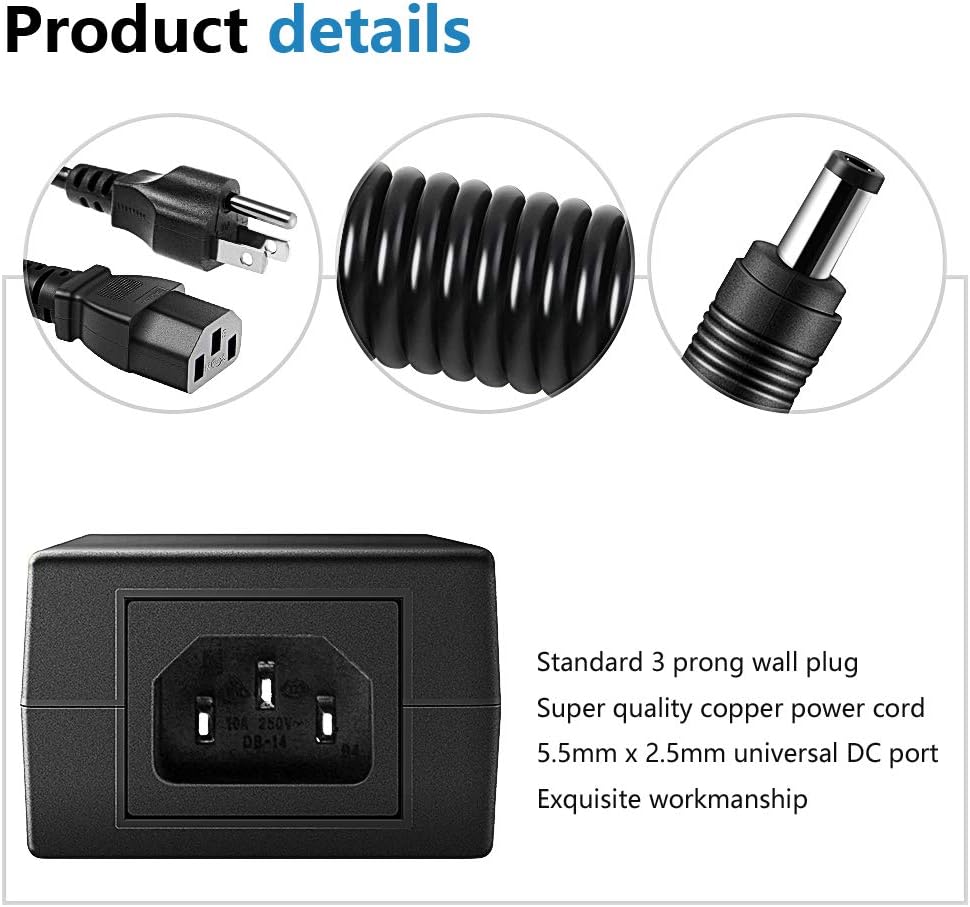
This image details the product components, highlighting the standard 3-prong wall plug, the quality copper power cord, and the 5.5mm x 2.5mm universal DC output port.
5. Setup
- Connect AC Input Cable: Insert the AC input power cable firmly into the corresponding port on the power supply adapter.
- Plug into Wall Outlet: Plug the AC input power cable into a standard 100-240V AC wall outlet.
- Connect to Device: Connect the DC output plug (5.5mm x 2.5mm) from the adapter to the DC input port of your 12V device. Ensure the connection is secure.
- Using DC Female Connector (Optional): If your device requires a custom connection, use the included DC female connector. You can screw wires onto it easily without soldering. Ensure correct polarity when wiring.

This image demonstrates the typical setup, showing the AC to DC adapter plugged into a wall socket and connected to an electronic device, indicating the flow of power.
6. Operating Instructions
Once the power supply is correctly set up and connected to your device, it will begin to provide power automatically. The adapter is designed for continuous operation within its specified limits.
- Ensure all connections are secure before powering on your device.
- The adapter will supply the necessary current up to its maximum rating of 5A. For example, if your device requires 3A, the adapter will provide 3A.
- Always verify that your device's power requirements (voltage and current) are compatible with this adapter to prevent damage to either the adapter or your device.

This image highlights the broad compatibility of the power adapter with various 12V devices, including LED strip lights, wireless routers, security cameras, and LCD monitors.
7. Maintenance
To ensure the longevity and reliable performance of your power supply adapter, follow these maintenance guidelines:
- Storage: Store the adapter in a dry, cool, and well-ventilated area when not in use.
- Environment: Avoid exposing the adapter to extreme temperatures, high humidity, or direct sunlight.
- Cleaning: Use a soft, dry cloth to clean the exterior of the adapter. Do not use liquid cleaners or solvents.
- Inspection: Periodically inspect the cables and connectors for any signs of damage, fraying, or loose connections.
- No User Serviceable Parts: Do not attempt to open, disassemble, or repair the adapter. Doing so will void the warranty and may pose a safety risk.
8. Troubleshooting
If you encounter issues with your SHNITPWR power supply adapter, please refer to the following common problems and solutions:
- No Power Output:
- Ensure the AC input cable is securely plugged into both the wall outlet and the adapter.
- Verify that the wall outlet is functional by testing it with another device.
- Check that the DC output plug is firmly connected to your device's input port.
- Confirm that your device requires 12V DC and its current draw does not exceed 5A (60W).
- Adapter Overheating:
- Reduce the load on the adapter. Ensure the connected device's power consumption is within 80% of the adapter's maximum capacity (i.e., less than 48W).
- Ensure adequate ventilation around the adapter. Do not cover it or place it in an enclosed space.
- Intermittent Power:
- Check all cable connections (AC input and DC output) for looseness.
- Inspect the DC output plug and the included DC female connector for any signs of damage or poor contact.
9. Warranty and Support
SHNITPWR products are manufactured to high-quality standards. For specific warranty terms and conditions, please refer to the documentation provided with your purchase or contact the retailer from whom you purchased the product. For technical assistance or further inquiries, please reach out to SHNITPWR customer support through the official brand channels or the point of purchase.