
Introduction
The AJA IPR-10G2-HDMI is a reliable, high-quality mini converter designed for professional video and audio conversion. It bridges UltraHD/HD single-channel SMPTE ST 2110 IP video and audio to HDMI 1.4b. This versatile tool supports a wide range of applications, converting 4K/UHD and fiber signals to 4K/UHD, audio, and HDMI. It monitors UltraHD and HD SMPTE 2110 signals from 10 Gigabit to HDMI output, seamlessly extracting and embedding audio. Featuring dual 10GbE SFP+ cages for hitless switching and a 1x reference input via BNC, it's ideal for integration into existing baseband environments. Its robust, fanless design makes it suitable for various display and device scenarios, from studio to field.
Product Overview
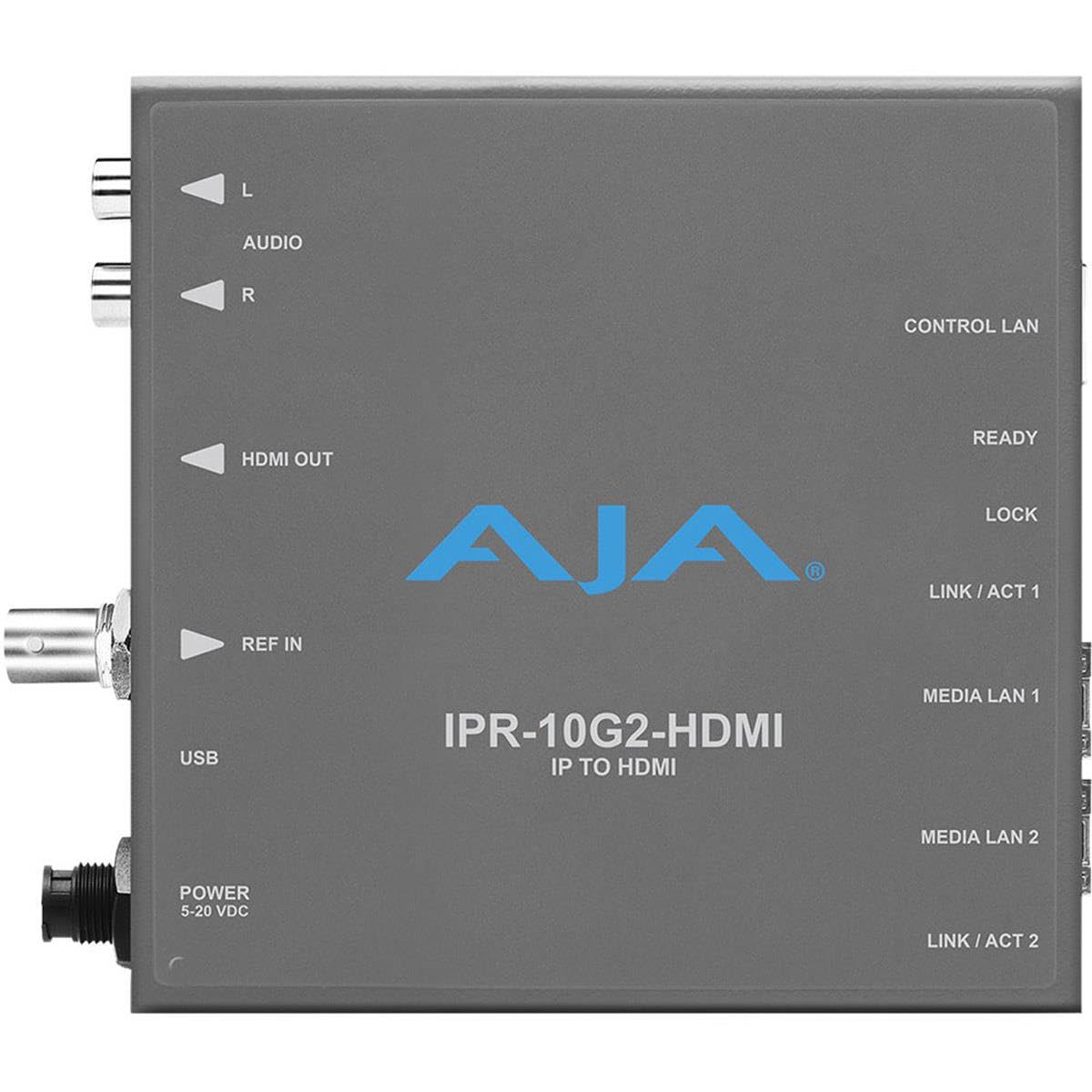
Figure 1: AJA IPR-10G2-HDMI Mini Converter. This image displays the top view of the AJA IPR-10G2-HDMI unit, highlighting its various input and output ports and indicators. On the left side, from top to bottom, are the L and R audio outputs, HDMI OUT, REF IN, USB port, and POWER (5-20 VDC) input. On the right side, from top to bottom, are the CONTROL LAN port, READY indicator, LOCK indicator, LINK/ACT 1 indicator, MEDIA LAN 1 port, MEDIA LAN 2 port, and LINK/ACT 2 indicator. The AJA logo and "IPR-10G2-HDMI IP TO HDMI" text are prominently displayed in the center.
Key Features:
- Excellent Video Quality: Experience pristine 10-bit, 4:2:2 uncompressed video. All details are captured with exceptional clarity and color accuracy for professional-grade results.
- Versatile Format Support: Supports a wide range of video formats including UltraHD and HD (23.98-60fps), and SD, providing flexibility for diverse production needs and workflows.
- Seamless IP Integration: Features SMPTE ST 2110 with dual SFP+ cages for hitless switching (ST 2022-7), ensuring reliable and uninterrupted video and audio delivery over IP networks.
- High-Definition Output: Equipped with HDMI 1.4b output, providing 24/30-bit per pixel RGB/YUV video for high-quality display on compatible monitors and devices.
- Comprehensive Audio Support: Offers up to 8 channels of HDMI embedded audio at 24-bit/48kHz, plus 2x RCA analog audio outputs, ensuring high-fidelity sound reproduction and integration.
Setup
Follow these steps to set up your AJA IPR-10G2-HDMI Mini Converter:
- Power Connection: Connect the provided power supply to the POWER 5-20 VDC input port on the unit. Ensure the power source is within the specified voltage range.
- HDMI Output: Connect an HDMI cable from the HDMI OUT port on the IPR-10G2-HDMI to the HDMI input of your display monitor or recording device.
- Audio Output: For analog audio monitoring, connect RCA cables from the L and R AUDIO output ports to your audio monitoring equipment.
- Reference Input: If external synchronization is required, connect a BNC cable from your reference signal source to the REF IN port.
- USB Connection: The USB port is typically used for initial configuration, firmware updates, or advanced control via AJA software. Connect a USB cable to a computer if needed for these purposes.
- Network Connections:
- Connect an Ethernet cable to the CONTROL LAN port for network-based control and configuration of the device.
- Connect your SMPTE ST 2110 IP video and audio streams to the MEDIA LAN 1 and MEDIA LAN 2 ports using appropriate SFP+ transceivers (not included). These dual ports enable redundant IP stream reception for hitless switching.
- Power On: Once all connections are secure, apply power to the unit. Observe the READY and LOCK indicators for proper operation. The LINK/ACT indicators for Media LAN ports will show network activity.
Operating Instructions
The AJA IPR-10G2-HDMI is designed for straightforward operation once configured. It automatically detects and processes incoming SMPTE ST 2110 IP streams.
- Signal Acquisition: The converter will automatically acquire the SMPTE ST 2110 IP video and audio streams from the connected Media LAN ports. The READY indicator will illuminate when the unit is operational, and the LOCK indicator will show a stable input signal.
- Video Output: The incoming IP video stream (UltraHD or HD) will be converted and output via the HDMI 1.4b port. Ensure your display device is set to the correct input.
- Audio Handling: Associated audio from the IP video stream is seamlessly extracted, synchronized, and embedded into the HDMI output. Additionally, selected audio channels can be output via the analog RCA ports.
- Redundancy (Hitless Switching): If using both Media LAN 1 and Media LAN 2 with redundant ST 2110-7 streams, the device will automatically switch between them without interruption in case of a primary stream failure.
- Monitoring: Use the LINK/ACT 1 and LINK/ACT 2 indicators to monitor network link status and activity on the Media LAN ports.
For advanced configuration, such as IP address settings, audio channel mapping, or firmware updates, refer to the comprehensive AJA IPR-10G2-HDMI manual available on the AJA website and use the AJA Mini-Config software.
Maintenance
The AJA IPR-10G2-HDMI is designed for robust and reliable operation with minimal maintenance requirements due to its fanless design.
- Cleaning: Periodically clean the exterior of the unit with a soft, dry cloth. Do not use liquid cleaners or solvents. Ensure all ports are free from dust and debris.
- Ventilation: Although fanless, ensure the unit is placed in an area with adequate airflow to prevent overheating. Do not block any ventilation openings.
- Firmware Updates: AJA periodically releases firmware updates to improve performance, add features, or address issues. Check the AJA website for the latest firmware and instructions on how to update your device using the AJA Mini-Config software.
- Cable Management: Ensure all connected cables are securely fastened and not under undue strain to prevent damage to the ports or cables themselves.
Troubleshooting
If you encounter issues with your AJA IPR-10G2-HDMI, refer to the following common troubleshooting steps:
| Problem | Possible Cause | Solution |
|---|---|---|
| No video output on HDMI. |
|
|
| No audio output (HDMI or RCA). |
|
|
| Network connection issues. |
|
|
If the problem persists, consult the full AJA IPR-10G2-HDMI manual or contact AJA technical support for further assistance.
Specifications
| Feature | Detail |
|---|---|
| Brand | AJA |
| Product Model Number | IPR-10G2-HDMI |
| Connectivity | HDMI |
| Product Dimensions | 12.88 x 2.39 x 12.85 cm |
| Item Weight | 848.22 g (1.87 pounds) |
| Release Year | 2019 |
| Battery Included | No |
| Compatible Devices | Game Console (General reference, likely for display compatibility) |
| Date First Available | 2020/10/15 |
Warranty and Support
AJA products are backed by a manufacturer's warranty. For specific warranty terms and conditions, please refer to the warranty information included with your product packaging or visit the official AJA website.
For technical support, product registration, and access to the latest drivers, firmware, and documentation, please visit the AJA support page:
When contacting support, please have your product model number (IPR-10G2-HDMI) and serial number ready.


