
Introduction
The Fujifilm X-T30 Mirrorless Digital Camera is designed for content creators of all skill levels, combining a sleek form factor with advanced imaging technology. It features a 26.1MP APS-C X-Trans CMOS 4 sensor and X-Processor 4 Quad-Core CPU, delivering fast autofocus, robust face detection, and high-resolution stills with exceptional sharpness. The camera also supports 10-bit, 4:2:2 DCI 4K video recording via its HDMI port, making it a versatile tool for various creative endeavors.

Figure 1: Front view of the Fujifilm X-T30 camera body.
Setup
1. Battery Installation and Charging
Insert the supplied NP-W126S battery into the battery compartment located at the bottom of the camera. Ensure the battery is oriented correctly. Close the battery compartment cover securely. To charge the battery, connect the supplied USB cable to the camera's USB port and a USB power adapter. The charging indicator light will illuminate during charging and turn off when complete.
2. Memory Card Insertion
Open the memory card slot cover, typically located on the side or bottom of the camera. Insert a compatible SD, SDHC, or SDXC memory card with the contacts facing the correct direction. Push the card in until it clicks into place. Close the memory card slot cover firmly.
3. Lens Attachment
Align the white dot on the camera body's lens mount with the white dot on the lens. Gently push the lens into the mount and rotate it clockwise until it clicks into place. To detach the lens, press the lens release button on the camera body and rotate the lens counter-clockwise.

Figure 2: Rear view of the Fujifilm X-T30, highlighting the LCD and control layout.
Operating the Camera
1. Power On/Off
To power on the camera, rotate the ON/OFF switch located on the top plate. To power off, rotate the switch back to the OFF position.
2. Shooting Modes
The X-T30 offers various shooting modes including Aperture Priority, Manual, Program, and Shutter Priority. These can be selected using the dedicated dials on the top of the camera. An AUTO toggle allows for quick switching between manual and fully automatic shooting modes.

Figure 3: Top view of the Fujifilm X-T30, illustrating the intuitive control dials.
3. Autofocus System
The camera features a 425-point hybrid autofocus system with advanced face and eye detection, ensuring accurate focus for both stills and video, even with moving subjects. The low-light limit for phase detection AF extends to -3EV.
4. Viewfinder and LCD Screen
Utilize the high-resolution built-in OLED electronic viewfinder (2.36 million dots) for precise framing, offering a maximum refresh rate of 100 frames per second for a crisp and responsive image. The 3.0-inch tilting touch LCD allows for flexible shooting angles and intuitive control.
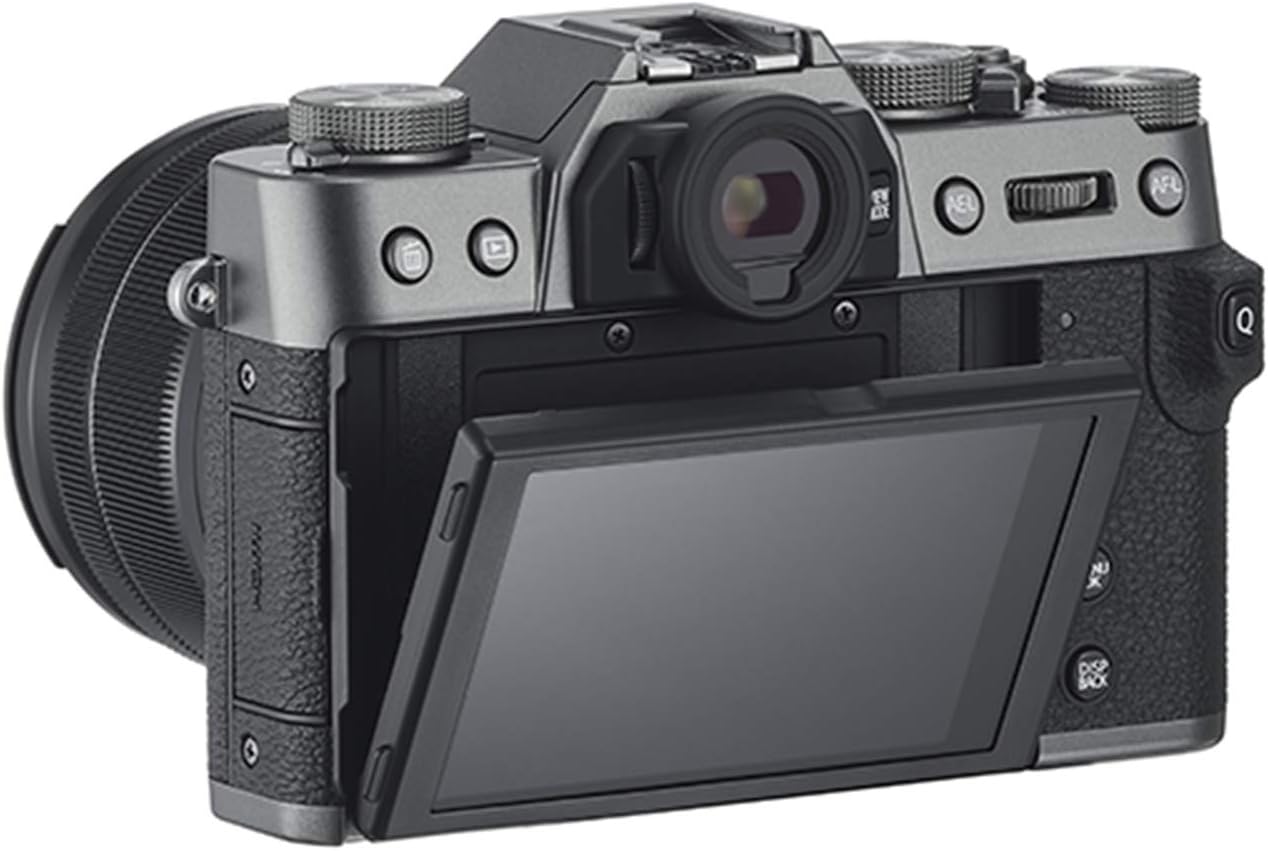
Figure 4: The tilting LCD screen of the Fujifilm X-T30 provides flexibility for various shooting angles.
5. Video Recording
The X-T30 supports 4K DCI 2160p video capture at up to 30 frames per second, without sensor cropping. It also offers 1080p at 120 frames per second for slow-motion effects. For professional workflows, 10-bit, 4:2:2 color can be recorded via the HDMI port.
6. Wireless Connectivity
Built-in Wi-Fi and Bluetooth V.4.2 enable seamless communication with the FUJIFILM Camera Remote app. This allows for wireless camera control and easy image transfer to smart devices.
Maintenance
1. Cleaning the Camera Body and Lens
Use a soft, lint-free cloth to wipe the camera body. For the lens, use a lens brush to remove dust, followed by a lens cleaning solution and a microfiber cloth. Avoid touching the lens surface directly with your fingers. Do not use harsh chemicals or abrasive materials.
2. Sensor Cleaning
If dust spots appear on your images, the sensor may need cleaning. It is recommended to have the sensor cleaned by a professional service. For minor dust, use a blower bulb to gently dislodge particles from the sensor when the camera is in sensor cleaning mode.
3. Battery Care
Store batteries in a cool, dry place. Avoid fully discharging batteries before recharging them to prolong their lifespan. Remove the battery from the camera if it will not be used for an extended period.
4. Storage
When not in use, store the camera in a dry, dust-free environment, preferably in a camera bag or case. Use desiccant packets to absorb moisture if storing in humid conditions.
Troubleshooting
| Problem | Possible Cause / Solution |
|---|---|
| Camera does not power on. | Battery is depleted or incorrectly inserted. Ensure battery is charged and properly seated. |
| Images are blurry. | Check focus mode (AF-S, AF-C, MF). Ensure lens is clean. Use a faster shutter speed or higher ISO in low light. |
| Memory card error. | Card may be full, corrupted, or incompatible. Try formatting the card (this will erase all data) or use a different card. |
| Video recording stops unexpectedly. | Memory card write speed may be too slow for 4K video. Use a high-speed SDXC card (UHS-I Speed Class 3 or higher recommended). Camera may be overheating in prolonged video recording. |
Specifications
- Model Name: X-T30 Body Dark Silver
- Sensor: 26.1MP BSI APS-C X-Trans CMOS 4
- Processor: X-Processor 4 Quad-Core CPU
- Autofocus System: 425-point Hybrid AF with Face/Eye Detection
- ISO Range: Expanded ISO 100-51200
- Video Resolution: 4K DCI 2160p (up to 30fps), 1080p (up to 120fps)
- Viewfinder: 2.36M-dot OLED Electronic Viewfinder (100fps refresh rate)
- LCD Screen: 3.0-inch Tilting Touch LCD (1,040,000 pixels)
- Connectivity: Built-in Wi-Fi, Bluetooth V.4.2, USB, HDMI, 2.5mm audio
- Storage: SD, SDHC, SDXC (1 slot)
- Weight: Approximately 0.7 Pounds (body only)
- Dimensions (approx.): 3.3 inches (height)
Warranty and Support
The Fujifilm X-T30 Mirrorless Digital Camera comes with a 1 Year manufacturer warranty. For detailed warranty terms and conditions, please refer to the warranty card included in your product packaging or visit the official Fujifilm support website.
For further assistance, technical support, or to download the full user manual in PDF format, please visit the official Fujifilm support page or contact their customer service. You can also find additional resources and FAQs on the Fujifilm Store on Amazon.
A comprehensive User Guide (PDF) is available for download: User Guide PDF
An additional User Manual (PDF) is also available: User Manual PDF

