
1. Introduction
This manual provides essential instructions for the safe and efficient use of your Milwaukee M18 REDLITHIUM XC 5.0 Battery and Charger Starter Kit. This kit includes two M18 REDLITHIUM XC 5.0 Extended Capacity Battery Packs and one M18 charger. These components are designed to deliver optimized performance and extended runtime for all Milwaukee M18 cordless power tools.
The M18 REDLITHIUM XC 5.0 battery features advanced construction for durability and protection against harsh jobsite environments, including water routing away from electronics and resistance to vibration and drops. It also ensures operation in extreme cold weather conditions (below -18°C / 0°F).
2. Important Safety Information
WARNING: Read all safety warnings, instructions, illustrations, and specifications provided with this power tool battery pack and charger. Failure to follow all instructions listed below may result in electric shock, fire, and/or serious injury.
- Battery Pack Safety:
- Do not disassemble, open, or shred battery packs.
- Do not short-circuit a battery pack. Do not store battery packs haphazardly in a box or drawer where they may short-circuit each other or be short-circuited by conductive materials.
- Do not expose battery packs to heat or fire. Avoid storage in direct sunlight.
- Do not subject battery packs to mechanical shock.
- In the event of battery leakage, do not allow the liquid to come into contact with the skin or eyes. If contact has been made, wash the affected area with copious amounts of water and seek medical advice.
- Keep battery packs clean and dry.
- Recharge only with the charger specified by the manufacturer.
- Do not use any battery pack that is not designed for use with the equipment.
- Keep battery packs out of the reach of children.
- Observe the plus (+) and minus (-) marks on the battery and equipment and ensure correct use.
- Charger Safety:
- This charger is for charging Milwaukee M18 REDLITHIUM battery packs only. Do not charge other types of batteries.
- Do not expose the charger to rain or wet conditions.
- Do not use the charger if the cord or plug is damaged.
- Always unplug the charger from the power outlet before cleaning or maintenance.
- Ensure proper ventilation during charging. Do not cover the charger.
3. Package Contents
Your Milwaukee M18 REDLITHIUM XC 5.0 Battery and Charger Starter Kit includes the following items:
- Two (2) Milwaukee M18 REDLITHIUM XC 5.0 Extended Capacity Battery Packs (Model: 48-11-1850)
- One (1) Milwaukee M18 Multi-Voltage Charger (Model: 48-59-1812)

Figure 1: Components of the Milwaukee M18 REDLITHIUM XC 5.0 Battery and Charger Starter Kit, showing one battery pack (model 48-11-1850) and one charger (model 48-59-1812).
4. Setup
4.1 Charging the Battery Pack
- Connect the Charger: Plug the charger's power cord into a standard 120V AC electrical outlet. The charger's indicator light will illuminate, typically green, to show it is ready.
- Insert Battery: Slide the M18 REDLITHIUM XC 5.0 battery pack into the charging port on the charger. Ensure it clicks securely into place.
- Monitor Charging: The charger's indicator light will change, usually to red or blinking green, to indicate that charging has begun. A fully discharged 5.0Ah battery typically takes approximately 60 minutes to charge.
- Remove Battery: Once charging is complete, the indicator light will turn solid green. Remove the battery pack from the charger.
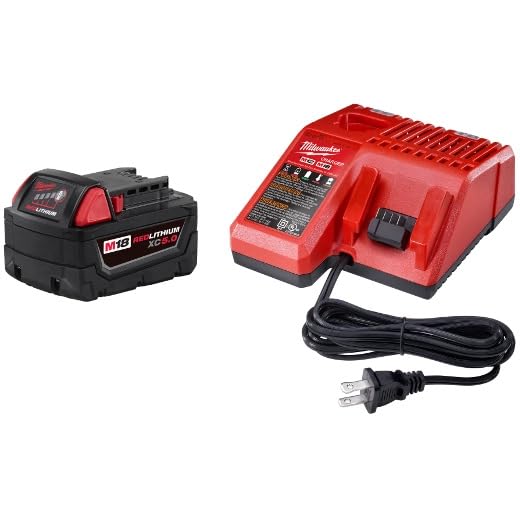
Figure 2: A Milwaukee M18 REDLITHIUM XC 5.0 battery pack being charged by the M18 charger. The green light on the charger indicates a ready or fully charged status.
4.2 Inserting the Battery into a Tool
- Align the battery pack with the battery port on your Milwaukee M18 cordless power tool.
- Slide the battery pack into the tool until it clicks into place, indicating a secure connection.
- To remove, press the battery release button(s) on the tool and slide the battery pack out.
5. Operating Instructions
5.1 Fuel Gauge
Each M18 REDLITHIUM XC 5.0 battery pack is equipped with an onboard fuel gauge. Press the button on the battery pack to display the remaining runtime. The number of illuminated LEDs indicates the charge level.
5.2 REDLINK Intelligence
The M18 REDLITHIUM XC 5.0 battery packs feature REDLINK Intelligence, which provides optimized performance and overload protection. This system facilitates total communication between the tool, battery, and charger, preventing damage to your cordless power tools in heavy-duty situations and protecting against cell damage from over-discharge.
5.3 Extreme Weather Operation
The advanced design of the M18 REDLITHIUM XC 5.0 battery allows it to operate effectively in extreme cold weather conditions, down to -18°C (0°F), without significant loss of performance.
6. Maintenance
6.1 Cleaning
- Keep battery pack terminals and charger contacts free of dust and debris. Use a clean, dry cloth to wipe surfaces.
- Do not use solvents or harsh chemicals to clean the battery or charger.
6.2 Storage
- Store battery packs and chargers in a cool, dry place, away from direct sunlight and excessive heat.
- For long-term storage, it is recommended to store battery packs with a partial charge (e.g., 50-75%) rather than fully charged or fully discharged.
- Do not store battery packs in a discharged condition. Recharge them periodically if stored for extended periods.
6.3 Battery Disposal
Do not dispose of battery packs with household waste. Lithium-ion batteries must be recycled or disposed of according to local regulations. Contact your local waste management authority for information on recycling options.
7. Troubleshooting
| Problem | Possible Cause | Solution |
|---|---|---|
| Battery not charging | Charger not plugged in; faulty outlet; damaged battery or charger; battery too hot/cold. | Check power connection; try a different outlet; allow battery to reach room temperature; inspect battery/charger for damage. If damaged, replace. |
| Tool not powering on with charged battery | Battery not fully inserted; tool malfunction; battery fault. | Ensure battery is securely clicked into place; test with another charged battery; if problem persists, consult tool's manual or Milwaukee service. |
| Reduced runtime or power | Battery nearing end of life; extreme operating conditions; heavy load on tool. | Ensure battery is fully charged; operate within recommended temperature ranges; consider replacing battery if performance significantly degrades. |
If troubleshooting steps do not resolve the issue, please contact Milwaukee customer support.
8. Specifications
| Feature | Detail |
|---|---|
| Battery Model (Each) | 48-11-1850 |
| Charger Model | 48-59-1812 |
| Battery Type | Lithium-Ion |
| Voltage | 18V |
| Battery Capacity | 5.0 Amp Hours (Ah) |
| Kit Item Model Number | 48-59-1850P |
| Product Dimensions (Kit) | 12.32 x 6.14 x 3.46 inches |
| Item Weight (Kit) | 4.98 pounds |
| Compatibility | All Milwaukee M18 cordless power tools and chargers |
9. Warranty & Support
For warranty information, service, or technical support, please contact Milwaukee Tool customer service directly. Refer to the documentation included with your original purchase for specific warranty terms and conditions, or visit the official Milwaukee Tool website.
Milwaukee Tool Official Website: www.milwaukeetool.com


