
DOBE NS-8115
DOBE Switch 4 in 1 Game Pack
User Manual
Model: NS-8115
Introduction
Thank you for purchasing the DOBE Switch 4 in 1 Game Pack. This comprehensive accessory kit is designed to enhance your Nintendo Switch gaming experience by providing essential components for charging, comfortable play, and protection. The pack includes a Charging Dock, a Folding Play Stand, Joy-Con Protective Cases, and Thumbstick Covers.

Image: Overview of the DOBE Switch 4 in 1 Game Pack, showcasing all included accessories: the charging dock, folding play stand, clear Joy-Con protective cases, and black thumbstick covers.
Please read this manual carefully to ensure proper setup, operation, and maintenance of your new accessories.
Setup Instructions
1. Charging Dock Setup
The Charging Dock allows you to charge up to four Joy-Con controllers simultaneously. It features clear pillars that illuminate to indicate charging status.
- Connect the USB cable from the Charging Dock to a powered USB port (e.g., Nintendo Switch dock, USB wall adapter, or computer USB port).
- Ensure the dock is placed on a stable, flat surface.
- Align the Joy-Con controllers with the charging slots and slide them down until they click into place. The clear pillars will light up to indicate charging.
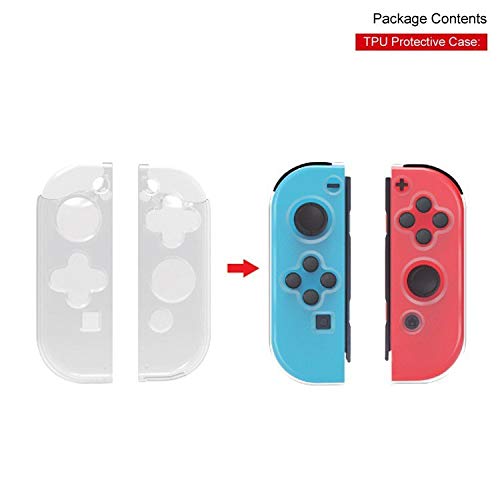
Image: The DOBE Charging Dock with two Nintendo Switch Joy-Con controllers inserted into the charging slots. The image shows the dock connected via a USB cable, ready for charging.
2. Folding Play Stand Setup
The Folding Play Stand provides a stable and adjustable viewing angle for your Nintendo Switch console, ideal for tabletop mode.
- Gently unfold the stand by pulling the top section upwards until it locks into an open position.
- Place your Nintendo Switch console into the cradle of the stand. Ensure it is securely seated.
- Adjust the angle of the stand by pressing the release button (if present) or by gently pushing the back support to your desired viewing angle.

Image: The DOBE Folding Play Stand shown in two states: folded flat and unfolded with a Nintendo Switch console resting on it, demonstrating its adjustable nature.
3. Joy-Con Protective Case Installation
The clear TPU protective cases are designed to shield your Joy-Con controllers from scratches and minor impacts while maintaining their original look.
- Ensure your Joy-Con controllers are clean and dry.
- Carefully align each Joy-Con with its corresponding protective case (left Joy-Con with left case, right with right).
- Gently push the Joy-Con into the case, ensuring all buttons and ports are accessible and the case fits snugly.
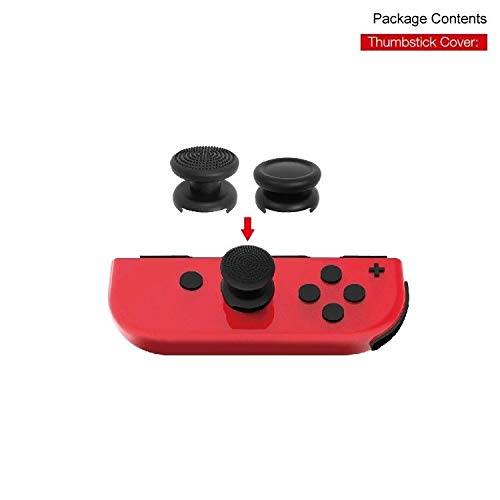
Image: A visual guide demonstrating how to install the clear TPU protective cases onto the Nintendo Switch Joy-Con controllers, showing the case separate and then applied to the controller.
4. Thumbstick Cover Installation
The thumbstick covers provide enhanced grip and protection for your Joy-Con analog sticks.
- Turn the thumbstick cover inside out, exposing the inner rim.
- Place the inverted rim over the top of the Joy-Con analog stick.
- Carefully roll the cover down over the analog stick until it fully encapsulates it and sits securely.

Image: A close-up view illustrating the process of installing a black thumbstick cover onto the analog stick of a red Nintendo Switch Joy-Con controller.
Operating Instructions
Using the Charging Dock
Once Joy-Cons are inserted into the charging dock, they will begin charging automatically. The transparent pillars will glow to indicate active charging. When fully charged, the light may change color or turn off depending on the specific model's indicator. Always ensure a stable power source for optimal charging speed.
Using the Folding Play Stand
The Folding Play Stand is designed for hands-free gaming. Simply place your Nintendo Switch console into the stand in tabletop mode. The adjustable angle allows for comfortable viewing during single-player or multiplayer sessions. It is also suitable for charging the console while playing, as it provides access to the USB-C port at the bottom of the console.
Benefits of Protective Cases and Thumbstick Covers
The Joy-Con Protective Cases offer a layer of defense against everyday wear and tear, preventing scratches and scuffs on your controllers. The Thumbstick Covers improve grip and comfort during extended gaming sessions, reducing thumb fatigue and providing better control. They also protect the original analog sticks from wear.
Maintenance
- Cleaning: Use a soft, dry cloth to wipe down the Charging Dock, Folding Play Stand, and protective cases. For stubborn dirt, a slightly damp cloth can be used, but ensure all components are completely dry before use or storage. Do not use harsh chemicals or abrasive cleaners.
- Storage: Store all components in a cool, dry place away from direct sunlight and extreme temperatures. When not in use, the Folding Play Stand can be folded flat for compact storage.
- Handling: Handle all components with care. Avoid dropping the Charging Dock or applying excessive force to the Folding Play Stand.
Troubleshooting
| Problem | Possible Cause | Solution |
|---|---|---|
| Joy-Cons not charging on dock. | Loose connection; insufficient power; Joy-Cons not properly seated. | Ensure USB cable is securely connected. Try a different USB port or power adapter. Re-seat Joy-Cons firmly into the charging slots. |
| Folding Play Stand unstable. | Not fully unfolded; uneven surface. | Ensure the stand is fully extended and locked into position. Place the stand on a flat, stable surface. |
| Protective cases do not fit. | Incorrect orientation; not for Joy-Cons. | Ensure you are using the correct case for the left/right Joy-Con. Verify the product is for official Nintendo Switch Joy-Cons. |
Specifications
- Model Number: NS-8115
- Product Dimensions: 9 x 4 x 4 inches
- Item Weight: 1 pound
- Date First Available: February 12, 2019
- Compatibility: Nintendo Switch Joy-Con controllers and Nintendo Switch console
Warranty Information
DOBE products typically come with a limited manufacturer's warranty. For specific warranty terms, duration, and claim procedures, please refer to the warranty card included with your purchase or visit the official DOBE website. Please retain your proof of purchase for warranty claims.
Customer Support
If you encounter any issues or have questions regarding your DOBE Switch 4 in 1 Game Pack that are not covered in this manual, please contact DOBE customer support. You can usually find contact information on the product packaging or on the official DOBE website. Please have your model number (NS-8115) and purchase details ready when contacting support.
For more information, visit the DOBE Store on Amazon.
Related documentsNS-8115

Ask a question about this manual
Ask about setup, troubleshooting, compatibility, parts, safety, or missing instructions. Manuals+ will review the question and use this page’s manual context to help answer it.