
GoolRC A979-B
GoolRC WLtoys A979-B 1/18 Scale 4WD Electric RTR Monster Truck Instruction Manual
Model: A979-B | Brand: GoolRC
Introduction
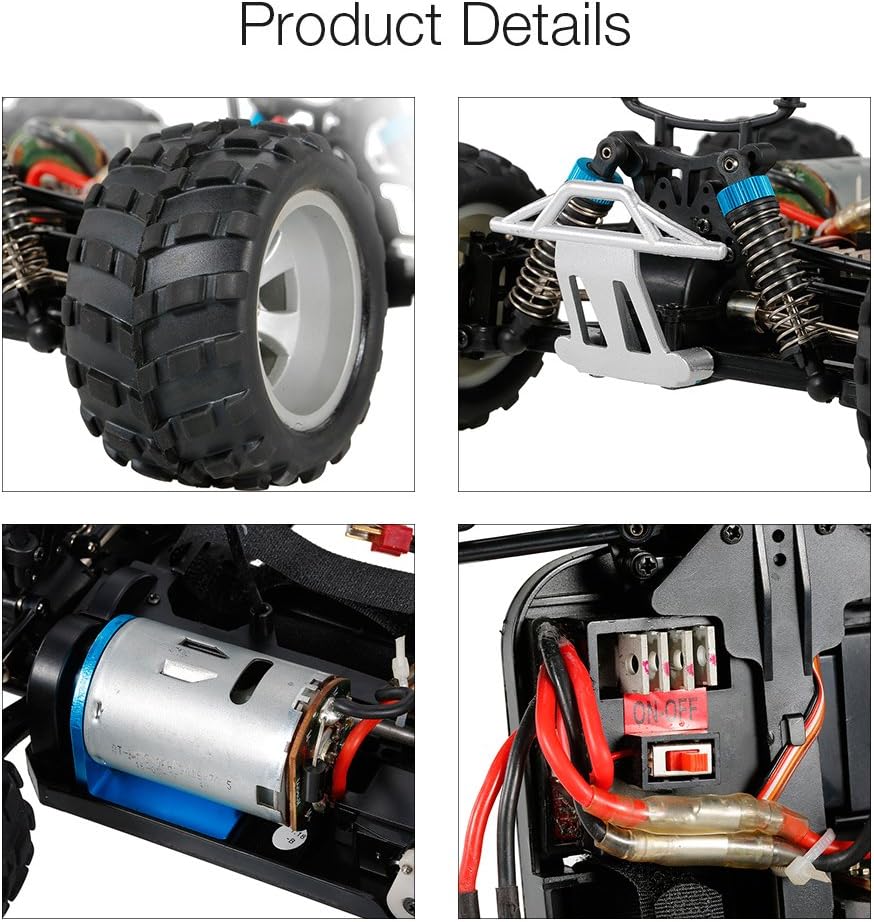
This manual provides comprehensive instructions for the safe and effective use of your GoolRC WLtoys A979-B 1/18 Scale 4WD Electric RTR Monster Truck. Please read this manual thoroughly before operating the vehicle to ensure proper setup, operation, and maintenance. This remote-controlled truck features a 1/18 scale design, 2.4GHz control system, four-wheel independent suspension, shock absorbers, and an independent metal differential for stable performance across various terrains.

Safety Information
Warning: Choking hazard - small parts. Not suitable for children under 3 years.
- Always operate the RC car in open areas, away from people, pets, and obstacles.
- Do not operate near public roads or in crowded areas.
- Keep fingers, hair, and loose clothing away from moving parts.
- Ensure batteries are charged correctly and handled with care.
- Adult supervision is recommended for users under 14 years of age.
- Do not modify the vehicle or its components, as this may lead to malfunction or injury.
Package Contents
Verify that all items listed below are included in your package:
- 1 x GoolRC WLtoys A979-B RC Car
- 1 x 2.4GHz Transmitter (Remote Control)
- 1 x 7.4V 1500mAh Lithium Battery (for car)
- 1 x Balance Charger and Plug
- 1 x Hex Wrench
- 1 x English Instruction Manual

Setup
1. Charging the Car Battery
- Connect the 7.4V 1500mAh Lithium battery to the balance charger.
- Plug the balance charger into a suitable power outlet.
- The charging time is approximately 120 minutes. Do not overcharge the battery.
- Once charging is complete, disconnect the battery from the charger.
2. Installing Batteries in the Transmitter
- Open the battery compartment cover on the back of the 2.4GHz transmitter.
- Insert 4 x 1.5V AA batteries (not included) into the compartment, ensuring correct polarity (+/-).
- Close the battery compartment cover securely.

3. Installing the Car Battery
- Remove the car body shell by detaching the body clips.
- Place the charged 7.4V 1500mAh Lithium battery into the battery compartment of the car.
- Connect the battery plug to the car's power connector.
- Secure the battery if necessary and reattach the car body shell.
4. Pairing the Transmitter and Car
- Turn on the power switch on the RC car.
- Turn on the power switch on the 2.4GHz transmitter.
- The transmitter and car should automatically pair. A solid light on both indicates a successful connection.
- If pairing fails, turn off both devices and repeat the process.
Operating
Transmitter Controls

- Steering Wheel: Rotate left or right to control the direction of the car.
- Throttle Trigger: Pull to move forward, push to brake or reverse.
- Power Switch: Turns the transmitter on or off.
- Steering Fine-Tuning: Adjusts the steering trim to ensure the car drives straight when the steering wheel is centered.
- Forward/Backward Fine-Tuning: Adjusts the throttle trim.
Driving Tips
- Start with slow speeds to familiarize yourself with the controls.
- The car can reach speeds of up to 70KM/h, requiring careful control.
- Operating time on a full charge is approximately 8 minutes.
- The remote control range is approximately 100 meters.
- Suitable for operation on flat ground, gravel, or grassland. Avoid deep water or extremely rough terrain.
Maintenance
- Cleaning: After each use, gently clean the car to remove dirt, dust, and debris. Use a soft brush or compressed air. Avoid using water directly on electronic components.
- Inspection: Regularly inspect the wheels, suspension, and chassis for any damage or loose parts. Tighten screws as needed.
- Battery Care: Always disconnect the battery from the car when not in use. Store batteries in a cool, dry place. Do not store fully charged or completely depleted batteries for extended periods.
- Lubrication: Periodically check moving parts for smooth operation. Apply appropriate RC-grade lubricant to gears and bearings if necessary.
- Storage: Store the RC car and transmitter in a dry, safe place away from direct sunlight and extreme temperatures.
Troubleshooting
| Problem | Possible Cause | Solution |
|---|---|---|
| Car does not respond to transmitter | Low battery in car or transmitter; Not paired; Power switch off | Charge car battery; Replace transmitter batteries; Ensure both power switches are ON; Re-pair transmitter and car. |
| Car runs slowly or intermittently | Low car battery; Obstruction in drivetrain; Damaged motor | Recharge car battery; Check for debris in gears/wheels; Inspect motor for damage. |
| Car pulls to one side | Steering trim incorrect; Damaged steering components | Adjust steering fine-tuning on transmitter; Inspect steering linkages and servo for damage. |
| Short operating time | Battery not fully charged; Old battery; Aggressive driving style | Ensure battery is fully charged; Consider replacing old batteries; Moderate throttle usage. |
| Loss of range | Low transmitter battery; Interference; Damaged antenna | Replace transmitter batteries; Move to an area with less interference; Check transmitter antenna for damage. |
Specifications
| Feature | Detail |
|---|---|
| Model No. | A979-B |
| Scale | 1/18 |
| Drive System | 4 Wheel Drive (4WD) |
| Remote Control Frequency | 2.4GHz |
| Max. Speed | 70KM/h |
| Motor | 540 Brushed Motor |
| Transmitter Battery | 4 * 1.5V AA Battery (not included) |
| Car Battery | 7.4V 1500mAh Lithium battery (included) |
| Remote Control Distance | Approx. 100M |
| Charging Time | Approx. 120mins |
| Working Time | Approx. 8mins |
| Recommended Age | 14 years and up |
| Product Dimensions | 12 x 8 x 6 inches (250 x 195 x 118mm) |
| Item Weight | 3.69 pounds (785g) |
| Manufacturer | WLtoys |
Warranty and Support
For warranty information or technical support, please refer to the contact details provided with your purchase documentation or visit the official GoolRC website. Keep your proof of purchase for any warranty claims.
Related documentsA979-B


Ask a question about this manual
Ask about setup, troubleshooting, compatibility, parts, safety, or missing instructions. Manuals+ will review the question and use this page’s manual context to help answer it.