
Vasco Electronics MINI2
Vasco Mini 2 Translator Device User Manual
Brand: Vasco Electronics
Model: MINI2
1. Introduction
The Vasco Mini 2 Translator Device is a portable, multi-language voice translator designed to facilitate instant two-way conversations across language barriers. This device supports over 50 languages and features a built-in SIM card providing lifetime, free, and unlimited global data for translations, eliminating the need for Wi-Fi in many situations.
Its compact design makes it an ideal companion for travelers, business professionals, and anyone needing seamless communication in diverse linguistic environments. The Vasco Mini 2 was recognized as the "Best Connected Consumer Device" at The Global Mobile Awards in Barcelona, 2020.
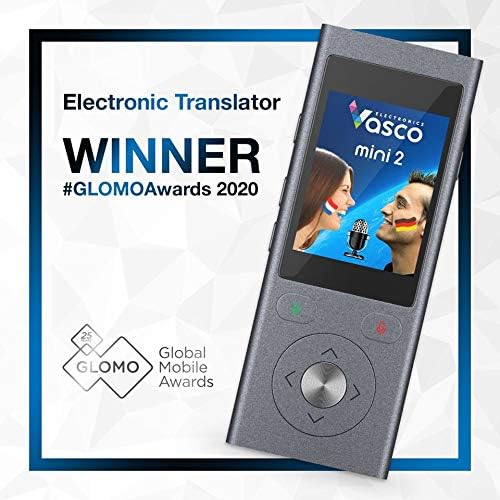
Image: The Vasco Mini 2 Translator, highlighting its award as 'WINNER #GLOMOAwards 2020'.
Video: An overview of Vasco Electronics, showcasing their commitment to creating cutting-edge voice translators and their mission to simplify communication.
2. Setup
2.1. Initial Charging
Before first use, fully charge your Vasco Mini 2 device using the provided USB cable and power adapter. The device is equipped with a Lithium Ion battery.
2.2. Powering On/Off
To power on the device, press and hold the power button located on the side until the screen illuminates. To power off, press and hold the power button until the shutdown options appear, then select 'Power Off'.
2.3. Language Selection
Upon initial startup or when changing languages, navigate through the on-screen menu to select your desired source and target languages. The device supports over 50 languages for translation.

Image: The Vasco Mini 2 screen displaying options for selecting English and Spanish, illustrating the device's multi-language capability and the "Lifetime, Free & Unlimited Global Data" feature.

Image: A visual representation of the Vasco Mini 2's built-in SIM card, emphasizing the benefit of free internet for translations.
3. Operating the Device
3.1. Two-Way Voice Translation
The Vasco Mini 2 is designed for intuitive two-way communication. It features two dedicated buttons for translation:
- Press and hold the left button (green) to speak in your native language. Release the button when finished. The device will translate and speak the phrase in the target language.
- Press and hold the right button (red) for the other person to speak in their language. Release the button when finished. The device will translate and speak the phrase in your native language.
The translated text will also appear on the device's screen for visual confirmation.

Image: The Vasco Mini 2 device displaying a visual of two people with different country flags, symbolizing its two-way translation capabilities.
Video: A demonstration of the Vasco Mini 2 translator in action, highlighting its compact size and ease of use for instant communication.
4. Maintenance
4.1. Cleaning
To clean your Vasco Mini 2, use a soft, dry, lint-free cloth. Do not use abrasive cleaners, solvents, or aerosol sprays directly on the device. Avoid getting moisture in any openings.
4.2. Battery Care
The device contains a Lithium Ion battery. For optimal battery life, avoid exposing the device to extreme temperatures. Store it in a cool, dry place when not in use for extended periods. Fully charge the device periodically if storing for a long time.
4.3. Software Updates
Ensure your device's software is up to date to benefit from the latest language improvements and features. Connect the device to a Wi-Fi network and check for available updates through the device settings menu.
5. Troubleshooting
5.1. Device Not Responding
- Ensure the device is charged. Connect it to a power source.
- Perform a soft reset by pressing and holding the power button for approximately 10-15 seconds until the device restarts.
5.2. Translation Issues
- No Translation/Incorrect Translation: Ensure you are speaking clearly and directly into the microphone. Verify that the correct source and target languages are selected.
- "No Match Found" Error: This often indicates a poor internet connection. While the device has a built-in SIM, signal strength can vary. Try moving to an area with better network coverage.
- Audio Quality: Ensure the speaker is not obstructed. Adjust the volume settings if the audio is too low or distorted.
5.3. Connectivity Problems
- Although the device uses a built-in SIM for data, Wi-Fi can be used for updates or in areas with poor cellular coverage. Check Wi-Fi settings if you are attempting to connect to a local network.
- If experiencing persistent connectivity issues, try restarting the device or checking for software updates.
6. Specifications
| Feature | Detail |
|---|---|
| Manufacturer | Vasco Electronics |
| Brand | Vasco Electronics |
| Item Weight | 1.03 pounds |
| Package Dimensions | 6.69 x 4.96 x 3.39 inches |
| Item Model Number | MINI2 |
| Batteries | 1 Lithium Ion batteries required (included) |
| Manufacturer Part Number | MINI2 |
| ASIN | B07NNDQSJP |
| Date First Available | May 19, 2019 |
7. Warranty and Support
For detailed warranty information and technical support, please refer to the official Vasco Electronics website or contact their customer service directly. Keep your proof of purchase for warranty claims.
For the most up-to-date information, visit the Vasco Electronics Store on Amazon.
Related documentsMINI2


Ask a question about this manual
Ask about setup, troubleshooting, compatibility, parts, safety, or missing instructions. Manuals+ will review the question and use this page’s manual context to help answer it.