
Introduction
Thank you for choosing the Pyle PRT259.1 Wireless Handheld Microphone. This microphone operates on a UHF frequency of 259.1MHz, designed for clear audio transmission. This manual provides essential instructions for the proper setup, operation, and maintenance of your device to ensure optimal performance and longevity.
What's in the Box
Upon unpacking, please ensure all items are present:
- Pyle Wireless Handheld Microphone
Setup
Battery Installation
The microphone requires batteries for operation. Please follow these steps for proper installation:
- Unscrew the bottom cap of the microphone by turning it counter-clockwise.
- Insert the required batteries (not included), observing the correct polarity (+/-) as indicated inside the compartment.
- Carefully screw the bottom cap back on by turning it clockwise until it is securely fastened.
Note: Some users have reported difficulty with the battery compartment. Ensure batteries are correctly sized and positioned before attempting to close the cap. Do not force the cap if it does not screw on smoothly.
Powering On
Locate the ON/OFF switch on the microphone body. Slide the switch to the 'ON' position to power on the microphone. A small indicator light may illuminate to confirm power.

Image: Front view of the Pyle Wireless Handheld Microphone, showing the grille, body, ON/OFF switch, and indicator light.
Operating Instructions
Basic Operation
- Ensure the microphone is powered on by sliding the ON/OFF switch to 'ON'.
- Position the microphone approximately 2-6 inches (5-15 cm) from your mouth for optimal sound capture.
- Speak clearly and directly into the microphone grille.
- To turn off the microphone, slide the ON/OFF switch to the 'OFF' position.
For wireless operation, this microphone requires a compatible UHF receiver (not included) tuned to the frequency of 259.1MHz.
Maintenance
Cleaning
To maintain the appearance and functionality of your microphone:
- Wipe the microphone body with a soft, dry cloth.
- Do not use liquid cleaners, solvents, or abrasive materials, as these can damage the finish or internal components.
- Avoid immersing the microphone in water or exposing it to excessive moisture.
Storage
When not in use for extended periods:
- Remove the batteries to prevent potential leakage, which can damage the microphone.
- Store the microphone in a cool, dry place, away from direct sunlight and extreme temperatures.
Troubleshooting
No Power / Microphone Not Turning On
- Check Battery Installation: Ensure batteries are inserted with correct polarity and are not depleted. Replace with fresh batteries if necessary.
- Battery Compartment: Verify the battery compartment cap is securely fastened. If experiencing difficulty, ensure the correct battery size is used and that there is no obstruction preventing the cap from closing properly.
- Power Switch: Confirm the ON/OFF switch is fully in the 'ON' position.
Poor Sound Quality / No Sound
- Microphone Position: Ensure the microphone is held correctly and pointed towards the sound source.
- Interference: Move away from potential sources of radio interference (e.g., other wireless devices, large metal objects).
- Receiver (if applicable): Ensure your receiver unit (not included with this microphone) is properly set up, powered on, and tuned to the microphone's frequency (259.1MHz). Check the receiver's volume and connection to your audio system.
Specifications
| Model | PRT259.1 |
| Brand | Pyle |
| Connectivity Technology | UHF, Wireless |
| Frequency Response | 259.1 MHz |
| Microphone Form Factor | Handheld |
| Polar Pattern | Unidirectional |
| Impedance | 600 Ohm |
| Compatible Devices | Voice Recorder (generally any compatible UHF receiver) |
| Power Source | Batteries (Required: Yes, Included: No) |
| Product Dimensions (L x W x H) | 12.7 x 12.7 x 12.7 cm |
| Item Weight | 190 g |
| UPC | 068888767057 |
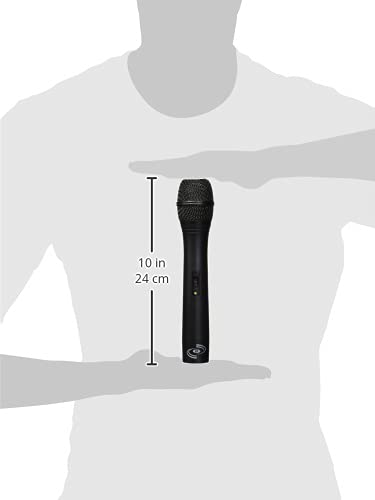
Image: Pyle Wireless Handheld Microphone shown with a measurement overlay indicating its approximate length of 10 inches (24 cm).
Warranty and Support
Pyle products typically come with a manufacturer's warranty. For specific warranty details, support, or service inquiries, please refer to the documentation included with your purchase or visit the official Pyle website. You can also contact Pyle customer support directly for assistance with product-related questions or issues.


