
Introduction
The MEDca Digital Personal Sound and Voice Amplifier is designed to enhance sound and voice clarity, making it easier to hear in various environments. This device is suitable for individuals who require sound amplification for activities such as watching television, participating in conversations, or observing nature. Its compact design and versatile earbud options provide a comfortable and effective listening experience.
Package Contents
Please verify that all the following items are included in your package:
- MEDca Digital Personal Sound and Voice Amplifier Unit
- Wired Headphones
- Single Earbud Cable
- Double Earbud Cable
- Assorted Ear Tips
- 1 AAA Battery

Image: The complete package contents, showing the amplifier, two types of earbud cables, multiple ear tips, and an AAA battery.
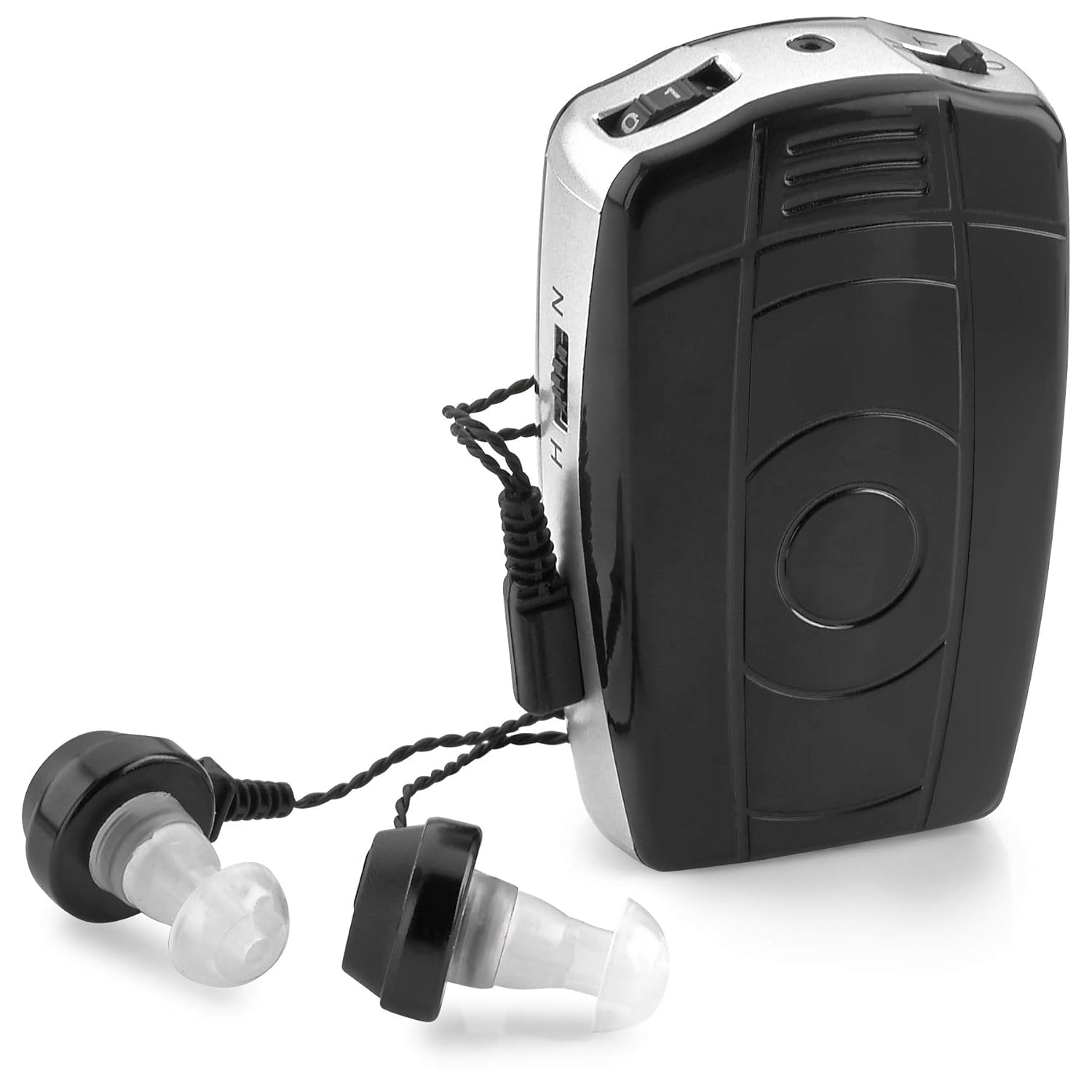
Image: The MEDca Digital Personal Sound and Voice Amplifier unit with earbuds attached.
Setup
Battery Installation
- Locate the battery compartment on the amplifier unit.
- Open the battery compartment cover.
- Insert the provided AAA battery, ensuring the polarity (+/-) matches the markings inside the compartment.
- Close the battery compartment cover securely.
Earbud Connection and Selection
The amplifier supports both single (mono) and double (stereo) earbud configurations. Choose the cable that best suits your hearing needs.
- Select either the single or double earbud cable.
- Connect the chosen earbud cable to the amplifier's audio jack.
- Choose the most comfortable ear tips from the assorted sizes provided and attach them to the earbuds.
- Place the earbuds securely in your ears.
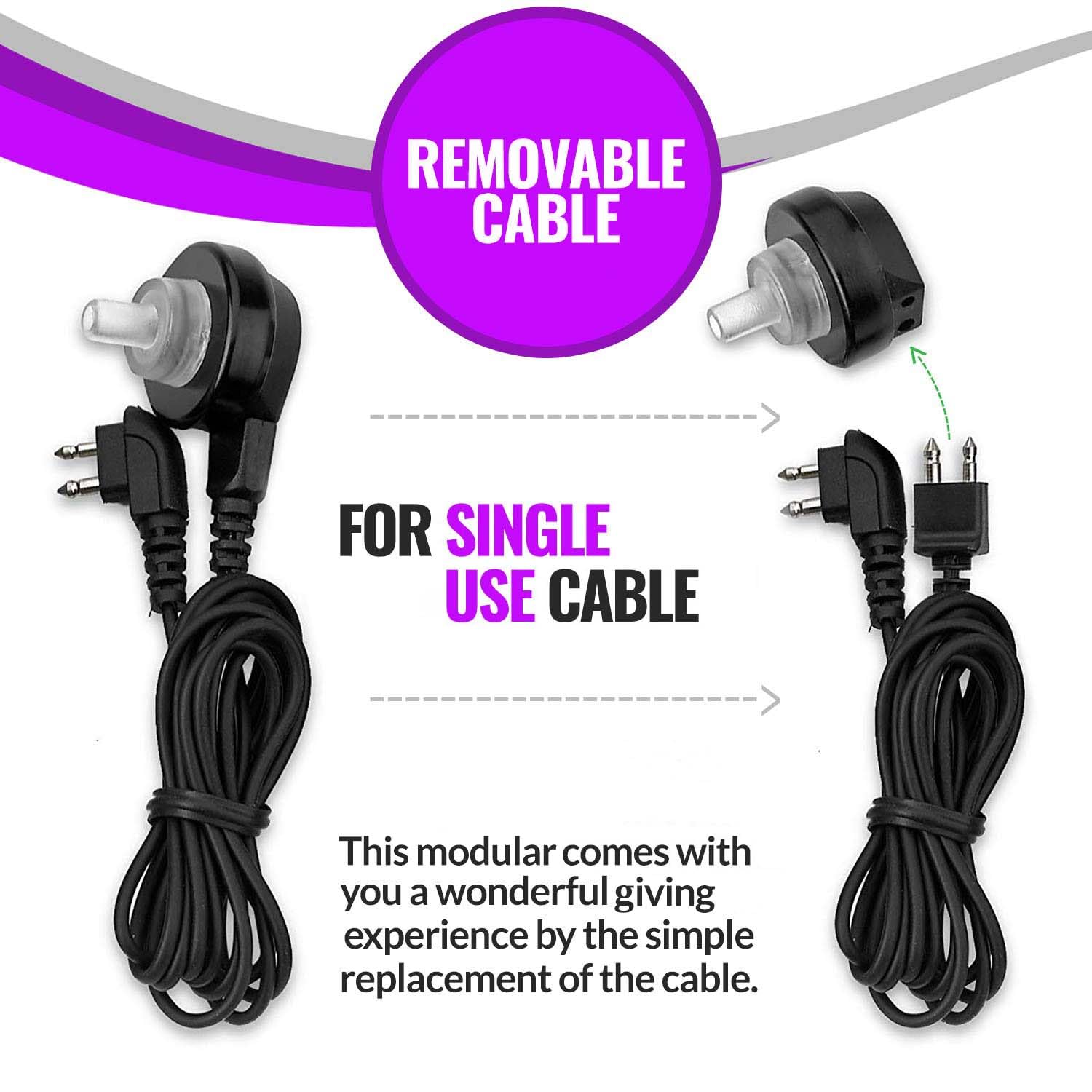
Image: This diagram shows how the removable cable allows for either single or double earbud use.
Operating Instructions
Power On/Off and Volume Control
- To power on the device, slide the ON/OFF switch to the 'ON' position.
- Adjust the volume using the control dial located on the amplifier. Start with a low volume and gradually increase it to a comfortable listening level.
- To power off, slide the ON/OFF switch to the 'OFF' position.
Pitch Control
The amplifier features a pitch control switch (H/N) to adjust the sound frequency response. 'H' typically enhances higher frequencies, while 'N' provides a more natural sound profile. Experiment with both settings to find the one that offers the clearest sound for your environment.
Usage Tips
- Position the amplifier's swivel microphone towards the sound source for optimal amplification.
- The device includes a belt clip for convenient portability, allowing hands-free use.
- The amplifier is designed to pick up ambient sounds, providing a comprehensive listening experience.

Image: Detailed view of the amplifier's controls, including the volume dial, power switch, and pitch control.
Maintenance
Cleaning
- Wipe the amplifier unit with a soft, dry cloth. Do not use liquid cleaners or immerse the device in water.
- Clean ear tips regularly with a mild soap and water solution, then rinse thoroughly and allow to air dry completely before reattaching.
Battery Replacement
Replace the AAA battery when sound quality diminishes or the device stops functioning. Follow the battery installation steps outlined in the Setup section.
Storage
Store the amplifier in a cool, dry place away from direct sunlight and extreme temperatures. If storing for an extended period, remove the battery to prevent leakage.
Troubleshooting
| Issue | Possible Cause | Solution |
|---|---|---|
| No Sound | Device is off; low battery; earbuds not connected; volume too low. | Ensure device is ON; replace battery; check earbud connection; increase volume. |
| Weak Sound | Low battery; ear tips not sealed properly; volume too low. | Replace battery; try different ear tip size for better seal; increase volume. |
| Static or Feedback | Earbuds not inserted correctly; volume too high; proximity to microphone. | Re-insert earbuds for a snug fit; lower volume; ensure microphone is not too close to earbuds. |
| Short Battery Life | Old or low-quality battery; continuous high volume use. | Use fresh, high-quality AAA batteries; reduce volume when possible. |
Specifications
| Feature | Detail |
|---|---|
| Model Number | AVA-68V4 |
| Maximum Output Power | 130+/dB |
| Maximum Gain | 68 dB |
| Harmonic Distortion | <5% |
| Frequency Range | 450~3500Hz |
| Input Noise | <30dB |
| Battery Type | 1 x AAA (1.5V) |
| Battery Life | Up to 30 hours (current <4mA) |
| Product Dimensions | 4.06 x 3.9 x 2.13 inches |
| Weight | 3.52 ounces |
| Material | Plastic |

Image: Information regarding the AAA battery and its extended battery life.
Warranty and Support
MEDca is committed to customer satisfaction. If you encounter any issues with your Digital Personal Sound and Voice Amplifier, please contact MEDca customer support for assistance. While specific warranty periods may vary, MEDca strives to ensure your needs are met.
For further information or support, please visit the official MEDca store or contact their customer service department.