
1. Introduction
This manual provides essential information for the safe and efficient use of your EBM-PAPST 40x20mm 12V DC Fan, Model 412H. Please read these instructions carefully before installation and operation to ensure proper function and longevity of the product. Keep this manual for future reference.
2. Safety Information
- Ensure the power supply matches the fan's voltage requirements (12V DC). Incorrect voltage can damage the fan or power source.
- Disconnect power before installing, cleaning, or performing any maintenance on the fan.
- Avoid touching the fan blades while the fan is operating or connected to power.
- Do not obstruct the fan's intake or exhaust. Ensure adequate airflow for optimal performance and to prevent overheating.
- Install the fan in a dry environment, away from moisture and extreme temperatures.
- Handle the fan by its frame. Avoid putting stress on the wires or connector.
3. Product Overview
The EBM-PAPST 40x20mm 12V DC Fan (Model 412H) is designed for efficient cooling in various applications, particularly desktop computers. It features a compact design with a fiberglass-reinforced PBT frame for durability.
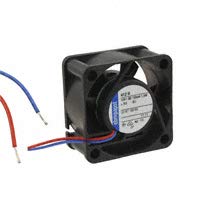
Figure 3.1: EBM-PAPST 40x20mm 12V DC Fan. This image shows the compact fan unit with its two-wire lead for power connection.
Key features include:
- Dimensions: 40x40x20mm
- Voltage: 12V DC
- Airflow: 8 CFM (Cubic Feet Per Minute)
- Speed: 8100 RPM (Revolutions Per Minute)
- Noise Level: 29 dB(SB)
- Power Connector: 2-Wire Leads
- Frame Material: Fiberglass Reinforced PBT
4. Setup and Installation
Follow these steps for proper installation of your EBM-PAPST DC fan:
- Prepare the Installation Area: Ensure the area where the fan will be installed is clean and free of obstructions. Verify that there is sufficient space for the fan's dimensions (40x40x20mm).
- Mount the Fan: Secure the fan to the desired location using appropriate screws or mounting hardware (not included). Ensure the fan is mounted firmly to prevent vibration and noise. Pay attention to the airflow direction indicated on the fan frame (if present) to ensure proper cooling.
- Connect Power: The fan comes with 2-wire leads. Connect these leads to a compatible 12V DC power source. Typically, the red wire is positive (+) and the black wire is negative (-). Ensure correct polarity to avoid damage.
- Verify Connections: Double-check all connections to ensure they are secure and correctly wired before applying power.
5. Operating Instructions
Once installed and connected, the EBM-PAPST 40x20mm 12V DC Fan operates automatically when power is supplied.
- Power On: Apply 12V DC power to the connected leads. The fan should begin to spin immediately.
- Power Off: Disconnect the 12V DC power supply to stop the fan.
- Normal Operation: The fan is designed for continuous operation. During normal operation, you should hear a consistent, low-level hum (approximately 29 dB) and feel airflow.
6. Maintenance
Regular maintenance helps ensure optimal performance and extends the lifespan of your fan.
- Cleaning: Periodically inspect the fan blades and grille for dust accumulation. Disconnect power before cleaning. Use a soft brush, compressed air, or a damp cloth to gently remove dust. Do not use harsh chemicals or abrasive materials.
- Inspection: Check for any signs of damage to the fan blades, frame, or wiring. Ensure mounting screws remain tight.
- Lubrication: This fan is designed to be maintenance-free and does not require lubrication.
7. Troubleshooting
If you encounter issues with your fan, refer to the following troubleshooting guide:
| Problem | Possible Cause | Solution |
|---|---|---|
| Fan does not spin | No power, incorrect wiring, damaged fan. |
|
| Unusual noise or vibration | Loose mounting, obstructed blades, worn bearings. |
|
| Low airflow | Dust accumulation, obstructed intake/exhaust. |
|
8. Specifications
| Feature | Detail |
|---|---|
| Brand | ebm-papst |
| Model | 412H |
| Dimensions | 40x40x20mm |
| Voltage | 12 Volts DC |
| Wattage | 1.6 watts |
| Air Flow Capacity | 8 Cubic Feet Per Minute (CFM) |
| Maximum Rotational Speed | 8100 RPM |
| Noise Level | 29 Decibels (dB SB) |
| Power Connector Type | 2-Pin Wire Leads |
| Cooling Method | Forced Air |
| Compatible Devices | Desktop |
| Material | Fiberglass Reinforced PBT Frame |
| ASIN | B07NK558V1 |
| UPC | 763236724538 |
9. Warranty and Support
For warranty information or technical support, please contact EBM-PAPST directly or refer to their official website. Keep your purchase receipt as proof of purchase.
Manufacturer: EBM-PAPST
Date First Available: March 19, 2019

