
Introduction
This manual provides essential information for the proper setup, operation, and maintenance of your Taylor Precision Products Springfield Big and Bold Thermometer. Designed for clear and easy temperature readings, this thermometer is suitable for various outdoor and indoor environments. Please read these instructions carefully before use to ensure optimal performance and longevity of your device.
Product Overview

Image Description: This image displays three white, circular Springfield Big and Bold Thermometers. Each thermometer features a large, easy-to-read dial with black numbers indicating temperatures in Fahrenheit, ranging from -60°F to 120°F. A prominent red needle points to the current temperature. Each thermometer is equipped with a silver-colored mounting bracket at the top, designed for easy installation. The thermometers are shown against a plain white background.
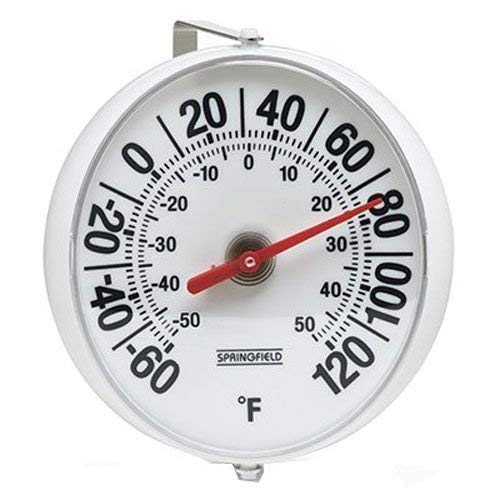
Image Description: A close-up view of a single Springfield Big and Bold Thermometer. The white circular face is clearly visible, showing the temperature scale from -60°F to 120°F in black numerals, with smaller markings for individual degrees. The red temperature needle is positioned around 75°F. The word "SPRINGFIELD" and the °F symbol are printed at the bottom of the dial. A silver mounting bracket is visible at the top, indicating its readiness for wall or surface attachment.
The Taylor Precision Products Springfield Big and Bold Thermometer is designed for clear and accurate temperature measurement. Its large, bold display ensures readability from a distance. Each thermometer comes equipped with a mounting bracket for convenient installation.
Setup and Installation
- Unpacking: Carefully remove the thermometer from its packaging. Inspect for any signs of damage.
- Choosing a Location: Select a location that provides an accurate ambient temperature reading. Avoid direct sunlight, heat sources, or areas prone to extreme drafts, as these can affect accuracy. For outdoor use, choose a sheltered spot.
- Mounting:
- Position the mounting bracket against the desired surface.
- Mark the locations for the mounting screws through the holes in the bracket.
- Use appropriate screws (not always included or may require larger size than supplied) to secure the bracket firmly to the surface. Note: Some users have reported that the supplied screws may be too small for secure mounting and recommend using #6 screws, potentially requiring enlargement of the bracket holes.
- Once the bracket is secure, hang the thermometer onto the bracket.
Operating Instructions
The Taylor Precision Products Springfield Big and Bold Thermometer is an analog device that requires no batteries or complex setup for operation. Once mounted, it will continuously display the ambient temperature.
- Reading the Temperature: Observe the red needle on the thermometer's dial. The needle points to the current temperature in degrees Fahrenheit (°F).
- Temperature Scale: The dial features a clear scale ranging from -60°F to 120°F, with major increments marked for easy reading.
Maintenance and Care
To ensure the longevity and continued accuracy of your thermometer, follow these simple maintenance guidelines:
- Cleaning: Wipe the thermometer clean with a soft, damp cloth. Avoid using abrasive cleaners or solvents, as these can damage the display or casing.
- Protection: While designed for outdoor use, protecting the thermometer from extreme weather conditions (e.g., prolonged heavy rain, direct hail) can extend its lifespan.
- Storage: If storing the thermometer for an extended period, keep it in a dry, temperate environment.
Troubleshooting
If you encounter issues with your thermometer, consider the following common solutions:
- Inaccurate Readings:
- Ensure the thermometer is not in direct sunlight or near a heat source (e.g., exhaust vent, appliance).
- Verify that the thermometer is placed in an area with good air circulation.
- Allow sufficient time (at least 15-30 minutes) for the thermometer to acclimate to a new environment before taking a reading.
- Compare the reading with another known accurate thermometer in the same location.
- Mounting Instability:
- Ensure the mounting screws are appropriate for the surface and securely fastened.
- If the supplied screws are too small, consider using larger screws (e.g., #6) and, if necessary, carefully enlarging the bracket holes to accommodate them.
Specifications
| Brand | Taylor |
| Model Name | 90100 |
| Item Model Number | 90100 |
| Package Dimensions | 7.7 x 6.3 x 3.6 inches; 9.59 ounces |
| Item Length | 5.25 Inches |
| Upper Temperature Rating | 120 Degrees Fahrenheit |
| Display Type | Analog |
| Outer Material | Plastic |
| Product Care Instructions | Wipe Clean |
| Reusability | Reusable |
| Manufacturer | Taylor Precision Products |
| Date First Available | February 8, 2019 |
Warranty and Support
Specific warranty information for the Taylor Precision Products Springfield Big and Bold Thermometer is not provided in this manual. For details regarding warranty coverage, product support, or to inquire about replacement parts, please refer to the product packaging or contact Taylor Precision Products directly through their official website or customer service channels.


