
Introduction
The TFA Dostmann Sky 35.1152 is a wireless weather station designed to provide accurate indoor and outdoor temperature and humidity readings, along with a weather forecast. It features a radio-controlled clock with an alarm function and displays maximum and minimum values for various measurements. This manual will guide you through the setup, operation, and maintenance of your device.
Package Contents
Before you begin, please ensure all components are present:
- 1x TFA Dostmann Sky 35.1152 Base Station
- 1x Wireless Outdoor Sensor (Model 30.3195)
- Instruction Manual (this document)
- Note: Batteries are not included. You will need 3x 1.5V AAA batteries for the base station and 2x 1.5V AAA batteries for the outdoor sensor.
Setup
1. Battery Installation
For the Outdoor Sensor:
- Open the battery compartment cover on the back of the outdoor sensor.
- Insert 2x 1.5V AAA batteries, observing the correct polarity (+/-).
- Close the battery compartment cover securely.
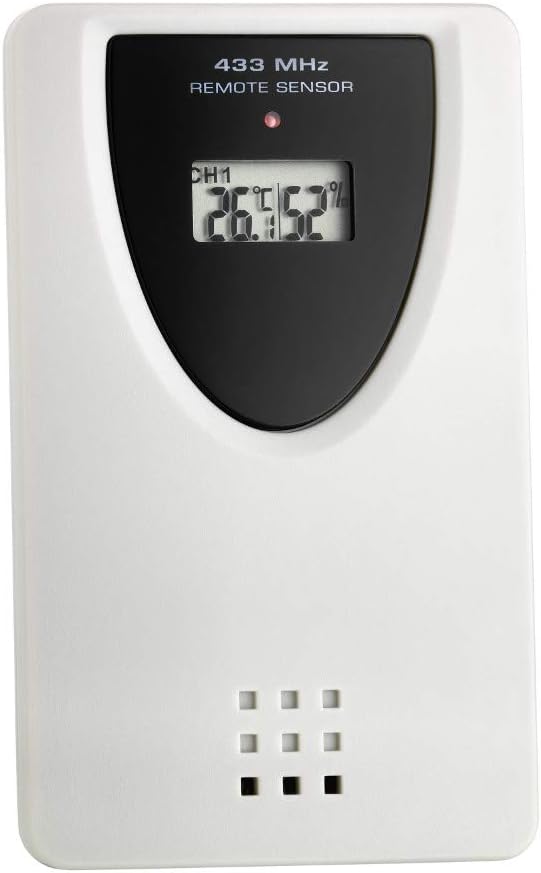
Image: The wireless outdoor sensor. Insert 2x AAA batteries into the compartment on the back.
For the Base Station:
- Open the battery compartment cover on the back of the base station.
- Insert 3x 1.5V AAA batteries, observing the correct polarity (+/-).
- Close the battery compartment cover securely.
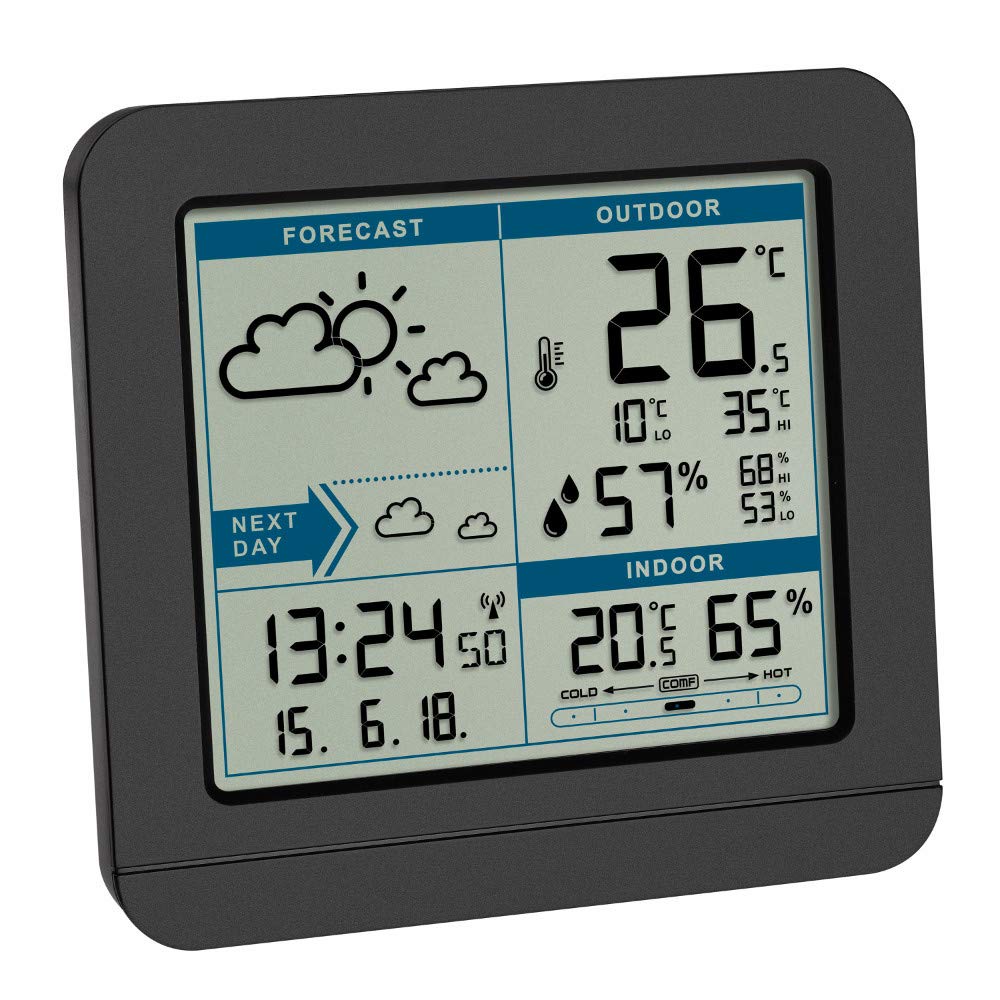
Image: The main display unit of the weather station. Batteries are inserted into the back compartment.
After inserting batteries into both units, the base station will automatically begin searching for the outdoor sensor signal and the radio time signal.
2. Sensor Placement
- Place the outdoor sensor in a shaded, dry location, protected from direct sunlight and rain, to ensure accurate temperature and humidity readings.
- Ensure the sensor is within the maximum transmission range of 60 meters (197 feet) from the base station. Walls and other obstacles can reduce this range.
- Avoid placing the sensor near large metal objects or electrical appliances that could interfere with the wireless signal.
3. Initial Synchronization
Once both units are powered, the base station will attempt to connect to the outdoor sensor and receive the radio-controlled time signal. This process may take a few minutes. If the outdoor temperature/humidity or time does not appear after 10 minutes, refer to the Troubleshooting section.
Operating Instructions
Display Overview
The display is divided into several sections, providing a clear overview of weather data and time information.
- FORECAST: Displays weather icons indicating the predicted weather for the next 12-24 hours.
- OUTDOOR: Shows the current outdoor temperature and humidity received from the wireless sensor. Includes daily high (HI) and low (LO) values.
- INDOOR: Displays the current indoor temperature and humidity, along with a comfort zone indicator.
- TIME/DATE: Shows the current time, date, and day of the week, synchronized via radio signal. An alarm icon will appear if the alarm is active.

Image: Detailed view of the weather station's main display, showing forecast, outdoor, indoor, and time/date sections.
Setting Time and Date
The weather station automatically sets the time and date via a radio signal (DCF77). If the signal is not received or you are outside the reception area, you can set the time manually.
- Automatic Synchronization: The radio signal icon will flash during synchronization and remain solid once successful.
- Manual Setting: Refer to the specific buttons on your device (usually labeled MODE, SET, or similar) and follow the sequence to adjust hours, minutes, year, month, and day. Consult the quick start guide included in the package for exact button functions.
Alarm Function
The weather station includes an alarm with a snooze function.
- Setting the Alarm: Press the ALARM button (or similar) to enter alarm setting mode. Use the UP/DOWN buttons to adjust the alarm time.
- Activating/Deactivating Alarm: Press the ALARM button again to toggle the alarm on or off. An alarm icon will appear on the display when active.
- Snooze Function: When the alarm sounds, press any button (except the alarm off button) to activate snooze. The alarm will sound again after a few minutes.
Max/Min Values
The device records maximum and minimum temperature and humidity values for both indoor and outdoor measurements.
- Viewing Max/Min: Press the MAX/MIN button (or similar) repeatedly to cycle through current, maximum, and minimum values.
- Resetting Max/Min: Daily max/min values reset automatically. An additional memory allows for manual reset of selected values by pressing and holding the MAX/MIN button for 3 seconds.
Comfort Zone Indicator
The indoor section of the display includes a comfort zone indicator, which visually represents the quality of the indoor air based on temperature and humidity levels. This helps you maintain an optimal indoor climate.
Maintenance
- Battery Replacement: Replace batteries in both the base station and outdoor sensor when the low battery indicator appears on the display. Always replace all batteries in a unit at the same time with new ones of the same type.
- Cleaning: Clean the device and sensor with a soft, damp cloth. Do not use abrasive cleaners or solvents. Ensure no water enters the battery compartments or electronic components.
- Storage: If storing the device for an extended period, remove all batteries to prevent leakage.
Troubleshooting
| Problem | Possible Cause | Solution |
|---|---|---|
| No outdoor temperature/humidity reading. |
|
|
| Incorrect time or no radio signal icon. |
|
|
| Display is dim or blank. |
|
|
Specifications
- Model: TFA Dostmann Sky 35.1152
- Material: Plastic
- Power Supply (Base Station): 3x 1.5V AAA batteries (not included)
- Power Supply (Outdoor Sensor): 2x 1.5V AAA batteries (not included)
- Outdoor Temperature Measuring Range: -20 °C to +50 °C (-4 °F to +122 °F)
- Indoor Temperature Measuring Range: -10 °C to +50 °C (+14 °F to +122 °F)
- Humidity Measuring Range: 20% to 99% RH
- Wireless Transmission Frequency: 433 MHz
- Maximum Transmission Range: 60 meters (197 feet) in open area
- Dimensions (Base Station): 123 x 52 x 117 mm (L x W x H)
- Weight (Base Station): Approximately 271g
- Special Features: Wireless transmission, weather forecast, radio-controlled clock with alarm and snooze, max/min memory with date and time, indoor air comfort zone indicator.
Warranty and Support
For warranty information or technical support, please refer to the documentation provided with your purchase or contact your retailer. You may also visit the official TFA Dostmann website for further assistance and contact details.


