Important Safety Information
When using your Shark Navigator Zero-M Self-Cleaning Brushroll Pet Pro Upright Vacuum, basic safety precautions should always be observed. Read all instructions before using this appliance.
- Always unplug the vacuum cleaner from the electrical outlet before cleaning or servicing.
- Do not use to pick up flammable or combustible liquids, such as gasoline, or use in areas where they may be present.
- Keep hair, loose clothing, fingers, and all parts of body away from openings and moving parts.
- Do not pick up anything that is burning or smoking, such as cigarettes, matches, or hot ashes.
- Use only as described in this manual. Use only manufacturer's recommended attachments.
What's in the Box
Your Shark Navigator ZU62 package includes the following components:
- Main Vacuum Body
- Handle Assembly
- Hose
- Dusting Brush
- Upholstery Tool
- Extension Hose
- Duster Crevice Tool
- Zero-M Cleaner Head

Image: All components of the Shark Navigator ZU62 vacuum cleaner.
Assembly
Follow these steps to assemble your Shark Navigator vacuum:
- Insert the wand into the cleaner head until it clicks securely.
- Slide the handle assembly onto the top of the wand until it clicks.
- Connect the hose to the back of the vacuum pod by pushing it firmly until it clicks into place.
- Attach the hose to the hose clip on the wand.
- Store the included accessories on the onboard storage posts.
Operation
Power and Floor Settings
Plug the power cord into an electrical outlet. The power switch is located on the top of the vacuum pod. Select the appropriate setting for your floor type:
- Hard Floor Setting: For bare floors and area rugs. The brushroll will spin slowly.
- Carpet Setting: For carpets. The brushroll will spin faster to deep clean.
The indicator light on the cleaner head will be green during normal operation. If it turns solid red, there is a clog or jam. If it blinks red, the brushroll is overheating.

Image: The Shark Navigator ZU62 in use on a carpeted floor.
Above-Floor Cleaning with Attachments
To clean above floors, detach the hose from the vacuum pod. You can attach various tools directly to the hose or to the extension wand for extended reach.
- Extension Hose: Provides up to 12 feet of reach for cleaning stairs, ceilings, and high areas.
- Dusting Brush: Ideal for delicate surfaces, blinds, and vents.
- Upholstery Tool: Designed to remove pet hair and debris from furniture and upholstery.
- Duster Crevice Tool: Combines a crevice tool for tight spaces with a dusting brush for added versatility.

Image: Using the vacuum's hose and wand to clean stairs.

Image: The extended hose and wand allow for cleaning high surfaces.
Maintenance
Emptying the Dust Cup
The vacuum features a 3XL capacity dust cup for longer cleaning sessions. To empty, press the release button on the side of the dust cup and lift it off the vacuum. Hold it over a trash bin and press the bottom release latch to empty debris. For thorough cleaning, the top of the dust cup also opens.

Image: The large capacity 3XL dust cup.
Filter Maintenance
Regularly clean the filters to maintain optimal suction power. The vacuum features Anti-Allergen Complete Seal Technology and a HEPA filter.
- Pre-Motor Filters: Located on top of the motor base, these foam and felt filters should be rinsed with water every 3 months. Allow to air dry completely before reinstalling.
- HEPA Filter: Located behind the front cover of the motor base, this filter should be tapped clean every 12 months. Do not wash.

Image: The Anti-Allergen Complete Seal Technology ensures dust and allergens are trapped.
Self-Cleaning Brushroll
The Zero-M self-cleaning brushroll is designed for nonstop hair removal. In case of a jam or if the indicator light turns red, you can access the brushroll for cleaning. Unplug the vacuum, then use a coin to unlock the three fasteners on the bottom of the cleaner head. Remove the cover to access the brushroll and clear any debris. The brushroll is designed to prevent hair wrap, but occasional cleaning may be necessary.
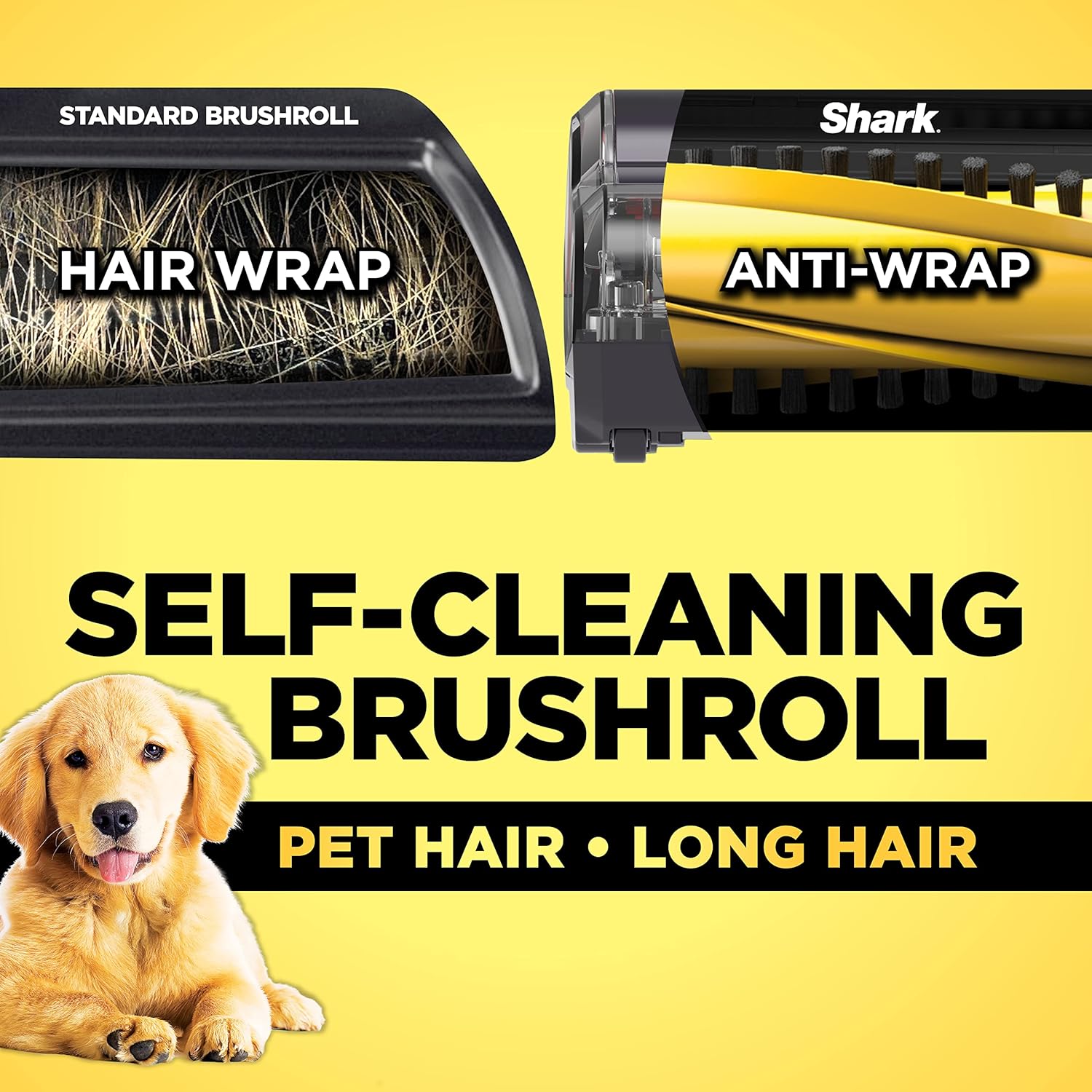
Image: Comparison of a standard brushroll with hair wrap versus the self-cleaning brushroll with no hair.
Troubleshooting
If your vacuum is not performing as expected, please refer to the following common issues and solutions:
- No Power: Check if the power cord is securely plugged into the outlet. Ensure the circuit breaker has not tripped.
- Vacuum Not Picking Up Debris: Check for clogs in the hose, filters, or brushroll. Ensure the dust cup is not full.
- Brushroll Not Spinning: Ensure the vacuum is in the correct floor setting (Carpet mode for brushroll activation). Check for obstructions in the brushroll.
- Vacuum Overheating: The brushroll indicator light may blink red. Turn off the vacuum and unplug it. Clear any clogs and allow the vacuum to cool down for at least 45 minutes before restarting.
Specifications
| Feature | Detail |
|---|---|
| Brand | Shark |
| Model Name | Navigator Zero-M Self-Cleaning Brushroll Pet Pro (ZU62) |
| Color | Pewter Grey Metallic |
| Form Factor | Upright |
| Special Feature | Corded |
| Filter Type | HEPA Filter |
| Capacity | 2.8 Quarts (Dust Cup) |
| Wattage | 1150 watts |
| Hose Length | 12 Feet |
| Cleaning Path Width | 11.97 Inches |
| Item Weight | 16 pounds |
| Product Dimensions | 11.97"L x 9.84"W x 45.28"H |
Warranty and Support
Your Shark Navigator ZU62 comes with a 5-year limited warranty.
For detailed warranty information, troubleshooting, or to purchase replacement parts, please refer to the official user guides:
You can also visit the Shark Store on Amazon for more product information and support.