
MEE audio EP-X5G2-GM
MEE audio X5-G2-2019 Wireless In-Ear Sport Headphones
User Manual
Model: EP-X5G2-GM
1. Setup
1.1 Package Contents
Verify that all items are present in your product packaging:
- X5 Wireless In-Ear Headset
- Micro-USB Charging Cable
- Eartips (4 sizes)
- Ear Fins
- User Manual

Image: Retail packaging of the MEE audio X5-G2-2019 headphones, showing the product and accessories.
1.2 Charging the Headphones
Before first use, fully charge the headphones. Connect the supplied Micro-USB charging cable to the charging port on the control module and plug the other end into a USB power source (e.g., computer USB port or wall adapter). The LED indicator will show charging status.
1.3 Wearing the Headphones
The X5-G2-2019 headphones are designed for a secure and comfortable fit. Experiment with the different sizes of eartips and ear fins to find the best seal and stability for your ears. The ergonomic design ensures they stay in place during physical activity.
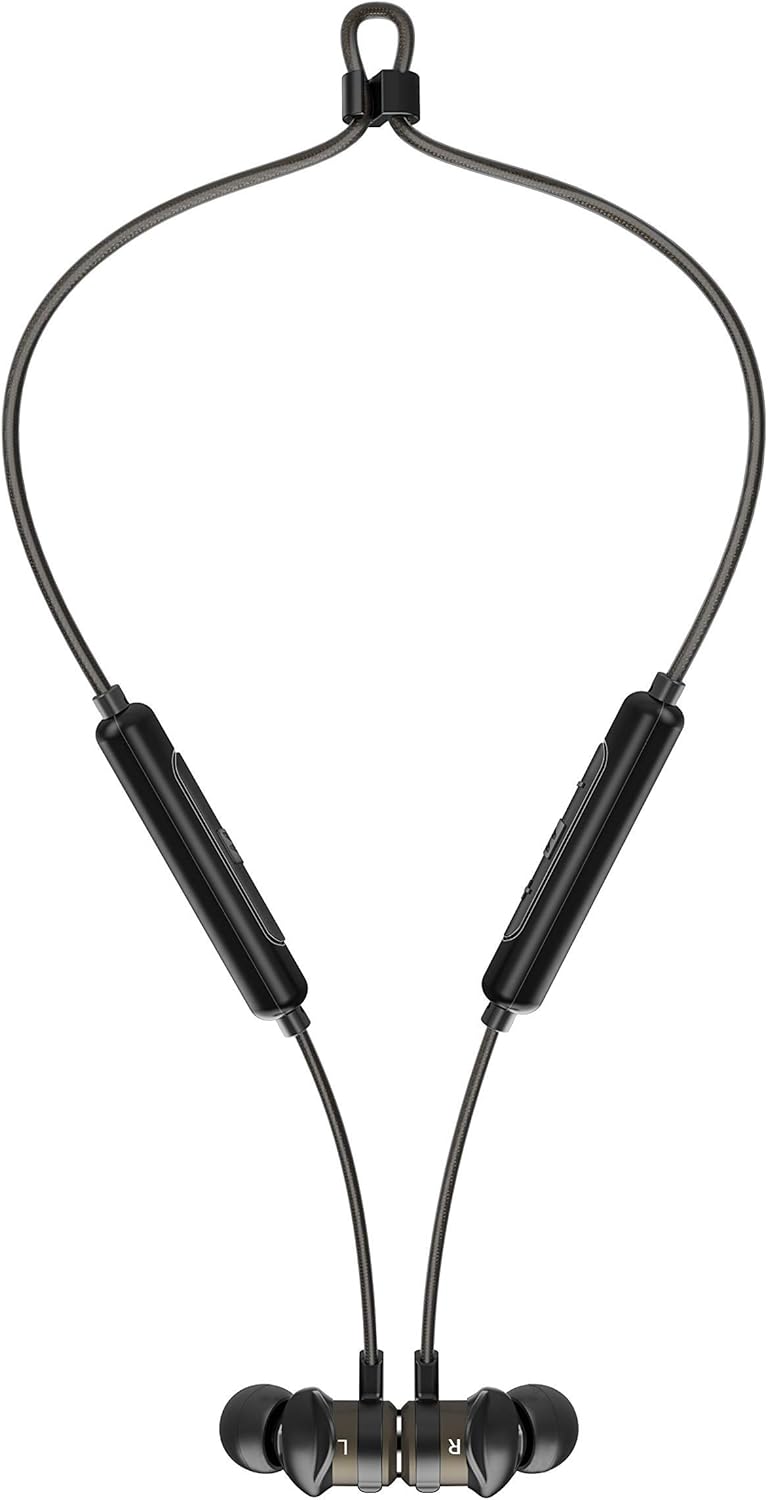

Image: The headphones shown worn around the neck and with earpieces magnetically connected for secure storage.
1.4 Bluetooth Pairing
- Ensure the headphones are charged and turned off.
- Press and hold the multi-function button on the control module until the LED indicator flashes blue and red, indicating pairing mode.
- On your device (smartphone, tablet, etc.), enable Bluetooth and search for new devices.
- Select "MEE audio X5-G2-2019" from the list of available devices.
- Once connected, the LED indicator will flash blue periodically.
2. Operating the Headphones
2.1 Controls Overview
The X5-G2-2019 features an integrated remote and microphone for convenient control of calls and music playback.

Image: Close-up of the MEE audio X5-G2-2019 headphones showing the inline control module with volume and multi-function buttons.
- Multi-function Button: Power on/off, play/pause, answer/end calls.
- Volume Up (+): Increase volume, next track (long press).
- Volume Down (-): Decrease volume, previous track (long press).
2.2 Power On/Off
- Power On: Press and hold the multi-function button until the LED flashes blue.
- Power Off: Press and hold the multi-function button until the LED flashes red and turns off.
2.3 Music Playback
- Play/Pause: Press the multi-function button once.
- Next Track: Long press the Volume Up (+) button.
- Previous Track: Long press the Volume Down (-) button.
2.4 Call Management
- Answer/End Call: Press the multi-function button once.
- Reject Call: Press and hold the multi-function button.
3. Maintenance
3.1 Cleaning
Clean the headphones regularly with a soft, damp cloth. Do not use harsh chemicals or abrasive materials. Remove eartips and clean them separately with mild soap and water if necessary, ensuring they are completely dry before reattaching.
3.2 Storage
When not in use, store the headphones in a cool, dry place away from direct sunlight and extreme temperatures. The magnetic earpieces allow for tangle-free storage around your neck or in a pouch.
3.3 Water and Sweat Resistance
The MEE audio X5-G2-2019 headphones feature an IPX5 sweat and weather-resistant design, protecting them from splashes and sweat. Do not submerge the headphones in water or expose them to running water.
4. Troubleshooting
4.1 Common Issues and Solutions
- No Power: Ensure the headphones are fully charged. Connect to a power source and check the charging indicator.
- Cannot Pair: Ensure the headphones are in pairing mode (flashing blue and red). Turn off and on your device's Bluetooth. Try forgetting the device on your phone and re-pairing.
- No Sound: Check the volume level on both the headphones and your connected device. Ensure the headphones are properly paired and connected.
- Poor Sound Quality: Ensure the eartips provide a good seal in your ear. Move closer to your connected device to avoid interference.
5. Specifications
| Brand | MEE audio |
| Model Name | EP-X5G2-GM |
| Model Number | EP-X5G2-GM |
| Connectivity Technology | Wired, Wireless |
| Wireless Communication Technology | Bluetooth |
| Ear Placement | In-Ear |
| Form Factor | In-Ear |
| Headphone Jack | Micro USB |
| Color | Gunmetal |
| Product Dimensions | 2 x 2 x 2 cm; 50 Grams |
| Batteries | 1 Lithium-Polymer Battery required (included) |
| Battery Life (Music Playback) | Up to 8.5 hours |
| Battery Life (Talk Time) | Up to 9 hours |
| Water Resistance Rating | IPX5 (Sweat and Weather Resistant) |
| Included Components | X5 Wireless In-Ear Headset, Micro-USB charging cable, Eartips (4 sizes), Ear fins, User Manual |
6. Warranty and Support
6.1 Warranty Information
MEE audio products are covered by a manufacturer's warranty. Please refer to the warranty card included in your product packaging or visit the official MEE audio website for detailed warranty terms and conditions specific to your region.
6.2 Customer Support
For technical assistance, troubleshooting, or warranty claims, please contact MEE audio customer support through their official website. Have your product model number (EP-X5G2-GM) and purchase information ready when contacting support.
Related documentsEP-X5G2-GM


Ask a question about this manual
Ask about setup, troubleshooting, compatibility, parts, safety, or missing instructions. Manuals+ will review the question and use this page’s manual context to help answer it.