Download PDFFree PDF. The Save button below keeps a bookmark and private notes in your account.
REMAX RB-M26 Multifunction Bluetooth Speaker with FM Radio and Alarm Clock
User Manual
Introduction
Thank you for purchasing the REMAX RB-M26 Multifunction Bluetooth Speaker. This device combines a portable Bluetooth speaker, FM radio, and a dual alarm clock, with additional support for TF card and USB audio playback. This manual provides detailed instructions to help you set up and operate your speaker effectively.
Package Contents
REMAX RB-M26 Bluetooth Speaker
USB Charging Cable
Audio Cable (AUX)
User Manual
Product Overview
Familiarize yourself with the speaker's components and controls.
Figure 1: REMAX RB-M26 Clock Speaker retail packaging, showing the product and key features.
The speaker features a large LED display for time and mode information, along with intuitive buttons and a rotary knob for control. The top panel typically includes buttons for power, mode selection, play/pause, volume, and alarm settings. The rear or side panel houses ports for USB, TF card, AUX input, and charging.
Setup
1. Charging the Speaker
Connect the small end of the USB charging cable to the charging port on the speaker.
Connect the large end of the USB cable to a USB power adapter (not included) or a computer's USB port.
The charging indicator will illuminate. It will turn off or change color once fully charged.
2. Powering On/Off
To power on, press and hold the Power button until the display lights up.
To power off, press and hold the Power button again until the display turns off.
3. Setting the Time
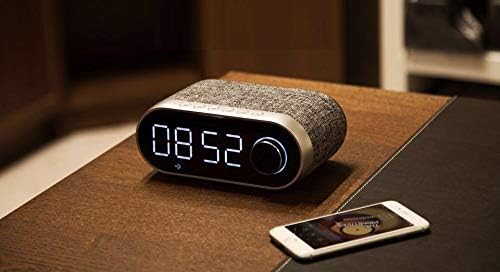
Figure 2: The REMAX RB-M26 speaker on a bedside table, showing the digital clock display.
In clock mode, press and hold the 'Time Set' button (or a similar button, refer to your specific unit's markings).
The hour digits will start flashing. Use the '+' and '-' buttons or the rotary knob to adjust the hour.
Press the 'Time Set' button again to move to minute adjustment. Adjust minutes similarly.
Press 'Time Set' once more to confirm and exit.
Operating Instructions
1. Bluetooth Pairing
Figure 3: The REMAX RB-M26 speaker connected via Bluetooth to a smartphone.
Power on the speaker. It will automatically enter Bluetooth pairing mode, indicated by a flashing Bluetooth icon on the display.
On your smartphone, tablet, or laptop, enable Bluetooth and search for available devices.
Select "REMAX RB-M26" from the list of devices.
Once paired, the Bluetooth icon will stop flashing and remain solid, and you will hear a confirmation tone.
2. FM Radio Operation
Press the 'Mode' button to switch to FM Radio mode.
Press and hold the 'Play/Pause' button to automatically scan and save available FM stations.
Use the 'Next/Previous' buttons to navigate between saved stations.
For manual tuning, short press the 'Next/Previous' buttons.
3. TF Card / USB Audio Playback
Insert a TF card (MicroSD) or a USB flash drive with MP3 audio files into the respective slot.
The speaker will automatically switch to TF card or USB mode and begin playback. If not, press the 'Mode' button to select the correct source.
Use the 'Play/Pause' button to control playback.
Use the 'Next/Previous' buttons to skip tracks.
4. AUX Input
Connect one end of the 3.5mm audio cable to the AUX port on the speaker.
Connect the other end to the audio output of your external device (e.g., MP3 player, computer).
Press the 'Mode' button to switch to AUX mode.
Audio playback will be controlled from your external device.
5. Alarm Clock Functions
Setting Alarm 1/2: In clock mode, short press the 'Alarm Set' button (or similar). The alarm time will flash. Use the '+' and '-' buttons or rotary knob to set the hour and minutes. Press 'Alarm Set' again to confirm. Repeat for a second alarm if desired.
Activating/Deactivating Alarm: After setting, press the 'Alarm Set' button to toggle the alarm on/off. An alarm icon will appear/disappear on the display.
Snooze Function: When the alarm sounds, press any button (except power off) to activate snooze. The alarm will sound again after a few minutes.
Stopping Alarm: To stop the alarm completely, press and hold the 'Alarm Set' button when it is sounding.
Maintenance
Clean the speaker with a soft, dry cloth. Do not use abrasive cleaners or solvents.
Avoid exposing the speaker to extreme temperatures, direct sunlight, or high humidity.
Do not immerse the speaker in water.
Store the speaker in a cool, dry place when not in use for extended periods.
Troubleshooting
Problem
Solution
Speaker does not power on.
Ensure the speaker is charged. Connect it to a power source using the USB cable.
No sound from the speaker.
Check the volume level on both the speaker and the connected device. Ensure the correct mode (Bluetooth, FM, TF, USB, AUX) is selected.
Bluetooth pairing fails.
Ensure the speaker is in Bluetooth pairing mode. Turn off and on Bluetooth on your device. Move the device closer to the speaker.
FM radio reception is poor.
Adjust the speaker's position. Extend any built-in antenna if available. Try scanning for stations again.
TF card/USB not playing.
Ensure the TF card/USB is inserted correctly and contains compatible audio files (e.g., MP3). Check if the speaker is in the correct mode.
Specifications
Brand: REMAX
Model: RB-M26
Connectivity Technology: Bluetooth
Mounting Type: Tabletop
Speaker Type: Surround Sound
Special Features: FM Radio, Alarm Clock
Compatible Devices: Tablet, Laptop, Smartphone
Control Type: Integrated Buttons/Knob (Note: Some models may include a remote control, please check your package contents.)
Audio Playback: Supports TF Card, USB Audio
Warranty and Support
The REMAX RB-M26 speaker comes with a standard manufacturer's warranty. Please refer to the warranty card included in your package for specific terms and conditions. For technical support or service inquiries, please contact your local REMAX distributor or the retailer where you purchased the product.
Ask about setup, troubleshooting, compatibility, parts, safety, or missing instructions. Manuals+ will review the question and use this page’s manual context to help answer it.