
1. Introduction
Thank you for purchasing the Geepas Chapati Maker GCM2028. This appliance is designed to simplify the process of making fresh chapatis, rotis, and other flatbreads at home. Please read this manual carefully before operating the appliance to ensure safe and efficient use. Keep this manual for future reference.
2. Important Safety Instructions
When using electrical appliances, basic safety precautions should always be followed, including the following:
- Read all instructions before use.
- Do not touch hot surfaces. Use handles or knobs.
- To protect against electrical shock, do not immerse cord, plugs, or the appliance in water or other liquid.
- Close supervision is necessary when any appliance is used by or near children.
- Unplug from outlet when not in use and before cleaning. Allow to cool before putting on or taking off parts, and before cleaning the appliance.
- Do not operate any appliance with a damaged cord or plug, or after the appliance malfunctions or has been damaged in any manner.
- The use of accessory attachments not recommended by the appliance manufacturer may cause injuries.
- Do not use outdoors.
- Do not let cord hang over edge of table or counter, or touch hot surfaces.
- Do not place on or near a hot gas or electric burner, or in a heated oven.
- Extreme caution must be used when moving an appliance containing hot oil or other hot liquids.
- Always attach plug to appliance first, then plug cord into the wall outlet. To disconnect, turn any control to "off", then remove plug from wall outlet.
- Do not use appliance for other than intended use.
3. Product Components
The Geepas Chapati Maker GCM2028 consists of the following main parts:
- Upper Heating Plate: Non-stick surface for cooking.
- Lower Heating Plate: Non-stick surface for cooking.
- Handle: For opening and closing the plates, and pressing dough.
- Power Indicator Light: Illuminates when the appliance is powered on.
- Ready Indicator Light: Illuminates when the appliance has reached the optimal cooking temperature.
- Base: Stable support for the appliance.
- Power Cord: For connecting to an electrical outlet.
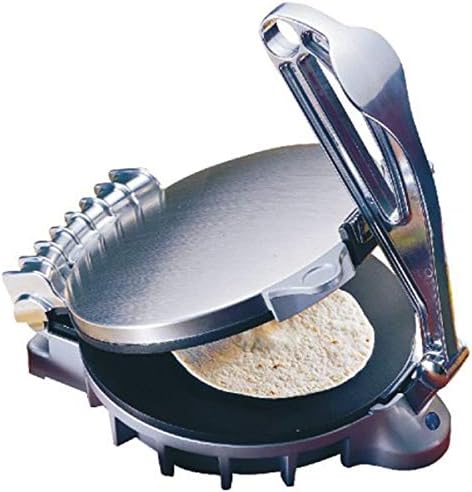
Figure 1: Geepas Chapati Maker GCM2028 with a chapati being pressed.
4. Setup
- Unpacking: Carefully remove the chapati maker from its packaging. Retain the packaging for storage or future transport.
- Initial Cleaning: Before first use, wipe the non-stick heating plates with a damp cloth or sponge. Dry thoroughly. Do not use abrasive cleaners or scourers.
- Placement: Place the appliance on a stable, heat-resistant, and dry surface, away from water sources. Ensure there is adequate ventilation around the unit.
- Power Connection: Plug the power cord into a suitable electrical outlet. The Power Indicator Light will illuminate.
- Initial Heating (Burn-off): For the first use, it is recommended to heat the appliance without any food for about 5-10 minutes to burn off any manufacturing residues. A slight odor or smoke may be present; this is normal. Ensure the area is well-ventilated. Unplug and allow to cool completely before proceeding.
5. Operating Instructions
Follow these steps to make chapatis using your Geepas Chapati Maker:
- Prepare Dough: Prepare your chapati dough according to your preferred recipe. Form small, uniform balls of dough, approximately 1.5 to 2 inches in diameter.
- Preheat: Close the chapati maker and plug it into the power outlet. The Power Indicator Light will turn on. Wait for the Ready Indicator Light to illuminate, indicating that the plates have reached the optimal cooking temperature. This usually takes 5-7 minutes.
- Place Dough: Open the chapati maker using the handle. Place one dough ball slightly off-center towards the back of the lower heating plate.
- Press: Gently close the upper heating plate. Press down firmly on the handle for 1-2 seconds to flatten the dough into a round chapati. Do not press for too long, as this can make the chapati hard.
- Cook: Release the handle. Allow the chapati to cook for approximately 30-45 seconds on one side. The chapati will start to puff slightly.
- Flip: Open the chapati maker and carefully flip the chapati using a wooden or plastic spatula. Close the lid and cook for another 30-45 seconds.
- Final Puffing: For a fully puffed chapati, you may need to press the top plate down lightly again for a few seconds during the second cooking phase.
- Remove: Once cooked to your preference, open the chapati maker and carefully remove the chapati using a spatula.
- Repeat: Close the lid to maintain heat and repeat the process for the remaining dough balls.

Figure 2: Detail of the handle and hinge for pressing the chapati.
6. Cleaning and Maintenance
Proper cleaning and maintenance will extend the life of your chapati maker.
- Always Unplug: Before cleaning, always unplug the appliance from the power outlet and allow it to cool completely.
- Clean Heating Plates: Wipe the non-stick heating plates with a damp cloth or sponge. For stubborn residue, use a small amount of cooking oil to soften it, then wipe clean. Do not use metal scouring pads or abrasive cleaners, as these can damage the non-stick coating.
- Clean Exterior: Wipe the exterior of the appliance with a soft, damp cloth. Do not use harsh chemicals or abrasive materials.
- Do Not Immerse: Never immerse the chapati maker, its cord, or plug in water or any other liquid.
- Storage: Once clean and dry, store the chapati maker in a cool, dry place. You can wrap the cord around the base for tidy storage.
7. Troubleshooting
| Problem | Possible Cause | Solution |
|---|---|---|
| Appliance does not turn on. | Not plugged in; power outage; faulty outlet. | Ensure the power cord is securely plugged into a working outlet. Check your home's circuit breaker. |
| Chapati not cooking evenly. | Uneven dough thickness; insufficient preheating; dough placed incorrectly. | Ensure dough balls are uniform. Allow the appliance to fully preheat until the Ready light illuminates. Place dough ball centrally. |
| Chapati sticking to plates. | Plates not clean; non-stick coating damaged; dough too wet. | Clean plates thoroughly before use. Ensure dough consistency is correct. Avoid using metal utensils. |
| Chapati not puffing. | Dough too thick/thin; insufficient heat; not pressed correctly; dough recipe issue. | Adjust dough consistency and thickness. Ensure full preheating. Press firmly for 1-2 seconds. Experiment with dough recipes. |
8. Specifications
- Model: GCM2028
- Brand: Geepas
- Color: Black
- Material: Stainless Steel, Aluminum
- Item Weight: Approximately 4.22 kg (9.3 lbs)
- Style: Modern
- Part Number: 2724299534258
- ASIN: B07NDZ5HPP
9. Warranty and Support
This Geepas appliance comes with a standard manufacturer's warranty. Please refer to the warranty card included in your product packaging for specific terms and conditions, including the warranty period and coverage details. For technical support, service, or warranty claims, please contact Geepas customer service through their official website or the contact information provided in your product documentation.
Please have your model number (GCM2028) and proof of purchase ready when contacting customer support.