
SUPER GENERAL SGSI127-i3
Super General 1 Ton 3 Star Inverter Split AC User Manual
Model: SGSI127-i3
1. Introduction
This user manual provides detailed instructions for the safe and efficient operation, installation, and maintenance of your Super General 1 Ton 3 Star Inverter Split Air Conditioner, model SGSI127-i3. Please read this manual thoroughly before using the appliance and retain it for future reference.
2. Safety Information
Always follow basic safety precautions when using electrical appliances to reduce the risk of fire, electric shock, and injury to persons.
- Ensure the power supply matches the voltage specified on the unit's rating label.
- Do not operate the AC with wet hands or when standing on a wet surface.
- Do not insert fingers or objects into the air inlet/outlet.
- Keep the unit away from flammable gases or combustible materials.
- Disconnect power before cleaning or performing any maintenance.
- Installation and repairs should only be performed by qualified service personnel.
3. Product Overview
The Super General SGSI127-i3 is a 1 Ton, 3 Star Inverter Split AC designed for efficient cooling in small-sized rooms (less than 120 sq ft). It features a copper condenser for better heat transfer and durability.
3.1 Main Components
- Indoor Unit: Mounted inside the room, responsible for air circulation and cooling.
- Outdoor Unit: Mounted outside, contains the compressor and condenser.
- Remote Control: For convenient operation of the AC.
- Copper Piping: Connects indoor and outdoor units.
3.2 Key Features
- Inverter Technology: Provides energy-efficient cooling by adjusting compressor speed.
- 3 Star Energy Rating: Indicates good energy efficiency.
- 1 Ton Capacity: Ideal for rooms up to 120 sq ft.
- Copper Condenser: Enhances cooling performance and product longevity.
- Auto Restart Function: Automatically resumes operation with previous settings after a power outage.
- Adjustable Speed Settings: Allows control over fan speed.
- Sleep Mode: Optimizes temperature for comfortable sleep and energy saving.
- Turbo Mode: Provides rapid cooling when needed.

Figure 3.2.1: Front view of the Super General Inverter Split AC indoor unit.

Figure 3.2.2: Top view of the Super General Inverter Split AC indoor unit.

Figure 3.2.3: Side view of the Super General Inverter Split AC indoor unit.

Figure 3.2.4: Internal view of the Super General Inverter Split AC indoor unit, showing mounting brackets and piping.
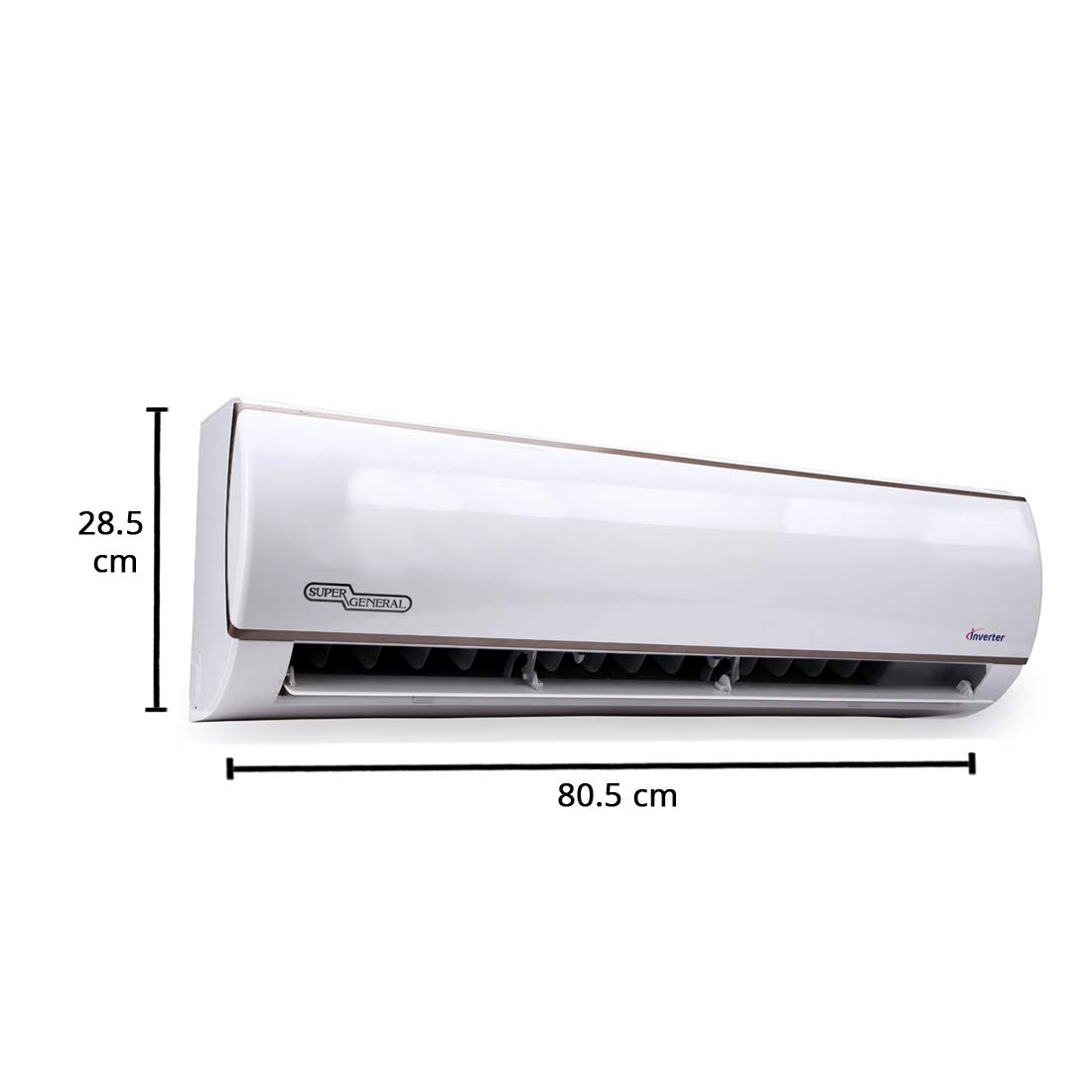
Figure 3.2.5: Dimensions of the Super General Inverter Split AC indoor unit (approx. 80.5 cm width, 28.5 cm height).
4. Setup and Installation
Installation of a split air conditioner requires specialized tools and knowledge. It is strongly recommended that installation be performed by a certified and experienced technician to ensure proper functioning and safety.
4.1 Pre-Installation Checklist
- Verify the room size is suitable for a 1-ton AC (typically <120 sq ft).
- Ensure a stable and level mounting surface for both indoor and outdoor units.
- Confirm availability of a dedicated power outlet with appropriate voltage and earthing.
- Plan for proper drainage of condensate water from the indoor unit.
4.2 Installation Steps (Overview for Technician)
- Mount the indoor unit securely on the wall, ensuring it is level.
- Drill a hole for refrigerant piping and drain hose to the outside.
- Install the outdoor unit on a stable base, ensuring adequate ventilation.
- Connect the refrigerant pipes and electrical wiring between indoor and outdoor units.
- Perform vacuuming of the refrigerant lines to remove air and moisture.
- Check for leaks and charge with refrigerant if necessary.
- Connect the power supply and test the unit's operation.
5. Operating Instructions
Your Super General AC is operated primarily using the wireless remote control. Familiarize yourself with the remote's functions for optimal use.

Figure 5.1: Super General AC Remote Control layout.
5.1 Remote Control Functions
- OFF/ON Button: Powers the unit on or off.
- MODE Button: Cycles through operating modes (Cool, Fan, Dry, Auto).
- TEMP ▲/▼ Buttons: Adjusts the desired temperature.
- FAN SPEED Button: Changes fan speed (Low, Medium, High, Auto).
- SWING (Horizontal) Button: Controls horizontal louver movement.
- SWING (Vertical) Button: Controls vertical louver movement.
- TURBO Button: Activates rapid cooling/heating.
- SLEEP Button: Engages sleep mode for quiet and energy-efficient operation.
- TIMER ON/OFF Buttons: Sets a timer for the unit to turn on or off automatically.
- SENSE ME Button: (If applicable) Activates a sensor in the remote to measure ambient temperature.
- ECO Button: (If applicable) Activates energy-saving mode.
- IONIZER Button: (If applicable) Activates air ionizer function.
- LED DISPLAY Button: Turns the indoor unit's display on or off.
- CLOCK Button: Sets the current time on the remote.
- SET Button: Confirms settings.
- LOCK Button: Locks the remote control buttons.
- RESET Button: Resets remote settings.
5.2 Operating Modes
- Cool Mode: Provides cooling. Set desired temperature and fan speed.
- Fan Mode: Circulates air without cooling. Fan speed can be adjusted.
- Dry Mode: Reduces humidity in the room.
- Auto Mode: The unit automatically selects the appropriate mode (Cool, Fan, Dry) based on the room temperature.
6. Maintenance
Regular maintenance ensures optimal performance and extends the lifespan of your air conditioner. Always disconnect power before cleaning.
6.1 Air Filter Cleaning
Clean the air filters every two weeks or more frequently if the AC is used heavily or in dusty environments.
- Open the front panel of the indoor unit.
- Remove the air filters.
- Wash the filters with lukewarm water and a mild detergent.
- Rinse thoroughly and allow them to dry completely in a shaded area before re-installing.
6.2 Outdoor Unit Cleaning
Periodically clean the outdoor unit's coils and fins to remove dust and debris. This should ideally be done by a professional technician.
6.3 Professional Servicing
It is recommended to have your AC serviced by a qualified technician at least once a year to check refrigerant levels, clean coils, and ensure all components are functioning correctly.
7. Troubleshooting
Before contacting service, refer to the following common issues and their solutions.
| Problem | Possible Cause | Solution |
|---|---|---|
| AC does not turn on. | No power supply; Remote control batteries dead; Circuit breaker tripped. | Check power connection; Replace remote batteries; Reset circuit breaker. |
| Insufficient cooling. | Dirty air filters; Blocked outdoor unit; Low refrigerant; Room too large. | Clean air filters; Clear obstructions from outdoor unit; Contact technician for refrigerant check; Ensure room size is appropriate. |
| Water leakage from indoor unit. | Blocked drain hose; Improper installation. | Clear drain hose; Contact technician for re-installation check. |
| Unusual noise. | Loose parts; Fan obstruction; Compressor issue. | Check for loose parts; Remove obstructions; Contact technician. |
If the problem persists after attempting these solutions, please contact authorized service personnel.
8. Specifications
| Feature | Detail |
|---|---|
| Brand | SUPER GENERAL |
| Model Number | SGSI127-i3 |
| Type | Inverter Split AC |
| Capacity | 1 Ton |
| Energy Rating | 3 Star |
| Condenser Material | Copper |
| Special Features | Auto Restart, Sleep Mode, Turbo Mode, Adjustable Speed Settings |
| Control Console | Remote Control |
| Item Weight | 32 kg |
| Date First Available | 29 January 2019 |
9. Warranty and Support
Your Super General 1 Ton 3 Star Inverter Split AC comes with the following warranty:
- Product Warranty: 1 year on the complete product.
- Compressor Warranty: 5 years on the compressor.
For warranty claims, technical support, or service requests, please contact Super General customer service. Keep your purchase invoice and warranty card handy.
Manufacturer: manufacturer (as per product data)
For further assistance, please refer to the official Super General website or contact their authorized service centers.
Related documentsSGSI127-i3

Ask a question about this manual
Ask about setup, troubleshooting, compatibility, parts, safety, or missing instructions. Manuals+ will review the question and use this page’s manual context to help answer it.