
1. Introduction
Thank you for purchasing the Walker Edison W48FPSMDRO Fireplace TV Stand. This product is designed to provide a stylish and functional entertainment solution with the added ambiance and warmth of an electric fireplace. This manual contains important information regarding the safe assembly, operation, and maintenance of your TV stand. Please read it thoroughly before beginning assembly or use, and retain it for future reference.
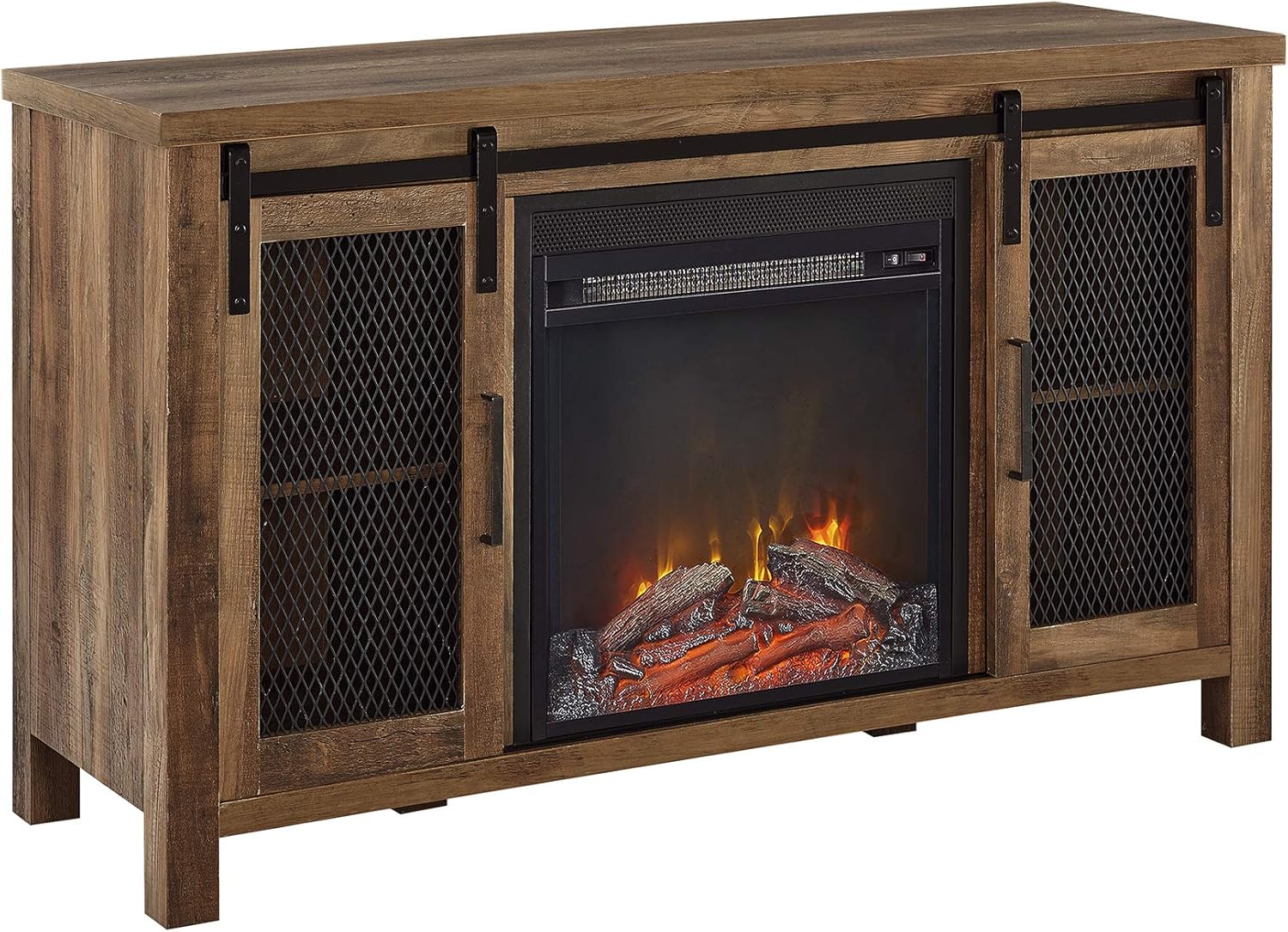
Image 1.1: Front view of the assembled Walker Edison W48FPSMDRO Fireplace TV Stand in Rustic Oak finish, featuring a central electric fireplace and two side cabinets with mesh sliding doors.
2. Safety Information
WARNING: Failure to follow these safety instructions could result in fire, electric shock, or personal injury.
- Always place the TV stand on a flat, level, and stable surface.
- Do not overload the TV stand. Refer to the specifications for weight limits.
- Keep children and pets away from the fireplace unit, especially when it is operating.
- Ensure the power cord is not pinched or routed under the unit or any heavy objects.
- Do not operate the fireplace if the cord is damaged or if the unit malfunctions. Contact customer support.
- Do not insert foreign objects into any ventilation or exhaust opening.
- Maintain a minimum clearance of 3 feet (0.9 meters) from combustible materials to the front of the fireplace.
- Unplug the fireplace from the power outlet before cleaning or performing any maintenance.
- This product is intended for indoor use only.
3. Package Contents
Before beginning assembly, ensure all parts are present and undamaged. If any parts are missing or damaged, do not proceed with assembly. Contact Walker Edison customer service for assistance.
- Furniture panels (top, bottom, sides, shelves, doors)
- Hardware pack (screws, dowels, cam locks, hinges, handles, sliding door tracks)
- Electric Fireplace Insert
- Instruction Manual
4. Assembly Instructions
Assembly typically requires two adults. Please follow the steps carefully. A Phillips head screwdriver and a hammer may be required (not included).
- Prepare the Area: Clear a spacious, clean, and level area for assembly. Lay out all components and hardware.
- Assemble the Base: Attach the side panels to the bottom panel using the provided hardware (e.g., cam locks and dowels). Ensure all connections are secure.
- Install Internal Shelves: Insert the fixed or adjustable shelves into the designated slots within the side compartments.
- Attach the Top Panel: Secure the top panel to the assembled frame.
- Install Sliding Door Tracks: Attach the upper and lower sliding door tracks to the TV stand as indicated in the detailed diagrams.
- Assemble and Install Doors: Attach handles to the sliding doors. Carefully insert the doors into the tracks.

Image 4.1: Detail of the sliding door mechanism, showing the metal track and mesh door panel.
- Insert Fireplace Unit: Carefully slide the electric fireplace insert into the central opening. Ensure it fits snugly and is properly aligned. Do not force the unit.
- Cable Management: Utilize any pre-drilled cable management holes to route power cords and media cables neatly.

Image 4.2: Rear view of the TV stand, illustrating the placement of the electric fireplace insert and openings for cable routing.
- Final Check: Verify that all screws are tightened, and the stand is stable.
5. Operating Instructions (Electric Fireplace)
The electric fireplace provides both visual flame effects and supplemental heat.
- Power Connection: Plug the fireplace power cord into a standard 120V AC grounded outlet.
- Power On/Off: Locate the main power switch on the fireplace unit (often on the front panel or side). Turn it to the "ON" position.
- Flame Effect: Press the "Flame" button to activate the flame effect. Some models may have adjustable flame brightness settings.
- Heat Function: Press the "Heater" or "Heat" button to turn on the heating element. The fireplace may have multiple heat settings (e.g., low/high) or a thermostat. Refer to the specific fireplace insert manual for detailed controls.
- Temperature Control: If equipped, use the temperature control buttons to set your desired room temperature.
- Timer Function: If available, use the timer button to set an automatic shut-off time for the heater.
- Shut Down: To turn off the heater, press the "Heater" button until it is off. To turn off the flame effect, press the "Flame" button. For complete power off, switch the main power switch to "OFF" and unplug the unit from the wall outlet.
6. Maintenance
- Cleaning the Furniture: Wipe surfaces with a soft, damp cloth. Avoid harsh chemicals or abrasive cleaners.
- Cleaning the Fireplace: Ensure the fireplace is unplugged and cool before cleaning. Use a soft, damp cloth to wipe the exterior. Do not spray water directly onto the unit.
- Dusting: Regularly dust the unit to prevent buildup, especially around the fireplace vents.
- Hardware Check: Periodically check all assembly hardware to ensure it remains tight. Retighten if necessary.
7. Troubleshooting
- Fireplace does not turn on:
- Check if the power cord is securely plugged into a grounded outlet.
- Ensure the main power switch on the fireplace unit is in the "ON" position.
- Verify that the wall outlet is functioning by plugging in another appliance.
- Check the circuit breaker in your home's electrical panel.
- No heat, but flame effect works:
- Ensure the "Heater" button has been pressed.
- Check if the thermostat setting (if applicable) is set higher than the current room temperature.
- The heater may have an overheat protection feature. Unplug the unit for 5-10 minutes, then plug it back in.
- Unstable or wobbly TV stand:
- Ensure the stand is on a level surface.
- Retighten all assembly hardware.
- Verify that all panels are correctly aligned and fully seated.
8. Specifications
| Model Number | W48FPSMDRO |
| Dimensions (L x W x H) | 121.92 cm x 40.64 cm x 71.12 cm (48 in x 16 in x 28 in) |
| Weight | 39.46 kg (87 lbs) |
| Material | High-Grade MDF, Durable Laminate, Metal |
| Color | Rustic Oak |
| Fireplace Power | 120V AC (Standard Household Outlet) |
| Maximum Top Weight Capacity | 75 lbs (approx. 34 kg) |
| Maximum Shelf Weight Capacity | 30 lbs (approx. 13.6 kg) |

Image 8.1: Dimensional drawing of the TV stand, indicating overall length, height, depth, and individual shelf dimensions, along with weight limits for the top surface and shelves.
9. Warranty and Support
Walker Edison products are designed for quality and durability. For specific warranty information, please refer to the documentation included with your purchase or visit the official Walker Edison website. If you encounter any issues or require assistance, please contact Walker Edison customer support.
Contact Information: Please refer to your purchase receipt or the manufacturer's website for the most current customer support contact details.


