
1. Introduction
Thank you for choosing the Yuwell YX303 Fingertip Pulse Oximeter. This device is designed for non-invasive spot-check measurement of functional oxygen saturation of arterial hemoglobin (SpO2) and pulse rate. It is suitable for use in hospitals, homecare, outdoor activities, and sports. Please read this manual carefully before use to ensure safe and effective operation.
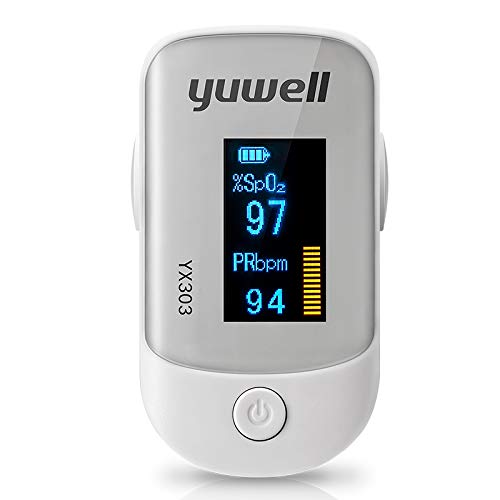
Image 1.1: The Yuwell YX303 Fingertip Pulse Oximeter. This image shows the compact device, typically with a display screen and a finger insertion area.
2. Safety Information
Important: This device is intended for non-medical use and is not a substitute for professional medical advice or diagnosis. Consult your physician for any medical concerns.
- Do not use the oximeter in an MRI or CT environment.
- Do not use the oximeter in situations requiring continuous monitoring.
- Keep the device away from children. Small parts may be a choking hazard.
- Do not use the oximeter on the same arm as a blood pressure cuff or arterial catheter.
- Avoid placing the oximeter on fingers with nail polish, artificial nails, or excessive dirt, as this may affect accuracy.
- Ensure the finger is clean and dry before use.
3. Product Overview
3.1. Key Features
- Low power consumption, simple to operate, light, and portable.
- Oxygen saturation (SpO2) and Pulse Rate (PR) display.
- Automatic power-off in 8 seconds when no finger is detected.
- Pulse strength indicator.
- Strong anti-interference capability.
3.2. Display Modes
The device features an OLED display. It shows:
- Oxygen Saturation (SpO2) percentage.
- Pulse Rate (BPM).
- Pulse bar graph.
4. Setup
4.1. Battery Installation
- Open the battery compartment cover on the back of the device.
- Insert two (2) AAA 1.5V alkaline batteries, ensuring correct polarity (+ and -).
- Close the battery compartment cover securely.
The device operates within a voltage range of 2.6V to 3.6V.
5. Operating Instructions
- Ensure the oximeter has batteries installed.
- Open the clamp of the oximeter.
- Insert one finger into the rubber opening of the oximeter, ensuring the finger is placed correctly and comfortably.
- Release the clamp. The oximeter will automatically turn on and begin measurement.
- Keep your hand still during the measurement. Movement can affect accuracy.
- Read the SpO2 and Pulse Rate values displayed on the OLED screen.
- After removing your finger, the device will automatically power off after approximately 8 seconds.
5.1. Measurement Accuracy Considerations
- Oxygen Saturation: Accuracy is ±2% for readings between 70% and 99%. For readings below 70%, accuracy is not defined.
- Pulse Rate: Accuracy is ±1% or ±1 BPM, whichever is greater.
- Weak Perfusion: The oximeter can accurately display oxygen saturation and pulse rate even with a pulse filling degree as low as 0.6%.
- Light Interference: Compared to measurements in a dark room, the deviation in oxygen saturation under natural light and illuminated conditions is less than ±1%.
6. Maintenance
6.1. Cleaning
- Clean the surface of the oximeter with a soft cloth dampened with medical alcohol (75% ethanol) or isopropyl alcohol.
- Do not immerse the device in water or any cleaning solution.
- Ensure the device is completely dry before reuse.
6.2. Storage
- Store the oximeter in a cool, dry place, away from direct sunlight and extreme temperatures.
- Remove batteries if the device will not be used for an extended period to prevent battery leakage.
7. Troubleshooting
| Problem | Possible Cause | Solution |
|---|---|---|
| No display after power on | Batteries are dead or incorrectly installed. | Replace batteries or re-install them with correct polarity. |
| Inaccurate readings | Finger not inserted properly; excessive movement; nail polish; cold finger. | Re-insert finger correctly; remain still; remove nail polish; warm finger. |
| "Finger Out" or similar error message | Finger not detected or improperly placed. | Ensure finger is fully inserted into the sensor. |
8. Specifications
| Parameter | Value |
|---|---|
| Display Mode | OLED Display |
| SpO2 Measurement Range | 70% ~ 100% |
| SpO2 Accuracy | ±2% (70%~99%), undefined (<70%) |
| Pulse Rate Measurement Range | 25 ~ 250 BPM |
| Pulse Rate Accuracy | ±1% or ±1 BPM (whichever is greater) |
| Power Supply | 2 x AAA 1.5V Alkaline Batteries |
| Voltage Range | 2.6V ~ 3.6V |
| Power Consumption | Less than 30 mA |
| Weak Perfusion Measurement | SpO2 and PR can be displayed when pulse filling degree is 0.6% |
| Automatic Shut-off | After 8 seconds of no finger use |
| Manufacturer | YUWELL |
| Model Number | YX303 (Internal Item No: 31681163949) |
| Package Dimensions | 11.52 x 7.21 x 3.8 cm |
| Weight | 300 g (including packaging) |
9. Warranty and Support
For warranty information and customer support, please refer to the documentation provided with your purchase or contact your retailer. Keep your purchase receipt as proof of purchase.

