
1. Introduction
The Festnight RICHMETERS RM409B is a handheld digital multimeter designed for high reliability and portability. This instrument is suitable for various applications in laboratories, factories, and homes. It features 9999 counts with True-RMS measurement and auto-ranging capabilities, allowing for precise measurements of AC/DC voltage, AC/DC current, resistance, capacitance, frequency, and temperature.
Key features include a large LCD backlight display for clear readings in various lighting conditions, a data hold function, and automatic power-off to conserve battery life. The device also incorporates a Non-Contact Voltage (NCV) detection function for enhanced safety.
2. Safety Information
To ensure safe operation and prevent damage to the multimeter, please observe the following safety precautions:
- Measurements must be performed using the correct input terminals and functions, and within the allowable measuring range for the selected function.
- Do not use the product in environments containing explosive gas, vapor, or in damp or wet conditions.
- A low battery level can lead to incorrect readings. Replace the batteries promptly when the low battery indicator appears.
- Do not attempt to make measurements if the battery compartment door is not properly closed and secured.
- Always disconnect the test leads from the circuit before changing functions or ranges.
- Exercise extreme caution when working with voltages above 36V DC or 25V AC RMS, as these can pose a shock hazard.
3. Product Overview
The Festnight RICHMETERS RM409B Digital Multimeter consists of the main unit, test leads, and a temperature test cable. Familiarize yourself with the components and controls before operation.

Figure 3.1: Front panel of the RM409B Multimeter with key components labeled.
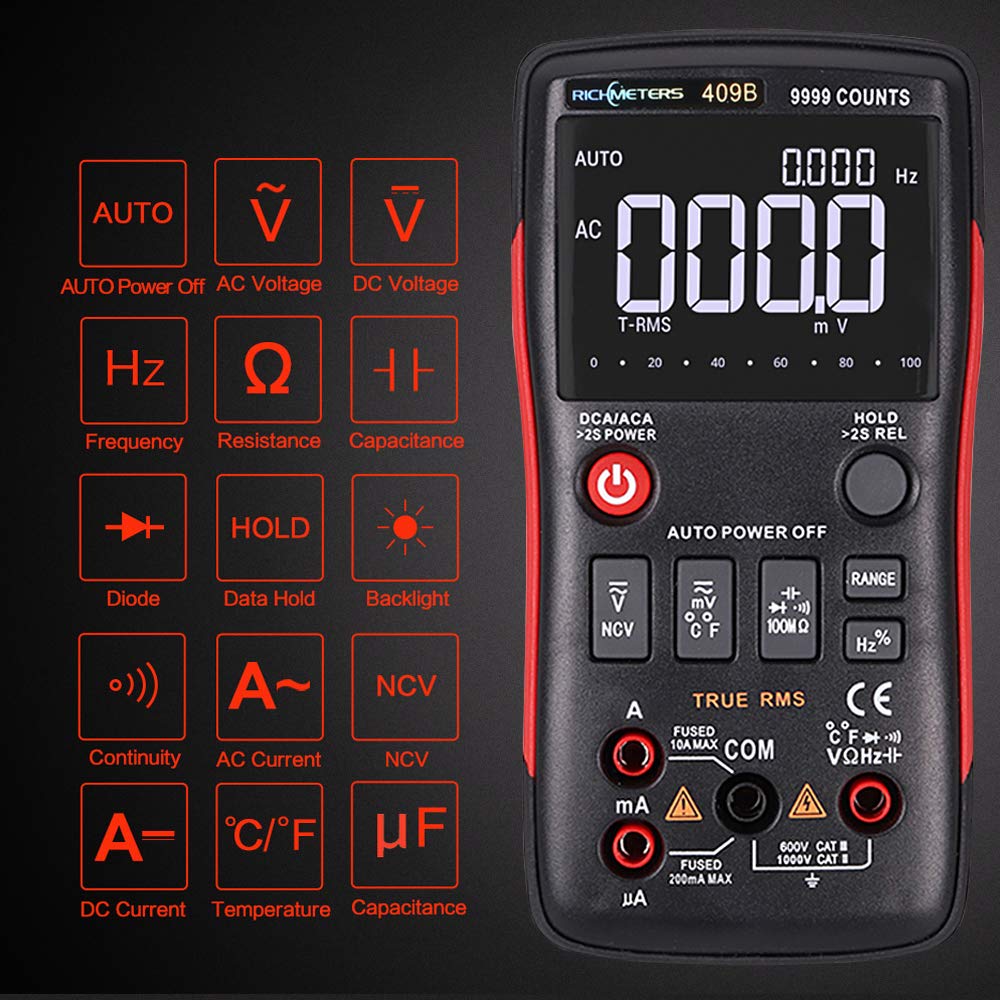
Figure 3.2: Overview of symbols and functions available on the RM409B Multimeter.
3.1. Controls and Terminals
- LCD Display: Shows measurement readings, units, and function indicators.
- Power Button: Turns the multimeter ON/OFF. Press and hold for 2 seconds to activate/deactivate.
- Function Buttons: Selects specific measurement modes (e.g., NCV, Temperature, Range, Frequency/Duty Cycle).
- HOLD Button: Freezes the current display reading. Press and hold for 2 seconds for REL (Relative Measurement) function.
- Input Terminals:
- COM: Common terminal for all measurements (black test lead).
- VΩHz: Input for voltage, resistance, frequency, capacitance, diode, and continuity measurements (red test lead).
- mA/µA: Input for milliampere and microampere current measurements (red test lead). Fused 200mA MAX.
- 10A MAX: Input for high current measurements up to 10A (red test lead). Fused 10A MAX.
4. Setup
4.1. Battery Installation
The RM409B multimeter requires two 1.5V AA batteries (not included). To install or replace batteries:
- Ensure the multimeter is turned OFF and all test leads are disconnected.
- Locate the battery compartment cover on the back of the unit.
- Use a screwdriver to loosen the screw(s) securing the cover.
- Remove the cover and insert two 1.5V AA batteries, observing the correct polarity (+/-) as indicated inside the compartment.
- Replace the battery compartment cover and tighten the screw(s) securely.
4.2. Connecting Test Leads
Always connect the black test lead to the COM terminal. Connect the red test lead to the appropriate input terminal based on the desired measurement:
- For Voltage, Resistance, Capacitance, Frequency, Diode, and Continuity measurements, connect the red test lead to the VΩHz terminal.
- For milliampere (mA) or microampere (µA) current measurements, connect the red test lead to the mA/µA terminal.
- For high current (up to 10A) measurements, connect the red test lead to the 10A MAX terminal.
4.3. Connecting Temperature Probe
To measure temperature, connect the temperature test cable to the VΩHz and COM terminals, ensuring correct polarity.

Figure 4.1: Included accessories with the RM409B Multimeter.
5. Operating Instructions
5.1. Power On/Off
Press and hold the Power button for approximately 2 seconds to turn the multimeter ON or OFF. The device will automatically power off after 5 minutes of inactivity to save battery life.
5.2. Auto/Manual Ranging
The RM409B operates in auto-ranging mode by default. To switch to manual ranging, press the RANGE button. Each subsequent press will cycle through available ranges. To return to auto-ranging, press and hold the RANGE button.
5.3. Voltage Measurement (AC/DC)
- Connect the black test lead to COM and the red test lead to VΩHz.
- Select the voltage measurement function (AC or DC) using the appropriate button or rotary switch.
- Connect the test leads in parallel to the circuit or component under test.
- Read the voltage value on the LCD display.
5.4. Current Measurement (AC/DC)
Caution: Always connect the multimeter in series with the circuit when measuring current. Never connect it in parallel across a voltage source.
- Connect the black test lead to COM.
- For currents up to 200mA, connect the red test lead to mA/µA. For currents up to 10A, connect the red test lead to 10A MAX.
- Select the current measurement function (AC or DC).
- Open the circuit where current is to be measured and connect the multimeter in series.
- Read the current value on the LCD display.
5.5. Resistance Measurement
- Connect the black test lead to COM and the red test lead to VΩHz.
- Select the resistance (Ω) measurement function.
- Ensure the circuit is de-energized before measuring resistance. Connect the test leads across the component.
- Read the resistance value on the LCD display.
5.6. Capacitance Measurement
- Connect the black test lead to COM and the red test lead to VΩHz.
- Select the capacitance (F) measurement function.
- Ensure the capacitor is fully discharged before connecting the test leads.
- Connect the test leads across the capacitor.
- Read the capacitance value on the LCD display.
5.7. Frequency Measurement
- Connect the black test lead to COM and the red test lead to VΩHz.
- Select the frequency (Hz) measurement function.
- Connect the test leads to the signal source.
- Read the frequency value on the LCD display.
5.8. Temperature Measurement
- Connect the temperature test cable to the VΩHz and COM terminals, observing polarity.
- Select the temperature (°C/°F) measurement function.
- Place the temperature probe in contact with the object or environment to be measured.
- Read the temperature value on the LCD display. The unit can be switched between Celsius and Fahrenheit.
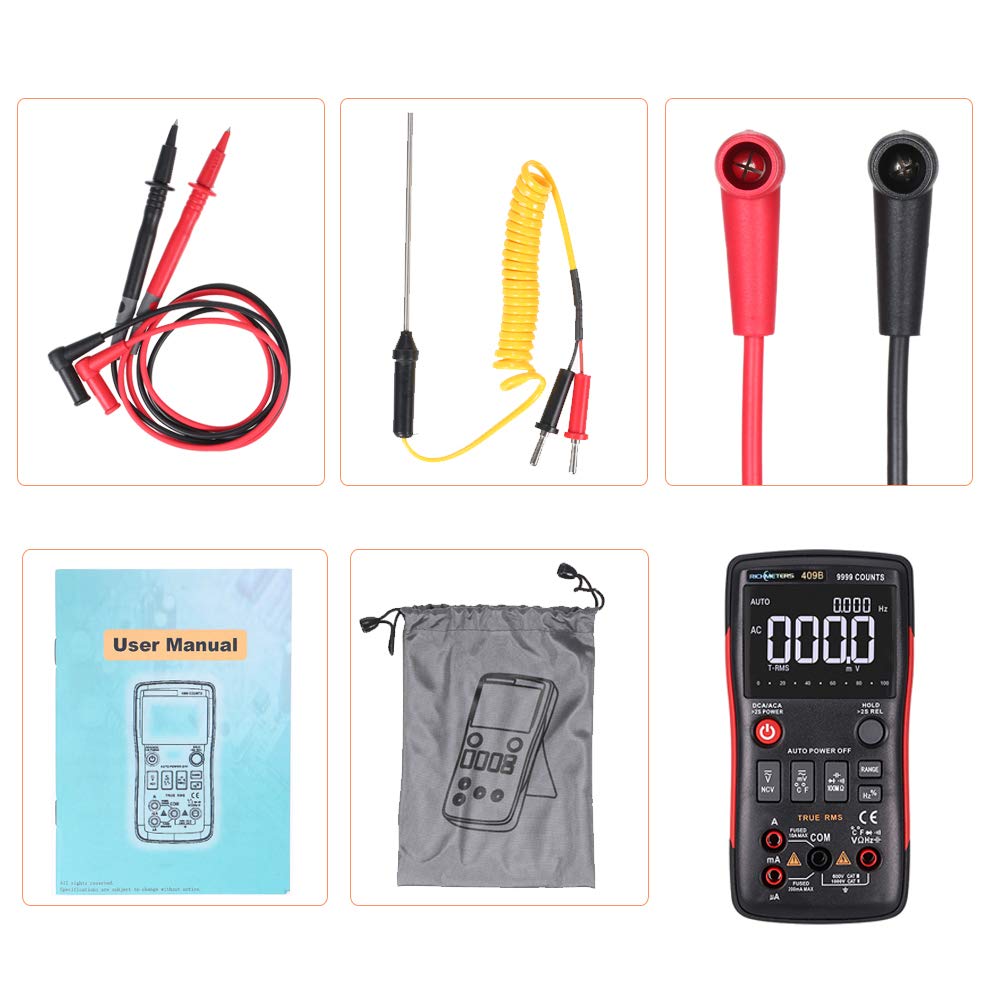
Figure 5.1: Temperature measurement function in use.
5.9. Diode Test
- Connect the black test lead to COM and the red test lead to VΩHz.
- Select the diode test function.
- Connect the red test lead to the anode and the black test lead to the cathode of the diode.
- Read the forward voltage drop on the display. Reverse the leads to check for open circuit.
5.10. Continuity Test
- Connect the black test lead to COM and the red test lead to VΩHz.
- Select the continuity test function.
- Connect the test leads across the circuit or component.
- If continuity exists (resistance below a certain threshold), the buzzer will sound.
5.11. Non-Contact Voltage (NCV) Detection
The NCV function allows for detection of AC voltage without direct contact with conductors, enhancing safety.
- Press the NCV button to activate the function.
- Move the top part of the multimeter close to the conductor or outlet.
- The display will show segments and an audible beep will indicate the presence of AC voltage. The number of segments and frequency of beeps increase with stronger voltage.

Figure 5.2: NCV (Non-Contact Voltage) detection in use.
5.12. Data Hold
Press the HOLD button to freeze the current reading on the display. Press it again to release the hold function.
6. Maintenance
6.1. Battery Replacement
When the low battery indicator appears on the display, replace the two 1.5V AA batteries as described in Section 4.1. Ensure the multimeter is off and leads are disconnected before opening the battery compartment.
6.2. Cleaning
Clean the multimeter casing with a soft, dry cloth. Do not use abrasive cleaners, solvents, or chemicals, as these may damage the casing or internal components.
6.3. Storage
When not in use for extended periods, remove the batteries to prevent leakage. Store the multimeter in a dry, cool environment, away from direct sunlight and extreme temperatures.
7. Troubleshooting
If you encounter issues with your RM409B multimeter, refer to the following common troubleshooting steps:
- No Display / Device Does Not Turn On: Check if the batteries are correctly installed and have sufficient charge. Replace batteries if necessary.
- Incorrect Readings: Ensure the correct function and measurement range are selected. Verify that the test leads are properly connected to the correct input terminals and are making good contact with the circuit. Check battery level.
- No Continuity Beep: Confirm the continuity function is selected. Ensure the circuit is de-energized.
- Fuse Blown (for current measurements): If the multimeter does not measure current, the internal fuse for the current input may be blown. This requires professional service for replacement.
8. Specifications
| Parameter | Specification |
|---|---|
| Model Number | RM409B |
| Operating Temperature | 0 - 40 ℃ |
| Operating Humidity | ≤75%RH |
| Storage Condition | -20~60℃ |
| Storage Humidity | ≤80%RH |
| Measuring Capacitance Range | 9.99nF / 99.99nF / 999.9nF / 9.99uF / 99.99uF / 999.9uF / 9.999MF |
| Measuring Voltage Range | 999.9mV / 9.999V / 99.99V / 999.9V |
| Measuring Current Range | 999.9uA / 99.99uA / 999.9mA / 10A |
| Measuring Resistance Range | 99.99Ω / 999.9Ω / 9.999kΩ / 99.99kΩ / 999.9KΩ / 9.999MΩ / 99.99MΩ |
| Frequency Range | 99.99Hz / 999.9Hz / 9.999KHz / 99.99KHz / 999.9KHz / 5MHz |
| Duty Cycle | 1% - 99% |
| Sample Rate | 3 times per second |
| Power | 2 * 1.5V AA batteries |
| Item Size | 145 * 74 * 35mm (5.71 * 2.91 * 1.38in) |
| Item Weight | 168g (5.93 ounces) |
| Brand | Festnight |
| GTIN / UPC | 793169099571 |

Figure 8.1: Dimensions of the RM409B Multimeter.
9. Warranty and Support
For information regarding warranty coverage, technical support, or service, please refer to the manufacturer's official website or contact your retailer directly. Keep your purchase receipt as proof of purchase.