
1. Important Safety Information
Please read all safety instructions carefully before assembly and use. Failure to follow these instructions may result in injury or damage to the product.
- Attention: Assemble and use the product following the provided instructions.
- Do not exceed the maximum allowed weight of 70 kg (154 lbs).
- Do not use the product if it is damaged or unstable.
- Avoid using the product for prolonged periods in a fixed position to prevent back problems.
2. Package Contents
Before beginning assembly, ensure all components are present and undamaged. Refer to the packing list for a complete overview of parts.

Image: Overview of the electric height adjustable desk frame components, including legs, crossbar, motor, and control panel.
The package includes the electric desk frame, control panel, power adapter, and all necessary assembly tools.
3. Setup and Assembly
Assembly is required for this product. For optimal safety and ease, it is recommended that 2 people perform the assembly.
3.1 Tools Required
- Screwdriver (recommended)
- All necessary assembly tools are included in the package.
3.2 Assembly Steps
- Unpack Components: Carefully remove all parts from the packaging and lay them out on a clean, flat surface.
- Attach Feet to Legs: Secure the base feet to the bottom of each leg using the provided screws.
- Connect Crossbar: Attach the adjustable crossbar between the two legs. Ensure the motor and control panel cables are routed correctly.
- Install Control Panel: Mount the control panel to the desired location on the desk frame, typically on the front edge of the desktop (desktop not included).
- Connect Power: Connect the power adapter to the desk frame's motor unit and then to a power outlet.
- Attach Desktop: Secure your chosen desktop to the frame using appropriate screws (desktop not included).
- Leveling: Adjust the leveling feet at the bottom of the desk legs to ensure stability on uneven surfaces.

Image: The desk frame assembled with the control panel and power cables visible, illustrating the electrical connections.
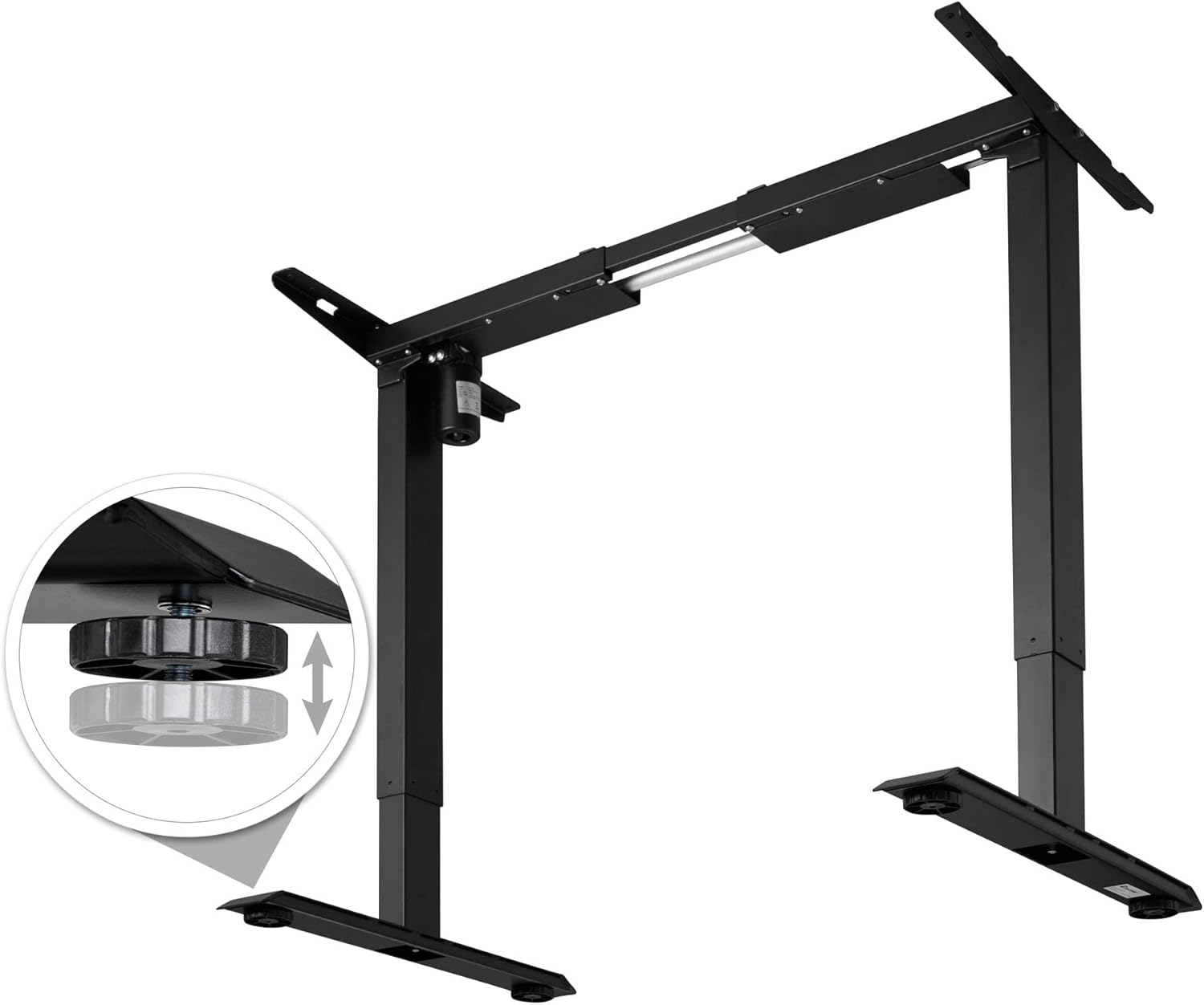
Image: The desk frame showing the power adapter and control panel connected, ready for operation.

Image: A close-up view of the adjustable leveling feet, demonstrating how to stabilize the desk on uneven floors.
4. Operating Instructions
The TecTake 800665 desk frame features electric height adjustment, memory functions, and an alarm to promote ergonomic working habits.
4.1 Control Panel Overview

Image: Detailed view of the control panel, showing the digital height display, up/down arrows, and memory preset buttons (1, 2, 3, M, A).
- Up/Down Arrows (▲ / ▼): Press and hold to adjust the desk height manually.
- Digital Display: Shows the current height of the desk in centimeters.
- Memory Buttons (1, 2, 3): Store and recall preferred height settings.
- "M" Button: Used to save a height setting to a memory button.
- "A" Button (Alarm): Activates or deactivates the sit/stand reminder alarm.
4.2 Adjusting Height
Press and hold the up (▲) or down (▼) arrow button to move the desk to your desired height. Release the button to stop movement.
The desk can be adjusted between a minimum height of 71 cm and a maximum height of 121 cm.
4.3 Setting Memory Presets
- Adjust the desk to your desired height using the up/down arrows.
- Press the "M" button. The display will show "S-".
- Within 3 seconds, press one of the memory buttons (1, 2, or 3). The display will show "S-1", "S-2", or "S-3" to confirm the setting is saved.
4.4 Using Memory Presets
Simply press the desired memory button (1, 2, or 3) to automatically move the desk to the saved height.
4.5 Setting the Alarm
The alarm function reminds you to change your working position. Consult the full manual for detailed alarm setting instructions, as specific steps are not provided here.
5. Maintenance
Proper maintenance ensures the longevity and optimal performance of your desk frame.
- Cleaning: Clean the desk frame with a damp cloth. Avoid abrasive cleaners or solvents.
- Inspection: Regularly check all screws and connections to ensure they are tight. Retighten if necessary.
- Weight Limit: Do not exceed the maximum recommended weight of 70 kg (154 lbs) to prevent damage to the motor and frame.
6. Troubleshooting
If you encounter any issues with your TecTake 800665 desk frame, refer to the following common troubleshooting steps:
- Desk Not Moving:
- Check if the power cable is securely plugged into both the desk frame and the wall outlet.
- Ensure the control panel cable is properly connected to the motor unit.
- If the desk has been used continuously for an extended period, the motor might have overheated. Allow it to cool down for 18 minutes (as indicated on some motor units) before attempting to operate it again.
- Uneven Movement:
- Check that the desk is not overloaded beyond its 70 kg weight capacity.
- Verify that all assembly screws are tightened evenly.
- Ensure the floor surface is level, or adjust the leveling feet accordingly.
- Error Codes on Display:
- If an error code appears, try unplugging the desk from the power outlet for 10-15 seconds, then plug it back in. This can often reset the system.
- If the issue persists, contact customer support.
7. Specifications
| Feature | Detail |
|---|---|
| Brand | tectake |
| Model Number | 402999 |
| Desk Design | Standing Desk Frame |
| Color | Black |
| Base Material | Alloy Steel |
| Top Material Type | Alloy Steel (for frame, desktop not included) |
| Special Feature | Height Adjustable, Memory Function, Alarm |
| Minimum Height | 71 Centimeters |
| Maximum Height | 121 Centimeters |
| Item Dimensions (L x W x H) | 129 x 65 x 121 Centimeters (Max. H) |
| Item Weight | 21 Kilograms |
| Recommended Maximum Weight Capacity | 70 Kilograms |
| Lift Mechanism | Electric |
| Assembly Required | Yes |
| Recommended Persons for Assembly | 2 |
| Included Assembly Tools | Yes |
| Care Instructions | Clean with a damp cloth. |

Image: Technical drawing illustrating the dimensions of the desk frame, including width (85-129 cm), depth (65 cm), and height (71-121 cm).
8. Warranty and Support
For warranty information or technical support, please contact TecTake customer service. Keep your purchase receipt and model number (402999) handy for faster service.
You can typically find contact information on the manufacturer's official website or through your point of purchase.

