
1. Overview
The Motorola Moto G7 is an unlocked smartphone designed for use on major US carrier networks. It features a 6.2-inch Full HD+ Max Vision display, a 12MP dual camera system, and runs on Android 9.0. This device is equipped with a Qualcomm Snapdragon 632 processor, 4GB RAM, and 64GB internal storage, expandable up to 512GB via Micro SD.
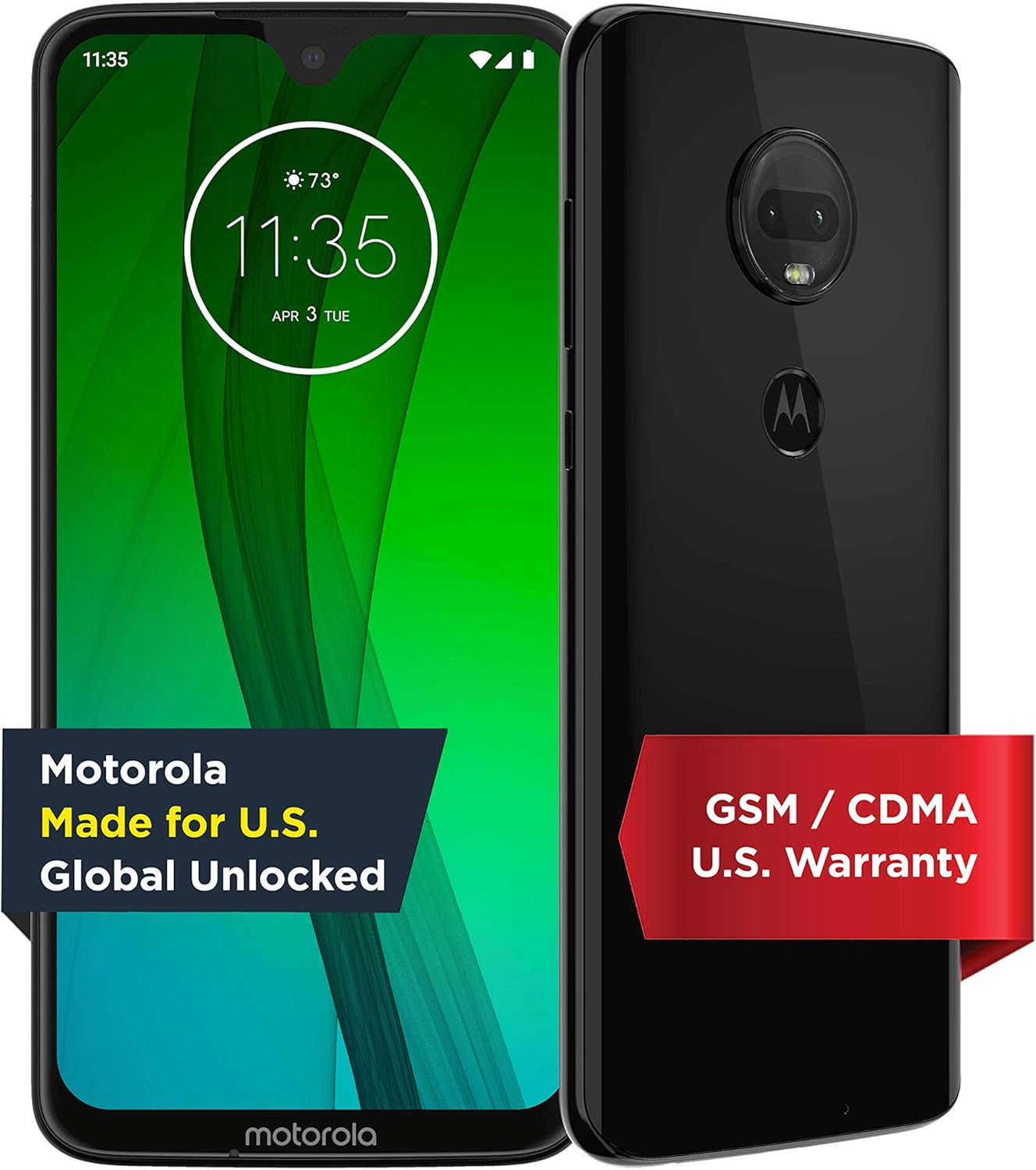
Figure 1.1: Front and back view of the Motorola Moto G7 smartphone.
2. Getting Started
2.1 Unboxing the Device
Upon opening the package, you will find the Motorola Moto G7 smartphone, a Motorola TurboPower charger brick, a USB-C cable, and a SIM ejector tool along with documentation.
Video 2.1: An unboxing demonstration of the Motorola Moto G7, showing the contents of the retail package including the device, charger, cable, and SIM tool.
2.2 Inserting the SIM Card
- Locate the SIM tray on the top edge of the phone.
- Insert the SIM ejector tool into the small hole on the SIM tray to open it.
- Place your nano-SIM card(s) and/or Micro SD card into the tray with the gold contacts facing down.
- Carefully push the tray back into the phone until it clicks into place.

Figure 2.2: Top edge of the Moto G7, illustrating the location of the SIM tray.
2.3 Initial Power On and Setup
- Press and hold the Power button on the right side of the device until the Motorola logo appears.
- Follow the on-screen prompts to select your language, connect to Wi-Fi, and set up your Google account.
- You can choose to restore data from a previous device or set up as new.

Figure 2.3: The initial setup screen of the Moto G7, prompting for language selection.
2.4 Charging the Device
Connect the USB-C cable to the charging port at the bottom of the phone and the other end to the TurboPower adapter. Plug the adapter into a power outlet. The device supports 18W TurboPower for fast charging.

Figure 2.4: Bottom edge of the Moto G7, highlighting the USB-C charging port and 3.5mm audio jack.
3. Device Layout
The Motorola Moto G7 features a sleek design with strategically placed components for ease of use.
- Front: 6.2-inch Full HD+ Max Vision display with a teardrop notch for the front-facing camera.
- Back: Dual camera system with LED flash, and a fingerprint sensor integrated into the Motorola logo.
- Right Side: Power button and Volume rocker.
- Bottom: USB Type-C port, 3.5mm audio jack, and speaker grille.
- Top: SIM/Micro SD card tray and secondary microphone.

Figure 3.1: Rear view of the Moto G7, showing the dual camera module and the fingerprint sensor embedded in the Motorola logo.
4. Operating Your Device
4.1 Basic Navigation
The Moto G7 runs on Android 9.0, offering an intuitive user experience. Use touch gestures to navigate: swipe up for the app drawer, swipe down for notifications and quick settings, tap to open apps, and pinch to zoom.
4.2 Camera Features
The device features a 12MP + 5MP dual camera system on the rear and an 8MP front-facing camera. The camera app includes various modes and features such as:
- Portrait Mode: For artistic depth-of-field effects.
- Manual Mode: For advanced control over camera settings.
- Google Lens Integration: For object recognition and information retrieval.
- Screen Flash: For improved low-light selfies.

Figure 4.1: Close-up of the Moto G7's 12MP dual camera system.
4.3 Security Features
The Moto G7 offers multiple security options to protect your device and data:
- Fingerprint Sensor: Located on the back, it allows for quick and secure unlocking.
- Facial Recognition: Unlock your phone using your face.
- Pattern, PIN, and Password: Standard Android security options.
4.4 Connectivity
The device supports various connectivity options:
- Cellular: Compatible with AT&T (VoLTE), Verizon (VoLTE), T-Mobile (VoLTE, WiFi Calling, Video Calling), and Tracfone (GSM, CDMA). Does not support Boost, U.S. Cellular, or Xfinity Wireless.
- Wi-Fi: Supports Wi-Fi 802.11 a/b/g/n, 2.4GHz + 5GHz, and Wi-Fi hotspot functionality.
- Bluetooth: Bluetooth 4.2 LE.
- GPS: True GPS, A-GPS, GLONASS, Galileo, Beidou.

Figure 4.2: Detailed chart of carrier compatibility for the Motorola Moto G7.
5. Maintenance
5.1 Water Protection
The Moto G7 features a water protection design with an IP54 rating. This means the device is protected against dust ingress and splashing water from any direction. It is not designed to be submerged in water.
5.2 Battery Care
The device has a 3,000 mAh non-removable battery. To maximize battery life:
- Avoid extreme temperatures.
- Use the provided TurboPower charger for optimal charging speed and battery health.
- Periodically discharge the battery fully before recharging.
5.3 Software Updates
Ensure your device is running the latest software version for optimal performance and security. You can check for updates in the phone's settings menu under 'System' > 'System updates'.
6. Troubleshooting
If you encounter issues with your Moto G7, try the following steps:
- Restart the Device: A simple restart can resolve many minor software glitches.
- Check Network Connection: If experiencing call or data issues, verify your SIM card is properly inserted and that you have network coverage.
- Clear App Cache: If an app is misbehaving, try clearing its cache in 'Settings' > 'Apps & notifications' > [App Name] > 'Storage & cache'.
- Factory Reset: As a last resort, a factory reset can resolve persistent software problems. Warning: This will erase all data on your phone. Back up important information before proceeding.
7. Specifications
| Feature | Specification |
|---|---|
| Model Number | PAE00009US |
| Operating System | Android 9.0 |
| Display | 6.2 Inches Full HD+ Max Vision (2270 x 1080) |
| Processor | Qualcomm Snapdragon 632 Octa-Core 1.8 GHz |
| RAM | 4 GB |
| Internal Storage | 64 GB (expandable up to 512 GB via Micro SD) |
| Rear Camera | 12MP + 5MP Dual Camera with LED flash |
| Front Camera | 8MP with screen flash |
| Battery | 3000 mAh (non-removable) with 18W TurboPower charging |
| Connectivity | Wi-Fi, Cellular (GSM/CDMA), Bluetooth 4.2 LE, GPS |
| Ports | USB Type-C, 3.5mm Audio Jack |
| Security | Fingerprint Sensor, Facial Recognition |
| Water Protection | IP54 (water repellent design) |
| Dimensions | 15.99 x 8.99 x 1 inches |
| Weight | 11.2 ounces |
8. Warranty and Support
For warranty information and technical support, please refer to the documentation included with your device or visit the official Motorola support website. You can find additional resources and contact information at motorola.com/us/support.


