
1. Introduction
Thank you for choosing the BLACK+DECKER BCD003C1 18V Cordless Hammer Drill Machine. This manual provides essential information for the safe and efficient operation, maintenance, and troubleshooting of your new tool. Please read these instructions carefully before use and retain them for future reference.
2. General Safety Instructions
Always follow basic safety precautions to reduce the risk of fire, electric shock, and personal injury. Keep this manual handy for quick reference.
2.1 Work Area Safety
- Keep the work area clean and well-lit. Cluttered or dark areas invite accidents.
- Do not operate power tools in explosive atmospheres, such as in the presence of flammable liquids, gases, or dust. Power tools create sparks which may ignite the dust or fumes.
- Keep children and bystanders away while operating a power tool. Distractions can cause you to lose control.
2.2 Electrical Safety
- Power tool plugs must match the outlet. Never modify the plug in any way.
- Avoid body contact with earthed or grounded surfaces such as pipes, radiators, ranges, and refrigerators. There is an increased risk of electric shock if your body is earthed or grounded.
- Do not expose power tools to rain or wet conditions. Water entering a power tool will increase the risk of electric shock.
2.3 Personal Safety
- Always wear eye protection. Use safety glasses, goggles, or a face shield.
- Dress properly. Do not wear loose clothing or jewelry. Keep your hair and clothing away from moving parts.
- Stay alert, watch what you are doing, and use common sense when operating a power tool.
- Use personal protective equipment. Always wear eye protection. Protective equipment such as dust mask, non-skid safety shoes, hard hat, or hearing protection used for appropriate conditions will reduce personal injuries.
3. Product Overview

Figure 1: The BLACK+DECKER BCD003C1 18V Cordless Hammer Drill Machine, featuring an orange and black design with a 1.5Ah Lithium-Ion battery.
The BLACK+DECKER BCD003C1 is an 18V cordless hammer drill machine designed for versatile drilling and driving applications in wood, metal, plastic, and masonry. It features a variable speed trigger, 10-position clutch, and an integrated LED work light for enhanced visibility.
3.1 Key Features
- Cordless Design: Enhances portability and ease of use.
- Integrated LED Light: Improves visibility in dimly lit work areas.
- 18V Lithium-Ion Battery: Provides efficient and potent power.
- 10-Position Clutch: Offers precise control for various materials (wood, metal, plastic).
- Variable Speed (0-650 RPM): Allows for optimal control during drilling and driving.
- Forward and Reverse Switch: For ultimate control and versatility.
- Max Torque: 30 Nm.
- Max Drilling Capacity: 25mm in wood, 10mm in steel.
3.2 Component Identification

Figure 2: Labeled diagram of the BLACK+DECKER BCD003C1 Cordless Hammer Drill Machine, highlighting parts such as the drill bit, keyless chuck, torque adjust collar, dual range gear selector, air vents, trigger switch, forward/reverse button, comfort grip handle, LED work light, and battery.
- Drill Bit: The cutting tool inserted into the chuck.
- Keyless Chuck: Holds the drill bit securely without a key.
- Torque Adjust Collar: Adjusts the torque setting for driving screws.
- Dual Range Gear Selector: Shifts between high and low-speed gears.
- Air Vents: Provide cooling for the motor.
- Trigger Switch: Activates the drill and controls variable speed.
- Forward/Reverse Button: Changes the rotation direction of the chuck.
- Comfort Grip Handle: Ergonomically designed for comfortable use.
- LED Work Light: Illuminates the work surface.
- Battery: Provides power to the cordless drill.
4. Setup and Assembly
4.1 Charging the Battery
- Ensure the battery is fully charged before first use.
- Connect the charger to a standard power outlet.
- Slide the battery pack onto the charger until it clicks into place.
- The charging indicator light on the charger will show the charging status. Refer to the charger's specific instructions for light indications.
- Once fully charged, disconnect the battery from the charger and unplug the charger from the outlet.
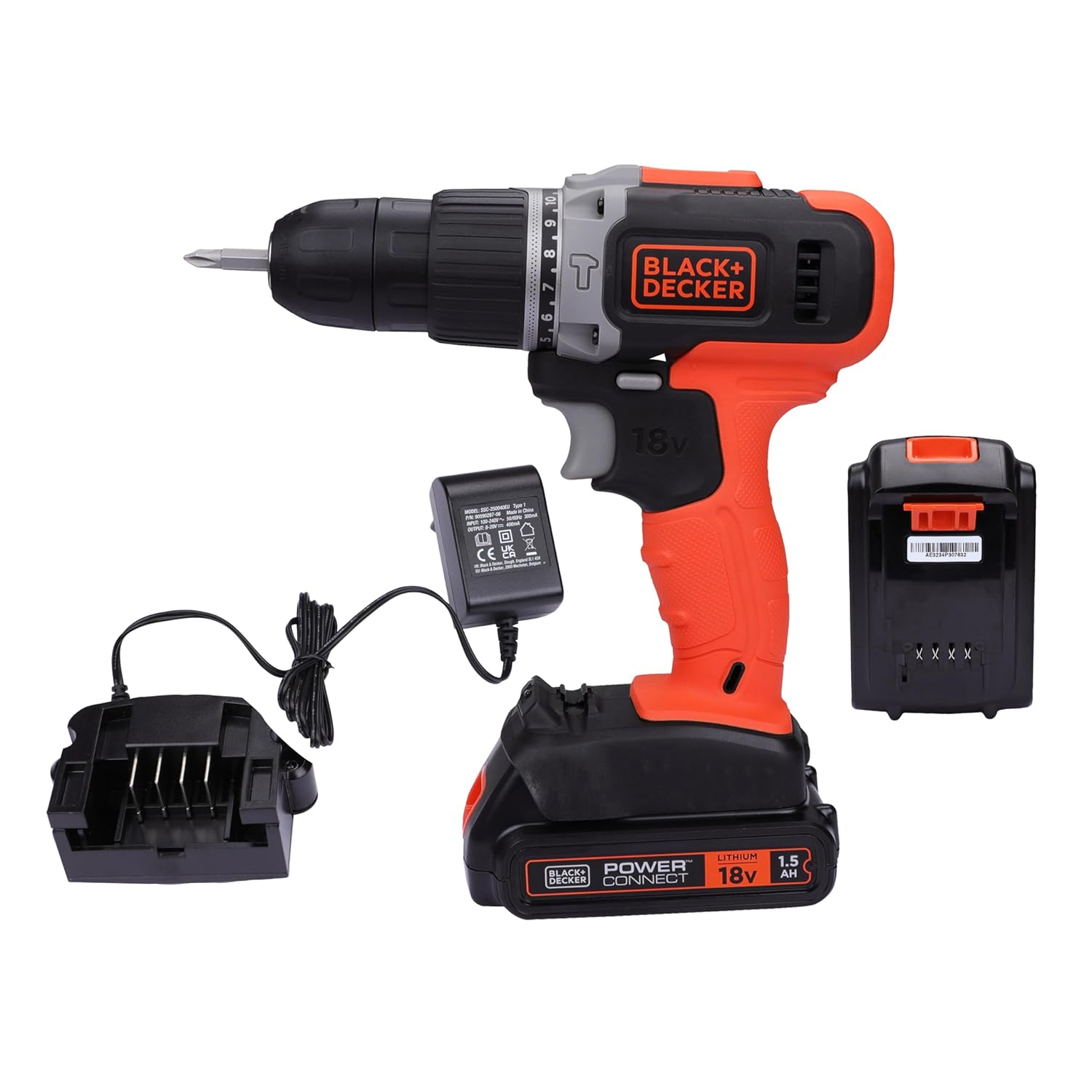
Figure 3: The BLACK+DECKER BCD003C1 drill shown with its 18V Lithium-Ion battery and charging unit.
4.2 Installing and Removing the Battery
- To Install: Align the battery pack with the base of the drill handle and slide it in until it locks securely.
- To Remove: Press the battery release button (refer to Figure 2) and slide the battery pack out.
4.3 Installing and Removing Drill Bits/Accessories

Figure 4: Close-up view of the keyless chuck, designed for hand-tightening without a chuck key.
- Ensure the drill is switched off and the forward/reverse button is in the center (locked) position.
- Grasp the rear half of the chuck and rotate the front half counter-clockwise until the chuck jaws are open wide enough to accept the bit.
- Insert the drill bit or accessory fully into the chuck.
- Rotate the front half of the chuck clockwise to tighten the jaws firmly around the bit. Hand-tighten only; do not use a wrench.
- To remove, reverse the tightening procedure.
5. Operating Instructions
5.1 Powering On/Off and Variable Speed Control

Figure 5: Detail of the forward/reverse slider (1) for continuous use and the variable speed switch (2) for ultimate fingertip control.
- To turn the tool ON, depress the trigger switch.
- To turn the tool OFF, release the trigger switch.
- The variable speed feature allows you to control the drilling speed by varying the pressure on the trigger switch. More pressure results in higher speed.
5.2 Forward/Reverse Operation
The forward/reverse button (refer to Figure 5, item 1) controls the direction of rotation. Push the button to the left for forward rotation (drilling/driving screws in) and to the right for reverse rotation (removing screws). Position the button in the center to lock the trigger and prevent accidental starting.
5.3 Torque Adjustment Collar and Dual Range Gearing

Figure 6: Detail of the torque adjustment collar (3) to adjust specific torque range and the dual range gearing switch (4) to shift gears for greater versatility.
- Torque Adjustment Collar (3): Rotate the collar to select the desired torque setting. Lower numbers are for driving small screws or working with soft materials. Higher numbers are for driving large screws or working with hard materials. The drill symbol indicates drilling mode, which provides maximum torque.
- Dual Range Gearing (4): Use the switch on top of the drill to select between two speed ranges. Position '1' is for low speed and high torque (e.g., driving screws, drilling large holes). Position '2' is for high speed and low torque (e.g., drilling small holes).
5.4 LED Work Light

Figure 7: Detail showing the LED work light (5) for poorly-lit spaces, the battery release button (6), and the Lithium-Ion battery (7).
The LED work light (refer to Figure 7, item 5) automatically illuminates when the trigger switch is pressed, providing light to the work surface. It remains on for a short period after the trigger is released.
5.5 General Drilling Tips

Figure 8: A user demonstrating the BLACK+DECKER BCD003C1 drill in action, boring a hole into a wooden surface.
- Always secure your workpiece to prevent movement.
- Apply steady, even pressure. Do not force the drill.
- For metal drilling, use a center punch to mark the hole location and use cutting oil to prolong bit life.
- For masonry drilling (hammer drill mode), ensure you use appropriate masonry bits.
6. Maintenance
Regular maintenance ensures optimal performance and extends the life of your tool.
6.1 Cleaning
- Keep the ventilation slots clean to prevent overheating.
- Regularly clean the tool's housing with a soft, damp cloth. Do not use abrasive cleaners or solvents.
- Remove any dust or debris from the chuck jaws.
6.2 Battery Care
- Store batteries in a cool, dry place away from direct sunlight and extreme temperatures.
- Do not store batteries in a discharged state for extended periods. Charge them periodically if not in use.
- Do not attempt to open or modify the battery pack.
6.3 Storage
When not in use, store the drill and its accessories in a secure, dry place, out of reach of children.
7. Troubleshooting
| Problem | Possible Cause | Solution |
|---|---|---|
| Drill does not start. | Battery not charged or improperly installed. Forward/reverse button in center (locked) position. | Charge battery fully and ensure it is securely installed. Move forward/reverse button to desired direction. |
| Loss of power during operation. | Battery charge is low. Overload due to excessive pressure. | Recharge the battery. Reduce pressure on the tool and allow it to work at its own pace. |
| Drill bit slips in chuck. | Chuck not tightened sufficiently. Bit shank is dirty or damaged. | Ensure chuck is hand-tightened firmly. Clean or replace the drill bit. |
| Excessive vibration or noise. | Damaged or bent drill bit. Loose components. | Replace the drill bit. Check for any loose parts and tighten if safe to do so. If problem persists, contact customer support. |
8. Specifications
| Feature | Specification |
|---|---|
| Brand | BLACK+DECKER |
| Model Number | BCD003C1 |
| Power Source | Battery Powered (18V Li-Ion) |
| Battery Capacity | 1.5 Ah |
| Voltage | 18 Volts |
| Amperage | 1.5 Amps |
| Maximum Rotational Speed | 650 RPM |
| Maximum Torque | 30 Nm |
| Chuck Capacity | 10 mm |
| Drilling Capacity (Wood) | 25 mm |
| Drilling Capacity (Steel) | 10 mm |
| Drill Type | Hammer Drill |
| Special Feature | Variable Speed, LED Work Light |
| Item Weight | 500 g |
| Dimensions (LxWxH) | 29 x 6 x 19 cm |
| Included Components | 1 Tool, 1 Battery |
9. Warranty and Customer Support
9.1 Warranty Information
This BLACK+DECKER BCD003C1 Cordless Hammer Drill Machine comes with a 1-year warranty from the date of purchase. Please retain your proof of purchase for warranty claims. The warranty covers manufacturing defects and faulty workmanship under normal use. It does not cover damage caused by misuse, abuse, unauthorized repairs, or normal wear and tear.
9.2 Customer Support
For any queries, technical assistance, or warranty claims, please contact BLACK+DECKER customer support:

Figure 9: BLACK+DECKER Customer Care Contact Information, including phone, email, and WhatsApp details.
- Phone: 1800-203-0644 (Mon-Sat, 09:00 AM - 06:00 PM IST, except government holidays)
- Email: SBD-CUSTOMERCOMMUNICATIONS@SBDINC.COM
- WhatsApp: +91 96060 55835 (Scan the QR code in Figure 9 or click the link to contact)
- Authorized Service Centers: 500+ locations available.
BLACK+DECKER provides sales and after-sales support, a great service network, original parts, and omnichannel support.


