
1. Important Safety Instructions
Please read all instructions carefully before using this electric fireplace. Keep this manual for future reference.
- This appliance is for household use only. Do not use outdoors.
- Ensure the power outlet voltage matches the rating label on the appliance.
- Do not operate the fireplace with a damaged cord or plug, or after the appliance malfunctions or has been dropped or damaged in any manner.
- Keep combustible materials such as furniture, pillows, bedding, papers, clothes, and curtains at least 1 meter (3 feet) from the front of the heater.
- Do not insert or allow foreign objects to enter any ventilation or exhaust opening as this may cause an electric shock or fire, or damage the heater.
- To prevent a possible fire, do not block air intakes or exhaust in any manner. Do not use on soft surfaces, like a bed, where openings may become blocked.
- The fireplace is equipped with overheat protection. If the heater overheats, it will automatically shut off. Unplug the unit and allow it to cool before restarting.
- This decorative fireplace produces no soot or dangerous carbon monoxide during use. There is no open flame, eliminating burn risk, making it safe for children and pets.
- Always unplug the fireplace when not in use.
2. Product Overview
The BALDERIA Candela Electric Corner Fireplace offers a realistic 3D flame effect and efficient electric heating. Its elegant design fits seamlessly into various interior styles.

Figure 2.1: BALDERIA Candela Electric Corner Fireplace with realistic 3D flame effect.
3. Setup and Installation
The BALDERIA Candela fireplace is designed for easy assembly and freestanding installation. Follow these steps for proper setup:
- Unpacking: Carefully remove all components from the packaging. Check for any damage during transit.
- Assembly: Assemble the fireplace casing according to the included assembly instructions. The MDF casing is lacquered in white and can be painted if desired.
- Placement: Position the fireplace in a suitable corner of your room. Ensure it is placed on a stable and level surface. Maintain adequate clearance from walls and other objects for proper ventilation.
- Power Connection: Plug the power cord into a standard electrical outlet. Ensure the outlet is easily accessible.

Figure 3.1: Product Dimensions (963mm W x 568mm D x 930mm H).
4. Operating Instructions
The fireplace can be operated using the control panel on the unit or the provided remote control.
4.1 Control Panel and Remote Control
Familiarize yourself with the controls:

Figure 4.1: Control Panel and Remote Control Layout.
- 1. Power (Allumage): Turns the unit ON/OFF.
- 2. Flame Effect (Effet de Flamme): Adjusts the 3D flame intensity. There are 3 levels of brightness.
- 3. Heating (Chauffage): Activates the 2000W electric heater.
- 4. Temperature Sensor (Capteur de Température): Used with the thermostat function to maintain desired room temperature.
- 5. Ambient Lighting (Éclairage d'Ambiance): Cycles through 13 LED ambient light colors.
- 6. Timer (Minuteur): Sets an automatic shut-off timer for the fireplace.
4.2 Adjusting Flame Intensity
Press the 'Flame Effect' button on the control panel or remote control to cycle through the 3 available flame intensity levels.
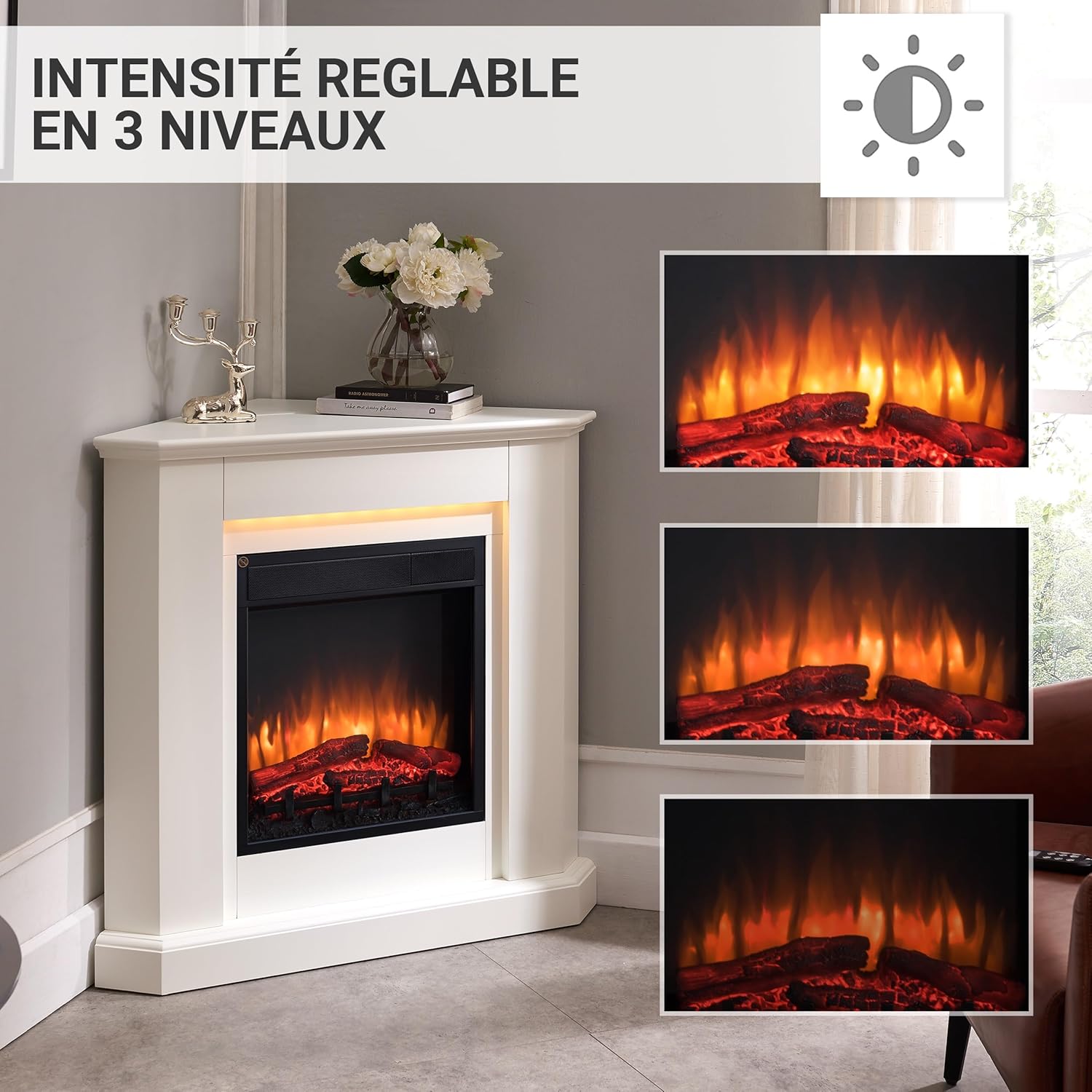
Figure 4.2: Flame Intensity Adjustment.
4.3 Changing Ambient Lighting
Press the 'Ambient Lighting' button to select from 13 different LED colors to match your mood or decor.

Figure 4.3: Ambient LED Lighting Options.
5. Maintenance
Regular maintenance ensures the longevity and optimal performance of your fireplace.
- Cleaning: Always unplug the appliance before cleaning. Use a soft, damp cloth to wipe the exterior surfaces. Do not use abrasive cleaners or solvents.
- Ventilation Openings: Keep the ventilation openings clear of dust and debris to ensure proper airflow and prevent overheating.
- Storage: If storing the fireplace for an extended period, unplug it and store it in a dry, cool place, preferably in its original packaging.
- Power Cord: Periodically inspect the power cord for any signs of damage. If damaged, it must be replaced by a qualified technician to avoid hazards.
6. Troubleshooting
If you encounter any issues with your BALDERIA Candela fireplace, refer to the following common problems and solutions:
| Problem | Possible Cause | Solution |
|---|---|---|
| Fireplace does not turn on. | No power supply. | Check if the power cord is securely plugged into a working outlet. Test the outlet with another appliance. |
| No heat output. | Heater not activated or thermostat setting too low. | Ensure the heating function is turned on. Adjust the thermostat to a higher setting. |
| Flame effect not working. | Flame effect function is off or bulb issue. | Activate the flame effect function. If still not working, contact customer support. |
| Unit overheats and shuts off. | Overheat protection activated. Blocked air vents. | Unplug the unit, allow it to cool for 15-20 minutes. Check and clear any obstructions from the air intake/exhaust vents. |
| Remote control not working. | Dead batteries or obstruction. | Replace the 2 AAA batteries in the remote control. Ensure there is no obstruction between the remote and the fireplace sensor. |
If the problem persists after trying these solutions, please contact customer support.
7. Specifications
| Feature | Specification |
|---|---|
| Brand | BALDERIA |
| Model Number | EF223A-MT223B |
| Color | White |
| Product Dimensions (L x W x H) | 96.3 x 56.8 x 93 cm |
| Item Weight | 27.2 Kilograms |
| Power Output | 2000 Watts |
| Material | Engineered Wood, Metal |
| Power Source | Electric Cable |
| Finish Type | Lacquered |
| Installation Type | Freestanding |
| Special Features | 3D Flame Effect, 2000W Electric Heating, LED Lighting, Remote Control, Timer, Thermostat |
| Batteries Required | 2 AAA (for remote control) |
8. Warranty and Support
BALDERIA is committed to providing quality products. For any questions or support needs, please refer to the following:
- Spare Parts Availability: Spare parts for this product are available for 5 years from the date of purchase.
- Customer Support: For technical assistance, warranty claims, or any other inquiries, please contact your retailer or the BALDERIA customer service directly. Refer to your purchase documentation for contact details.