
1. Introduction
Thank you for purchasing the Ikon IK-9210 12 Liter Halogen Convection Oven. This appliance is designed for healthy, oil-free cooking, offering versatility and efficiency in your kitchen. Please read this manual thoroughly before operating the appliance to ensure safe and optimal performance. Keep this manual for future reference.
2. Important Safety Instructions
When using electrical appliances, basic safety precautions should always be followed, including the following:
- Read all instructions before use.
- Do not touch hot surfaces. Use handles or knobs.
- To protect against electrical shock, do not immerse cord, plugs, or the main unit in water or other liquid.
- Close supervision is necessary when any appliance is used by or near children.
- Unplug from outlet when not in use and before cleaning. Allow to cool before putting on or taking off parts.
- Do not operate any appliance with a damaged cord or plug, or after the appliance malfunctions or has been damaged in any manner.
- The use of accessory attachments not recommended by the appliance manufacturer may cause injuries.
- Do not use outdoors.
- Do not let cord hang over edge of table or counter, or touch hot surfaces.
- Do not place on or near a hot gas or electric burner, or in a heated oven.
- Extreme caution must be used when moving an appliance containing hot oil or other hot liquids.
- Always attach plug to appliance first, then plug cord into the wall outlet. To disconnect, turn any control to "off", then remove plug from wall outlet.
- Do not use appliance for other than intended use.
3. Product Overview
Familiarize yourself with the components of your Ikon Halogen Convection Oven.
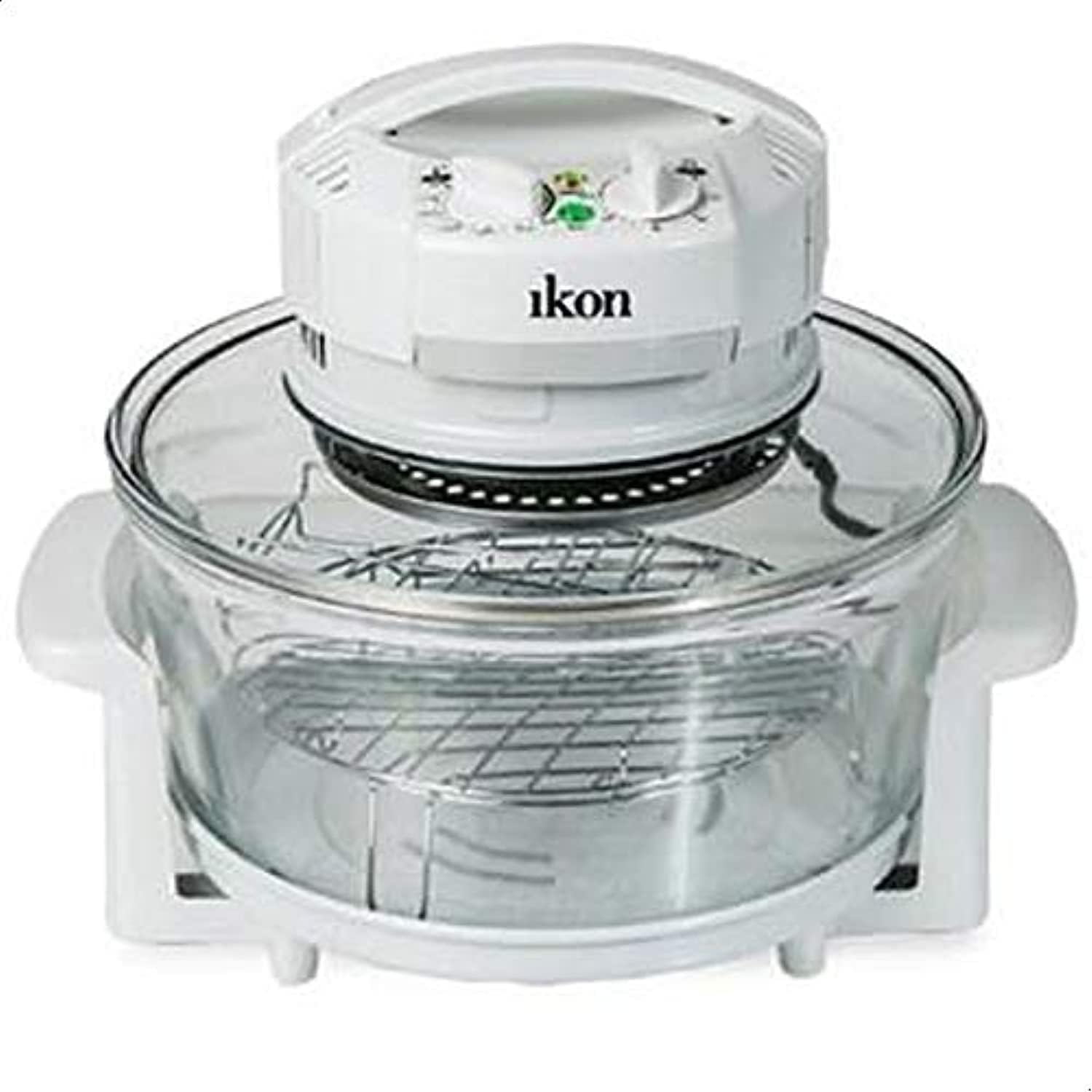
Figure 1: Ikon IK-9210 Halogen Convection Oven. This image shows the complete unit, including the white control head with the Ikon logo, the clear glass bowl, and the metal racks inside. The handles on the side of the glass bowl are also visible.
Components:
- Control Head: Contains the heating element, fan, temperature control knob, and timer knob.
- Glass Bowl: The main cooking chamber, made of heat-resistant glass.
- High Rack: For cooking items closer to the heating element.
- Low Rack: For cooking items further from the heating element.
- Tongs: For safely handling hot racks and food.
- Extension Ring (Optional/Included): Increases the oven's capacity for larger items.
4. Setup
- Unpacking: Carefully remove all packaging materials and accessories. Retain packaging for storage or future transport.
- Initial Cleaning: Before first use, wash the glass bowl, racks, and tongs in warm, soapy water. Rinse thoroughly and dry. Wipe the control head with a damp cloth. Do not immerse the control head in water.
- Placement: Place the oven on a stable, heat-resistant surface, ensuring adequate ventilation around the unit. Do not place it near flammable materials or other heat sources.
- Assembly: Place the glass bowl on its base. Insert the desired cooking rack (high or low) into the bowl.
- Power Connection: Ensure the appliance is unplugged before placing the control head onto the glass bowl. Once assembled, plug the power cord into a grounded electrical outlet.
5. Operating Instructions
The Ikon IK-9210 oven uses halogen heating and convection technology for even and efficient cooking.
Basic Operation:
- Prepare Food: Place your food on the appropriate rack inside the glass bowl.
- Secure Control Head: Carefully place the control head onto the glass bowl, ensuring it sits securely.
- Set Temperature: Turn the temperature control knob to the desired cooking temperature. The range is typically from 65°C to 250°C (150°F to 480°F).
- Set Timer: Turn the timer knob to the desired cooking time. The oven will start heating once the timer is set. A light will indicate operation.
- Cooking Process: The oven will automatically turn off once the set time has elapsed. A bell may sound.
- Remove Food: Using oven mitts and the provided tongs, carefully remove the control head and place it on a heat-resistant surface. Then, remove your cooked food.
Tips for Best Results:
- Preheating is generally not required for most dishes due to rapid heating.
- For even browning, turn food halfway through the cooking process.
- When using the extension ring, cooking times may need to be slightly adjusted.
- Refer to a convection oven cooking chart for specific food types and cooking durations.
6. Cleaning and Maintenance
Regular cleaning ensures the longevity and optimal performance of your oven.
- Always Unplug: Before cleaning, ensure the oven is unplugged from the power outlet and has completely cooled down.
- Glass Bowl and Accessories: The glass bowl, racks, and tongs can be washed in warm, soapy water or placed in a dishwasher. Rinse thoroughly and dry completely.
- Control Head: Wipe the exterior of the control head with a damp cloth. For stubborn stains, use a mild detergent. Do not immerse the control head in water or spray it with liquids.
- Self-Cleaning Function (if applicable): If your model features a self-cleaning function, add a small amount of water and detergent to the glass bowl, set the temperature to 100°C (212°F), and the timer for 10-15 minutes. The circulating hot air will help loosen food residue. Afterwards, scrub and rinse the bowl.
- Storage: Store the oven in a cool, dry place when not in use.
7. Troubleshooting
Refer to this section for common issues and their solutions.
| Problem | Possible Cause | Solution |
|---|---|---|
| Oven does not turn on. | Not plugged in; timer not set; control head not seated correctly. | Check power cord connection; set the timer; ensure control head is properly placed on the glass bowl. |
| Food is not cooking evenly. | Food overloaded; rack position incorrect; temperature too low. | Do not overload the oven; use the appropriate rack; increase temperature if needed; turn food halfway through. |
| Smoke or unusual odor during operation. | Food residue on heating element; new appliance odor. | Clean the heating element area (when cool); initial odor is normal and will dissipate after a few uses. If smoke persists, unplug and contact support. |
8. Specifications
| Feature | Detail |
|---|---|
| Brand | Ikon |
| Model Number | IK-9210 |
| Type | Halogen Convection Oven |
| Capacity | 12 Liters |
| Power/Wattage | 1400W |
| Material | Stainless Steel (heating element/racks), Glass (bowl) |
| Special Feature | Timer |
| Control Type | Knob |
| Door Style | Flat (referring to the lid/control head) |
| Included Components | Grill (racks), Tongs |
| Color | White |
| Item Weight | Approximately 6.92 kg |
| Shipping Dimensions | 37.01 x 36.6 x 24.21 cm |
9. Warranty and Support
For warranty information or technical support, please refer to the warranty card included with your product or contact your local Ikon distributor or customer service center. Please have your model number (IK-9210) and purchase date available when contacting support.
For further assistance, you may visit the official Ikon website (if available) or contact the retailer where the product was purchased.