
Merrytek MC030S L
Merrytek Microwave Motion Sensor User Manual
Model: MC030S L
Brand: Merrytek
1. Product Overview
The Merrytek MC030S L is a compact microwave (HF Radar) motion sensor designed for integration into lighting systems, particularly suitable for LED fixtures up to 400W. It features an on/off function and an integrated daylight sensor, making it ideal for energy-efficient lighting control in various indoor environments. Its small form factor allows for easy built-in installation.
Key Features:
- Microwave (HF Radar) Technology: Provides reliable motion detection through non-metallic materials.
- High Power Compatibility: Supports LED loads up to 400W.
- Adjustable Detection Area: Configurable detection range from 10% to 100% (up to 6 meters).
- Adjustable Hold Time: Lighting duration can be set from 5 seconds to 30 minutes after motion ceases.
- Integrated Daylight Sensor: Adjustable lux levels (2 lux, 10 lux, 25 lux, 50 lux, or disabled) to control operation based on ambient light.
- Wide Detection Angle: 150° detection angle for comprehensive coverage.
- Compact Design: Dimensions of 77 x 36 x 26 mm for discreet installation.
- Robust Construction: IP20 protection rating, suitable for ambient temperatures from -25 to 60 °C.
- Certifications: CE and UKCA certified, ensuring compliance with European and UK safety standards.

Figure 1.1: Merrytek MC030S L Microwave Motion Sensor, showing the compact design and DIP switch configuration area.
2. Safety Information
Please read all safety instructions carefully before installation and operation. Failure to follow these instructions may result in electric shock, fire, or other injuries.
- Electrical Safety: Installation should only be performed by a qualified electrician in accordance with local electrical codes and regulations. Always disconnect power at the circuit breaker before installation or maintenance.
- Indoor Use Only: This device has an IP20 rating, meaning it is not waterproof. Do not expose it to water, moisture, or high humidity. Install only in dry indoor locations.
- Operating Temperature: Ensure the ambient temperature is within the specified range of -25°C to 60°C.
- Load Capacity: Do not exceed the maximum load of 400W for LED lighting. Overloading can damage the device and pose a fire hazard.
- Interference: Microwave sensors can be affected by strong electromagnetic fields or other microwave devices. Avoid installing near such sources if possible.
3. Installation
The MC030S L sensor is designed for built-in installation, typically within a light fixture or ceiling cavity. Ensure adequate ventilation around the sensor.
3.1 Wiring Diagram
Follow the wiring diagram below for correct electrical connection. The sensor uses spring terminals for secure connections.

Figure 3.1: Wiring connections for the Merrytek MC030S L. Connect Live (L) and Neutral (N) to the input, and the switched Live (L) and Neutral (N) to the LED load. An LED power supply (LED Netzteil) is shown as an example load.
- Connect the Live (L) and Neutral (N) wires from your power supply to the 'INPUT' terminals of the sensor.
- Connect the Live (L) and Neutral (N) wires of your LED fixture (or LED power supply) to the 'OUTPUT' terminals of the sensor.
- Ensure all connections are secure and properly insulated.
3.2 Mounting Considerations
The optimal mounting height for the sensor is up to 6 meters. The detection range is also up to 6 meters, and the detection angle is 150°.
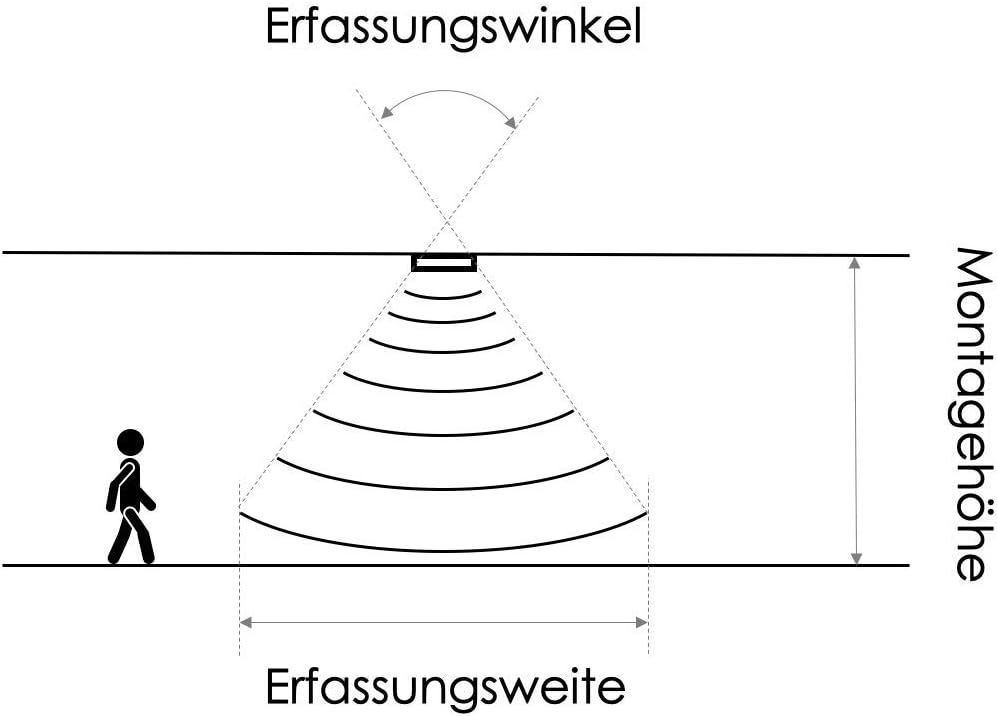
Figure 3.2: Illustration of the sensor's detection angle, optimal mounting height, and effective detection range.
- Mount the sensor in a location where its detection area covers the desired space.
- Avoid placing the sensor directly next to large metal objects or thick walls that could obstruct the microwave signal.
- Consider the movement patterns in the area; the sensor detects radial movement more effectively than direct movement towards or away from it.
4. Setup and Configuration (DIP Switches)
The Merrytek MC030S L features nine DIP switches (1-9) for adjusting its settings. These switches allow you to customize the detection area, hold time, and daylight sensor threshold.

Figure 4.1: Close-up view of the DIP switches on the Merrytek MC030S L, showing their numbering and corresponding settings.
4.1 DIP Switch Settings Table
Refer to the table below for the various configuration options. 'ON' indicates the switch is in the ON position, '-' indicates the switch is in the OFF position.
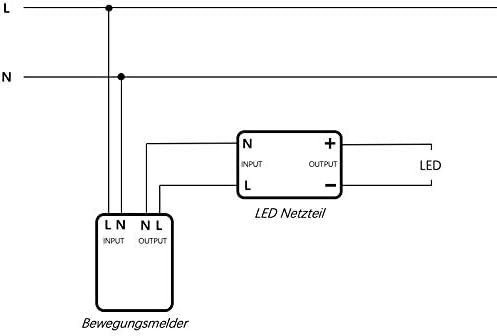
Figure 4.2: Detailed table explaining the function of each DIP switch for Detection Area, Hold Time, and Daylight Threshold.
Detection Area (Switches 1, 2, 3)
| Switch 1 | Switch 2 | Switch 3 | Detection Area |
|---|---|---|---|
| ON | ON | ON | 100% |
| ON | ON | - | 75% |
| ON | - | ON | 50% |
| - | - | ON | 25% |
| - | - | - | 10% |
Hold Time (Switches 4, 5, 6)
| Switch 4 | Switch 5 | Switch 6 | Hold Time |
|---|---|---|---|
| ON | ON | ON | 5 s |
| - | ON | ON | 30 s |
| ON | - | ON | 90 s |
| - | - | ON | 3 min |
| ON | ON | - | 20 min |
| - | - | - | 30 min |
Daylight Threshold (Switches 7, 8, 9)
| Switch 7 | Switch 8 | Switch 9 | Daylight Threshold |
|---|---|---|---|
| ON | ON | ON | 2 Lux |
| ON | ON | - | 10 Lux |
| - | ON | - | 25 Lux |
| ON | - | - | 50 Lux |
| - | - | - | Disable |
Note: After changing DIP switch settings, it is recommended to cycle the power to the sensor for the new settings to take full effect.
5. Operation
The Merrytek MC030S L operates by detecting motion within its adjustable detection area and activating the connected lighting based on the configured hold time and daylight threshold.

Figure 5.1: Operational sequence of the motion sensor.
- The motion detector is in standby mode and continuously monitors the environment for movement.
- When motion is detected, and the ambient light level is below the set daylight threshold (if enabled), the light switches on within the defined hold time.
- If new motion is detected during the active hold time, the light remains on and the hold time resets.
- Multiple motion detectors can be used together to extend the detection area.
- If no further motion is detected within the specified hold time, the light automatically switches off.
6. Maintenance
The Merrytek MC030S L is designed for long-term, maintenance-free operation. However, a few guidelines can help ensure its longevity:
- Cleaning: Gently wipe the sensor's surface with a soft, dry cloth if it becomes dusty. Do not use abrasive cleaners or solvents.
- Moisture: As stated in the safety information, this device is not waterproof. Ensure it remains in a dry environment and protect it from any water splashes or condensation.
- Inspection: Periodically check the wiring connections to ensure they remain secure.
7. Troubleshooting
If you encounter issues with your Merrytek MC030S L motion sensor, consider the following common problems and solutions:
- Light does not turn on with motion:
- Check power supply to the sensor and the connected light fixture.
- Verify wiring connections are correct and secure.
- Adjust the 'Detection Area' DIP switches (1-3) to a higher sensitivity (e.g., 100%).
- Check the 'Daylight Threshold' DIP switches (7-9). If the ambient light is above the set threshold, the sensor will not activate the light. Try setting it to 'Disable' for testing.
- Ensure there are no obstructions blocking the microwave signal.
- Light stays on continuously or turns on randomly:
- Adjust the 'Detection Area' DIP switches (1-3) to a lower sensitivity (e.g., 10% or 25%).
- Check for constant motion sources within the detection area (e.g., fans, swaying curtains, pets).
- Consider potential interference from other electronic devices, especially strong Wi-Fi signals or other microwave devices nearby. Relocating the sensor or the interfering device might help.
- Ensure the 'Hold Time' DIP switches (4-6) are set correctly.
- Light turns off too quickly or too slowly:
- Adjust the 'Hold Time' DIP switches (4-6) to your desired duration.
- Daylight sensor not working as expected:
- Adjust the 'Daylight Threshold' DIP switches (7-9) to a different lux level or 'Disable' to test.
- Ensure the sensor's light sensor is not obstructed or exposed to direct, inconsistent light sources.
8. Specifications
Detailed technical specifications for the Merrytek MC030S L Microwave Motion Sensor:

Figure 8.1: Dimensions of the Merrytek MC030S L sensor.
| Specification | Value |
|---|---|
| Manufacturer | Merrytek |
| Model Number | MC030S L |
| Product Dimensions (L x W x H) | 77 x 36 x 25.6 mm |
| Item Weight | 40 grams |
| Color | White |
| Power Source | Wired (220-240VAC, 50/60Hz) |
| Max Load | 400W (for LED) |
| Detection Technology | Microwave (HF Radar) |
| Detection Angle | 150° |
| Maximum Detection Range | 6 meters |
| Optimal Mounting Height | Max. 6 meters |
| Adjustable Detection Area | 10%, 25%, 50%, 75%, 100% |
| Adjustable Hold Time | 5s, 30s, 90s, 3 min, 20 min, 30 min |
| Adjustable Daylight Sensor | 2 lux, 10 lux, 25 lux, 50 lux, Disable |
| Protection Rating | IP20 |
| Ambient Temperature (Ta) | -25 °C to 60 °C |
| Connection Type | Spring Terminal |
| Certifications | CE, UKCA |
| Lifespan | >50,000 hours |
9. Warranty and Support
For information regarding warranty and returns, please refer to the retailer's policy where the product was purchased. Typically, customers have the right to withdraw their order within 30 calendar days without stating reasons. For returns, ensure the product casing is clean and undamaged.
For further technical support or inquiries, you may visit the manufacturer's information center:
Related documentsMC030S L


Ask a question about this manual
Ask about setup, troubleshooting, compatibility, parts, safety, or missing instructions. Manuals+ will review the question and use this page’s manual context to help answer it.