
1. Introduction
This manual provides comprehensive instructions for the setup, operation, and maintenance of the OBD2 hub Vas5054A Scanner ODIS V4.4.1 Plus OKI UDS OBD2 Diagnostic Tool. This device is designed for vehicle diagnostics within the Volkswagen Group (VW, Audi, Skoda) and other OBD-compliant vehicle systems. It supports both Bluetooth and USB connectivity for communication with an application PC.
2. Product Features
- Universal Diagnostic Interface: Compatible with Volkswagen Group vehicles (Audi, VW, Skoda) and other OBD vehicle systems.
- Bluetooth Connectivity: Enables wireless communication with the application PC.
- USB Connectivity: Provides a wired connection option to the application PC.
- Direct Protocol Handling: Vehicle protocols are processed directly within the VAS 5054A for fast response times and reliable real-time behavior.
- Automatic Software Updates: The device automatically adopts new features after a new software version is installed on the application PC.
- GFF Database Integration: Guided by a centralized management system, providing direct fault information and solutions.
- Optimized Diagnostic Procedure: Designed to streamline the diagnostic process and reduce technician time costs.
- Original OKI Chip and AMB2300 Bluetooth Module: Ensures high-quality performance and reliability.
- Supported Bus Systems: K line (ISO9141-2), High-speed CAN (ISO 11898-2), Low-speed CAN (ISO 11898-3), J1850 (SAE J1850), UDS Protocol.
3. Package Contents
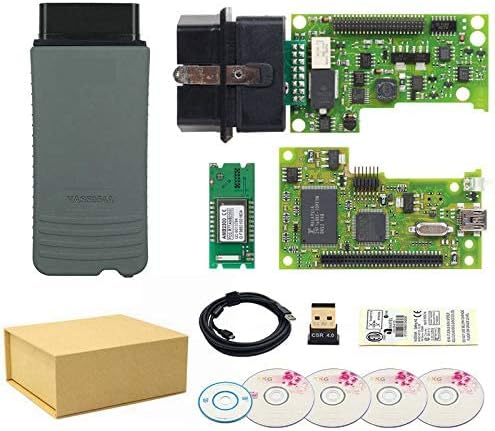
Image 3.1: The complete package contents of the Vas5054A diagnostic tool. This image displays the main Vas5054A unit, a USB cable for wired connection, four software CDs for installation, and a Bluetooth adapter for wireless communication. All items are neatly arranged alongside a brown cardboard box.
Please verify that all the following items are included in your package:
- 1x VAS 5054A Main unit
- 1x USB Cable
- 4x CD Software (for VW, AUDI, SKODA, SEAT)
- 1x Bluetooth-Adapter
4. Setup
4.1 Software Installation
The diagnostic application and its associated Diagnostic Base System must be installed on your application PC. The included ODIS software version is V7.2.1, which is compatible with Windows 10 64-bit OS ONLY. This scanner supports ODIS versions up to V7.2.1 and will not function with more advanced ODIS versions. Follow the instructions provided with the software CDs for proper installation.
4.2 Access Via Bluetooth
To establish a wireless connection:
- Ensure the Bluetooth adapter is connected to your PC or that your PC has integrated Bluetooth capabilities.
- Power on the VAS 5054A main unit.
- On your application PC, pair the VAS 5054A via Bluetooth. The Bluetooth software will create a virtual serial COM port (Bluetooth Serial Port Profile).
- During the diagnostic application installation or configuration, specify this COM port for communication with the VAS 5054A.
4.3 Access Via USB
To establish a wired connection:
- Connect the VAS 5054A main unit to your application PC using the supplied USB cable.
- Windows will detect the VAS 5054A through Plug and Play.
- The drivers, which were copied during the diagnostic application installation, will be automatically installed.
- Once the drivers are installed, the device is ready for use by the diagnostic application.

Image 4.1: A detailed view of the Vas5054A main unit, highlighting its robust casing and the standard OBD2 connector. This unit facilitates communication between the vehicle and the diagnostic software.
5. Operating Instructions
After successful setup and connection (either via Bluetooth or USB), the VAS 5054A is ready to communicate with your vehicle through the diagnostic application installed on your PC.
- Connect to Vehicle: Plug the OBD2 connector of the VAS 5054A into your vehicle's OBD2 port, typically located under the dashboard.
- Launch Diagnostic Software: Open the ODIS diagnostic application on your PC.
- Establish Communication: The diagnostic base system will access the VAS 5054A via the configured Bluetooth COM port or USB connection.
- Perform Diagnostics: Follow the on-screen prompts within the ODIS software to select your vehicle model, perform scans, read fault codes, view live data, and execute other diagnostic functions.
- Protocol Handling: The VAS 5054A handles vehicle protocols directly, ensuring efficient and reliable data exchange. The device automatically adapts to new software features installed on your PC.
5.1 Supported Vehicle Bus Systems
The VAS 5054A supports the following vehicle communication protocols:
- K line (ISO9141-2)
- High-speed CAN (ISO 11898-2)
- Low-speed CAN (ISO 11898-3)
- J1850 (SAE J1850)
- UDS Protocol
6. Maintenance
To ensure the longevity and optimal performance of your VAS 5054A diagnostic tool, please observe the following maintenance guidelines:
- Cleaning: Wipe the device with a soft, dry cloth. Avoid using abrasive cleaners or solvents.
- Storage: Store the device in a cool, dry place away from direct sunlight and extreme temperatures.
- Handling: Handle the device with care to prevent physical damage. Avoid dropping or subjecting it to strong impacts.
- Cable Care: Ensure the USB cable is not bent sharply or tangled, which can damage the internal wires.
7. Troubleshooting
If you encounter issues while using the VAS 5054A, consider the following troubleshooting steps:
- No Connection:
- Verify that the VAS 5054A is properly connected to the vehicle's OBD2 port and powered on.
- For USB connection, ensure the USB cable is securely connected to both the device and the PC. Check PC device manager for driver status.
- For Bluetooth connection, confirm that Bluetooth is enabled on your PC, the device is paired, and the correct COM port is selected in the diagnostic software.
- Software Issues:
- Ensure your ODIS software version is V7.2.1 or earlier and running on Windows 10 64-bit. Incompatible software or operating systems will prevent functionality.
- Reinstall the diagnostic application and drivers if communication problems persist.
- Check for any available software updates for the diagnostic application.
- Vehicle Communication Errors:
- Confirm that the vehicle's ignition is on.
- Ensure the vehicle's battery has sufficient charge.
- Verify that the vehicle model is supported by the ODIS software and the VAS 5054A.
8. Specifications
| Feature | Detail |
|---|---|
| Product Name | Vas5054A Scanner ODIS V4.4.1 Plus OKI UDS OBD2 Diagnostic Tool |
| Brand | OBD2 hub |
| Model Number | etwe |
| Connectivity | Bluetooth, USB |
| Supported ODIS Version | Up to V7.2.1 (V7.2.1 included in package) |
| Compatible OS | Windows 10 64-bit ONLY (for ODIS V7.2.1) |
| Supported Vehicle Bus Systems | K line (ISO9141-2), High-speed CAN (ISO 11898-2), Low-speed CAN (ISO 11898-3), J1850 (SAE J1850), UDS Protocol |
| Special Features | Plug and Play (USB), Bluetooth Module (AMB2300), Original OKI Chip |
| Item Weight | 2.18 ounces |
| Package Dimensions | 8.94 x 7.09 x 0.31 inches |
9. Warranty and Support
Specific warranty information for the OBD2 hub Vas5054A Scanner is not provided in the product details. For warranty claims, technical support, or further assistance, please contact the manufacturer or your point of purchase directly. Keep your purchase receipt as proof of purchase.