
1. Product Overview
The EcoSavers Countdown Timer is an energy-saving device designed to automatically control the power supply to connected appliances. It features four pre-set switching times, allowing you to set a duration after which the connected device will automatically turn off (or on, depending on the application). This helps reduce energy consumption and provides convenience for various household or office electronics.
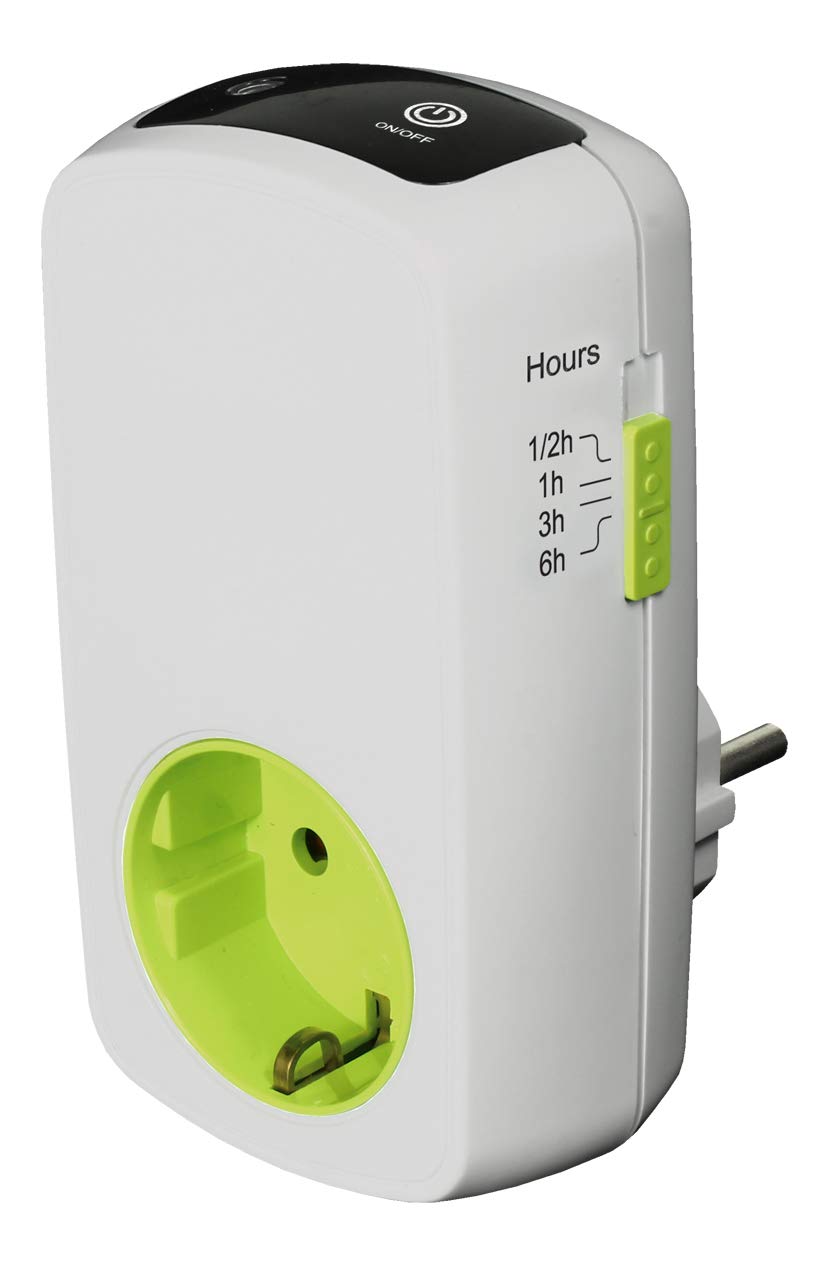
Figure 1: EcoSavers Countdown Timer. The image displays the EcoSavers Countdown Timer, a white device with a green-colored socket, packaged in a green and white box. The box highlights 'Countdown Timer' and 'Save Energy' features. The device itself shows indicators for different time settings.
2. Safety Instructions
- Read all instructions carefully before use.
- This device is for indoor use only. Do not expose to moisture or extreme temperatures.
- Do not exceed the maximum load capacity of 16A / 3680W. Overloading can cause damage to the timer and connected appliances, and may pose a fire hazard.
- Ensure the timer is securely plugged into a grounded wall socket.
- Do not disassemble or attempt to repair the timer. Refer all servicing to qualified personnel.
- Keep out of reach of children. This product includes child protection features, but supervision is always recommended.
- Unplug the timer from the wall socket before cleaning.
3. Product Features
- Energy Saving: Automatically switches off connected devices after a set time.
- Pre-set Times: Offers 4 fixed countdown durations (1/2 hour, 1 hour, 3 hours, 6 hours).
- Child Protection: Integrated safety features to prevent accidental tampering.
- Durable Material: Constructed from flame-retardant PC material for enhanced safety.
- Certified: GS certified for quality and safety standards.
4. Setup
- Unpack: Carefully remove the EcoSavers Countdown Timer from its packaging.
- Inspect: Check the device for any visible damage. Do not use if damaged.
- Plug In: Insert the timer into a standard 230V / 50Hz wall socket.
- Connect Appliance: Plug the appliance you wish to control into the socket on the front of the EcoSavers Countdown Timer. Ensure the appliance is switched on if it has its own power switch.
5. Operating Instructions
The EcoSavers Countdown Timer features a simple push-button operation to select the desired countdown duration.
- Power On: Once the timer is plugged into the wall and an appliance is connected, the timer is ready for use.
- Select Time: Press the button on the timer repeatedly to cycle through the available countdown settings: 1/2 hour, 1 hour, 3 hours, and 6 hours.
- Indicator: An LED indicator next to each time setting will illuminate to show the currently selected duration.
- Start Countdown: Once a time setting is selected, the countdown begins automatically. The connected appliance will remain powered during this period.
- Automatic Shut-off: When the selected countdown duration expires, the timer will automatically cut power to the connected appliance.
- Reset/Turn Off: To stop the countdown prematurely or to turn off the timer function, press the button until no LED indicator is lit. This will cut power to the connected appliance.
6. Maintenance
- Cleaning: Disconnect the timer from the power outlet before cleaning. Wipe the exterior with a soft, dry cloth. Do not use liquid cleaners or abrasive materials.
- Storage: Store the timer in a cool, dry place when not in use.
- Inspection: Periodically inspect the timer and its plug for any signs of wear or damage.
7. Troubleshooting
- Timer not turning on/off:
- Ensure the timer is securely plugged into a live wall socket.
- Verify that the connected appliance is functioning correctly when plugged directly into a wall socket.
- Check if a countdown duration has been selected and its LED indicator is lit.
- Appliance not receiving power:
- Confirm the appliance's own power switch is in the 'ON' position.
- Ensure the timer has not completed its countdown cycle.
- Check if the timer is overloaded. Reduce the total wattage of connected devices.
If problems persist, contact customer support or a qualified electrician.
8. Specifications
| Model Number | AT328 |
| Brand | EcoSavers |
| Voltage | 230 V / 50 Hz |
| Current | Max 16 A |
| Max Power | 3680 W |
| Setting Range | 1/2 hour, 1 hour, 3 hours, 6 hours |
| Material | Flame-retardant Polycarbonate (PC) |
| Child Protection | Yes |
| Certifications | GS Certified |
| Color | Black |
9. Warranty and Support
For warranty information, please refer to the terms and conditions provided by your retailer at the time of purchase. If you encounter any issues or require technical assistance, please contact the retailer where you purchased the EcoSavers Countdown Timer or visit the official EcoSavers website for support resources.