
Zoook Thunder 2
Zoook Rocker Thunder 2 Karaoke Bluetooth Party Speaker Instruction Manual
Introduction
This manual provides comprehensive instructions for the setup, operation, and maintenance of your Zoook Rocker Thunder 2 Karaoke Bluetooth Party Speaker. Please read this manual thoroughly before using the product to ensure proper function and to maximize your enjoyment.

Image: The Zoook Rocker Thunder 2 speaker, a black portable unit with colorful LED lights on the front grille, a control panel on top, and a wired microphone and remote control beside it.
What's in the Box
Upon opening your package, please ensure all the following items are present:
- Zoook Rocker Thunder 2 Bluetooth Speaker
- Micro USB Charging Cable
- Wired Microphone
- User Manual (this document)
- Remote Control

Image: A visual representation of the package contents, including the speaker, wired microphone, and remote control.
Key Features
- 30W Powerful Audio Output: Delivers clear and robust sound for various environments.
- Flashing DJ Lights: Integrated multi-color LED lights enhance the party atmosphere.
- Karaoke Functionality: Includes a wired microphone for singing along to your favorite tracks.
- Built-in Rechargeable Battery: Features a 4000mAh Lithium-Ion battery for portable use.
- Multiple Connectivity Options: Supports Bluetooth streaming, USB disk, TF card, AUX input, and FM radio.
- One-Click Recording: Allows recording of microphone input directly to a connected USB or TF card.
- Remote Control: Provides convenient control over speaker functions from a distance.

Image: The Zoook Rocker Thunder 2 speaker with icons highlighting its features: One Click Recording, Karaoke Ready, Bluetooth Streaming, TF Card Support, USB Disk, Lithium-Ion Battery, FM Radio, and Flashing DJ Lights.
Setup Guide
1. Charging the Speaker
- Connect the Micro USB charging cable to the speaker's charging port.
- Plug the other end of the cable into a compatible USB power adapter (not included) or a computer's USB port.
- The charging indicator light will illuminate. Once fully charged, the light may change color or turn off, depending on the model.
2. Powering On/Off
- To power on, press and hold the Power button on the control panel.
- To power off, press and hold the Power button again.
3. Connecting the Wired Microphone
- Insert the microphone cable into the MIC input jack on the speaker's control panel.
- Ensure the ON/OFF switch on the microphone is set to 'ON' for operation.
4. Bluetooth Pairing
- Power on the speaker. It will automatically enter Bluetooth pairing mode, indicated by a flashing Bluetooth light or an audible prompt.
- Enable Bluetooth on your mobile device (smartphone, tablet, etc.).
- Search for available Bluetooth devices and select "ZOOOK THUNDER 2" from the list.
- Once paired, the speaker will emit a confirmation sound, and the Bluetooth indicator light will become solid.
Operating Instructions
1. Mode Selection
- Press the 'MODE' button on the control panel or remote to switch between Bluetooth, FM Radio, AUX, USB, and TF card modes.
2. Bluetooth Mode
- After successful pairing, play audio from your connected device.
- Use the speaker's volume knob or your device's volume controls to adjust the sound level.
- Use the 'Previous/Next Track' buttons on the speaker or remote to navigate songs.
3. Karaoke Function
- Ensure the wired microphone is connected and powered on.
- Adjust the microphone volume using the dedicated 'MIC VOL' knob (if available) or the main volume control.
- To add an echo effect, use the 'ECHO' knob to control the intensity.

Image: The Zoook Rocker Thunder 2 speaker with a vintage-style microphone, emphasizing its karaoke feature and 30-watt power.
4. FM Radio Mode
- Switch to FM mode using the 'MODE' button.
- Press and hold the 'Play/Pause' button to initiate an automatic station scan. The speaker will save available stations.
- Use the 'Previous/Next Track' buttons to switch between saved FM stations.
5. USB/TF Card Playback
- Insert a USB flash drive or TF (MicroSD) card into the respective port.
- The speaker will automatically switch to USB/TF mode and begin playing audio files.
- Use the 'Previous/Next Track' and 'Play/Pause' buttons to control playback.
6. Recording Function
- Ensure a USB drive or TF card is inserted.
- Press the 'REC' button to start recording microphone input.
- Press 'REC' again to stop recording. The recording will be saved to the inserted storage device.
7. DJ Lights Control
- Press the 'ON/OFF LED' button on the control panel to toggle the flashing DJ lights on or off.
Video: A promotional video showcasing the Zoook Rocker Thunder 2 speaker in a party setting, demonstrating its sound and flashing lights, and highlighting its portability and karaoke features.
Video: An Amazon.in product video highlighting the key features of the Zoook Rocker Thunder 2 speaker, including its 30W power, DJ lights, karaoke function, and built-in battery.
Maintenance
- Cleaning: Use a soft, dry cloth to clean the speaker's exterior. Avoid using harsh chemicals or abrasive cleaners.
- Battery Care: To prolong battery life, fully charge the speaker before first use and recharge it regularly, even if not in frequent use. Avoid completely draining the battery.
- Storage: Store the speaker in a cool, dry place away from direct sunlight and extreme temperatures.
- Water Exposure: This speaker is not waterproof. Avoid exposure to water or high humidity.
Troubleshooting
- No Power: Ensure the speaker is charged. Connect the charging cable and allow it to charge for a period before attempting to power on.
- No Sound: Check the volume levels on both the speaker and your connected device. Ensure the correct input mode is selected.
- Microphone Not Working: Verify the microphone is securely plugged into the MIC input and its ON/OFF switch is in the 'ON' position. Adjust the microphone volume knob.
- Bluetooth Connection Issues: Ensure the speaker is in Bluetooth pairing mode. Turn off and on Bluetooth on your device, then try re-pairing. Keep devices within the effective Bluetooth range.
- Poor FM Reception: Extend the antenna fully. Try repositioning the speaker to improve signal reception.
Specifications
| Feature | Detail |
|---|---|
| Model | Thunder 2 |
| Brand | Zoook |
| Speakers Maximum Output Power | 30 Watts |
| Power Source | Battery Powered |
| Battery Type | Lithium Ion (4000mAh) |
| Battery Average Life | 6 Hours |
| Connectivity Technology | AUX, Bluetooth, USB, Wireless |
| Audio Output Mode | Stereo |
| Special Features | Bluetooth, Portable, Wireless, Flashing DJ Lights, Karaoke |
| Product Dimensions (LxWxH) | 30 x 17 x 38 cm |
| Item Weight | 3.2 kg |
| Colour | Black |
| Country of Origin | China |

Image: The Zoook Rocker Thunder 2 speaker with its dimensions labeled: 11 inches wide, 5.5 inches deep, and 13.4 inches high.
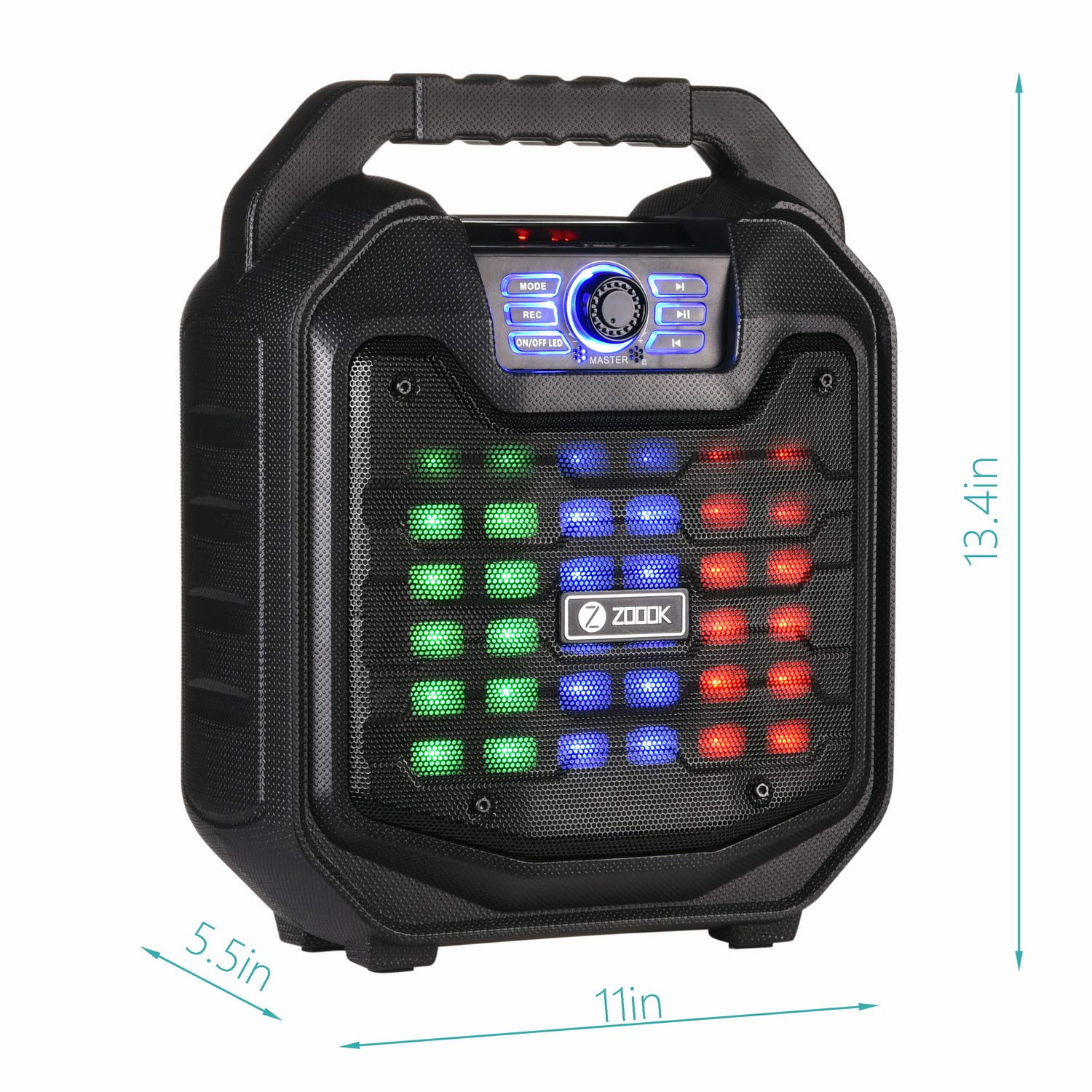
Image: A comparison table showing different models in the Zoook Thunder Series, including the Thunder 2, with specifications like microphone type, wattage, recording, and party lights.
Warranty and Support
Your Zoook Rocker Thunder 2 speaker comes with a 1-Year Warranty. For any queries, assistance, or support, please use the following contact methods:
- Toll-Free Number: 1800-103-3544
- Email Support: support@zoook.co.in
- Chat Support: Via Facebook at www.facebook.com/GoZoook
- Service Centre List: Find your nearest service center at https://goo.gl/eezwYW
Please provide us an opportunity to assist you and make your experience delightful!

Image: A graphic displaying Zoook's customer support options, including a toll-free number, email address, and Facebook chat link.
Ask a question about this manual
Ask about setup, troubleshooting, compatibility, parts, safety, or missing instructions. Manuals+ will review the question and use this page’s manual context to help answer it.