
Introduction
This manual provides detailed instructions for the safe and effective use of your Coniler Rechargeable Digital Hearing Amplifier. Please read this manual thoroughly before using the device to ensure proper operation and to maximize its lifespan.
Important Safety Information
- Consult a medical professional if you experience sudden hearing loss, ear pain, or discharge.
- Keep the device out of reach of children and pets to prevent accidental ingestion or damage.
- Do not expose the device to extreme temperatures, excessive moisture, or direct sunlight.
- Do not attempt to repair or modify the device yourself. Contact customer support for assistance.
- Use only the provided charging cable and adapter to prevent damage to the device and ensure safe charging.
Package Contents
Your Coniler Hearing Amplifier package should include the following items:
- Coniler Hearing Amplifier (1 unit)
- Charging Case
- USB Charging Cable
- Various sizes of ear domes (for optimal fit)
- Cleaning brush
- User Manual

Image: The Coniler Hearing Amplifier and its complete set of accessories, including the charging case, USB cable, various ear domes, and the user manual, as they appear in the package.
Product Overview
The Coniler Digital Hearing Amplifier is designed for adults and seniors, featuring dynamic compression for noise reduction and comfortable wear. Its advanced technology aims to provide clear sound in various environments.

Image: A visual diagram highlighting the key technological features of the hearing amplifier, such as noise reduction, digital chip processing, anti-drop coating, volume memory function, 3 environment modes, and feedback suppression capabilities.
Key Features:
- Noise Reduction: Incorporates speech noise synchronization detection optimization and layered noise reduction to minimize background distractions.
- Dynamic Compression: Effectively reduces background and low-frequency noise for clearer sound perception.
- Acoustic Feedback Cancellation: Designed to prevent whistling sounds, enhancing user comfort.
- Multiple Modes: Features 3 signal processing channels and 2 independent compression channels, offering optimized listening experiences for quiet, noisy, and strong noisy environments.
- Rechargeable: Equipped with a USB rechargeable battery for convenient and eco-friendly power.
- Comfortable Design: Utilizes a classic Behind-The-Ear (BTE) design for a secure and comfortable fit.
- Sweat and Water Resistant: Built to withstand daily exposure to sweat and light moisture, ensuring durability.

Image: The Coniler Hearing Amplifier with visible water droplets, demonstrating its sweat and water-resistant construction for enhanced durability in various conditions.
Setup and Fitting
- Choose the Right Ear Dome: Select an ear dome size that fits comfortably and securely in your ear canal. A proper fit is crucial to prevent sound leakage and feedback (whistling).
- Attach the Ear Tube and Dome: Securely attach the clear ear tube to the hearing amplifier's sound outlet. Then, firmly attach the chosen ear dome to the end of the ear tube.
- Adjust the Ear Tube Length: If the ear tube is too long or too short, it may cause discomfort or an improper fit. If necessary, carefully trim the ear tube to ensure the amplifier rests comfortably behind your ear while the dome sits securely in your ear canal.
- Place the Amplifier: Gently position the amplifier behind your ear. Guide the ear tube over the top of your ear and carefully insert the ear dome into your ear canal until it feels snug and comfortable.
Video: This instructional video provides a step-by-step guide on how to unbox, assemble, and correctly fit the Coniler Hearing Amplifier, including demonstrations of attaching the ear tube and dome, and proper placement behind the ear.

Image: A close-up view of a man wearing the Coniler Hearing Amplifier, illustrating its discreet and comfortable fit behind the ear during everyday activities.
Operating Instructions
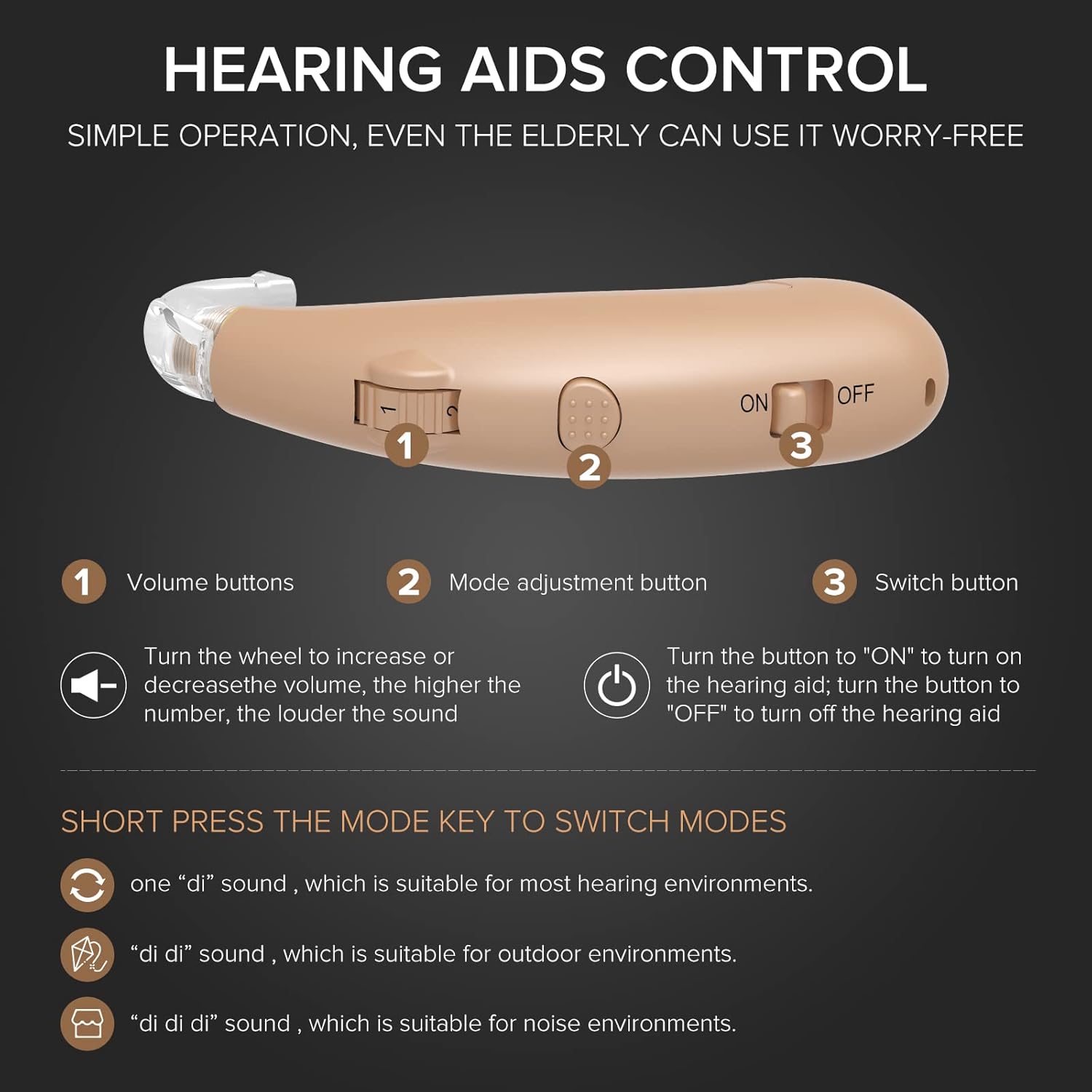
Image: A detailed view of the Coniler Hearing Amplifier's side, clearly showing the location of the volume adjustment buttons, the mode selection button, and the power ON/OFF switch.
- Power On/Off: Locate the switch button (typically labeled "ON/OFF") on the device. Slide it to the "ON" position to activate the hearing amplifier. To turn off the device, slide the switch to the "OFF" position.
- Adjust Volume: Use the designated volume buttons, which may be a wheel or a rocker switch, to increase or decrease the sound level. Adjust the volume gradually to a comfortable listening level. Higher numbers usually correspond to louder sound.
- Change Modes: Short press the mode adjustment button to cycle through the available listening modes. Each press will switch to the next mode, indicated by a distinct sound cue:
- One "di" sound: This mode is suitable for most general hearing environments.
- Two "di di" sounds: This mode is optimized for outdoor environments.
- Three "di di di" sounds: This mode is designed for noisy environments to enhance speech clarity.
Charging
The Coniler Hearing Amplifier is equipped with a built-in rechargeable battery for convenient use.
- Connect the small end of the USB charging cable to the charging port on the hearing amplifier.
- Connect the larger end of the USB cable to a compatible USB power adapter (not always included) or a USB port on a computer.
- A charging indicator light on the device will typically illuminate or change color to show that charging is in progress.
- Allow the device to charge for approximately 2-4 hours. A full charge provides power for up to two days of continuous use.

Image: The Coniler Hearing Amplifier connected to a USB charging cable, illustrating the correct method for charging the device and highlighting its battery life capabilities.
Maintenance
Cleaning:
- Regularly clean the ear domes and ear tubes with a soft, dry cloth to remove any moisture or residue.
- Use the provided cleaning brush to carefully remove any earwax or debris that may accumulate in the ear dome or sound outlet.
- Do not use water, alcohol, or other cleaning solutions directly on the amplifier unit, as this can cause damage.
Storage:
- When not in use, store the hearing amplifier in its charging case or a dry, cool place away from direct sunlight.
- Ensure the device is turned off before storing for extended periods to preserve battery life.
Troubleshooting
| Problem | Possible Cause | Solution |
|---|---|---|
| No sound or weak sound | Low battery, clogged ear dome, incorrect volume setting, device is off | Charge the device, clean the ear dome, increase volume, ensure the device is turned on |
| Whistling or feedback | Improper fit, ear dome too small, earwax buildup in ear canal | Re-seat the device for a snug fit, try a larger ear dome, consult a doctor for earwax removal |
| Sound is distorted | Ear dome clogged, volume set too high, low battery | Clean the ear dome, reduce the volume, charge the device |
| Device not charging | Charging cable not connected properly, faulty cable or adapter | Ensure a secure connection of the cable, try a different USB port or power adapter |
Specifications
- Brand: Coniler
- Model Number: 743829453328
- Material: Silicone
- Style: Behind-the-Ear (BTE)
- Power Source: Battery Powered (Rechargeable Lithium Ion)
- Battery Voltage: 3.7 Volts
- Control Type: Button Control
- Noise Control: Dynamic Compression, Acoustic Feedback Cancellation
- Recommended Uses: Quiet, Noisy, and Strong Noisy Environments
- Item Weight: 0.22 Pounds
Warranty and Support
The Coniler Hearing Amplifier comes with a 1-year quality assurance warranty from the date of purchase. This warranty covers manufacturing defects under normal use.
Additionally, a 3-month freedom return policy is available, allowing for returns within this period if you are not satisfied with the product.
For technical support, warranty claims, or any other inquiries, please refer to the contact information provided with your purchase or visit the official Coniler website for assistance.


