
1. Introduction
This instruction manual provides essential information for the setup, operation, and troubleshooting of your new Elekpia NS-RC4NA-18 Universal Remote Control. This remote is designed as a direct replacement for various Insignia TV models, offering immediate functionality without the need for complex programming or pairing.
2. Product Features
- Direct replacement for Insignia TV models: NS-39D310NA17, NS-50D510NA17, NS-50D510MX17, NS-32D311NA17, NS-32D311MX17, NS-40D420NA18, NS-49D420NA18, NS-55D420NA18, NS-40D420MX18, NS-55D420MX18, NS32D311NA17, NS32D311MX17, NS40D420NA18, NS49D420NA18, NS55D420NA18, NS40D420MX18, NS55D420MX18, NS39D310NA17, NS50D510NA17, NS50D510MX17.
- No programming or pairing required; ready to use upon battery installation.
- Universal compatibility with all Insignia LED LCD HDTVs.
- Ergonomic design with clearly labeled, responsive buttons.
3. Setup
3.1 Battery Installation
The remote control requires two (2) 1.5V AAA batteries for operation. Batteries are not included with the remote.
- Locate the battery compartment cover on the back of the remote control.
- Slide the cover downwards to open the compartment.
- Insert two (2) AAA batteries, ensuring the positive (+) and negative (-) ends align correctly with the indicators inside the compartment.
- Slide the battery compartment cover back into place until it clicks securely.
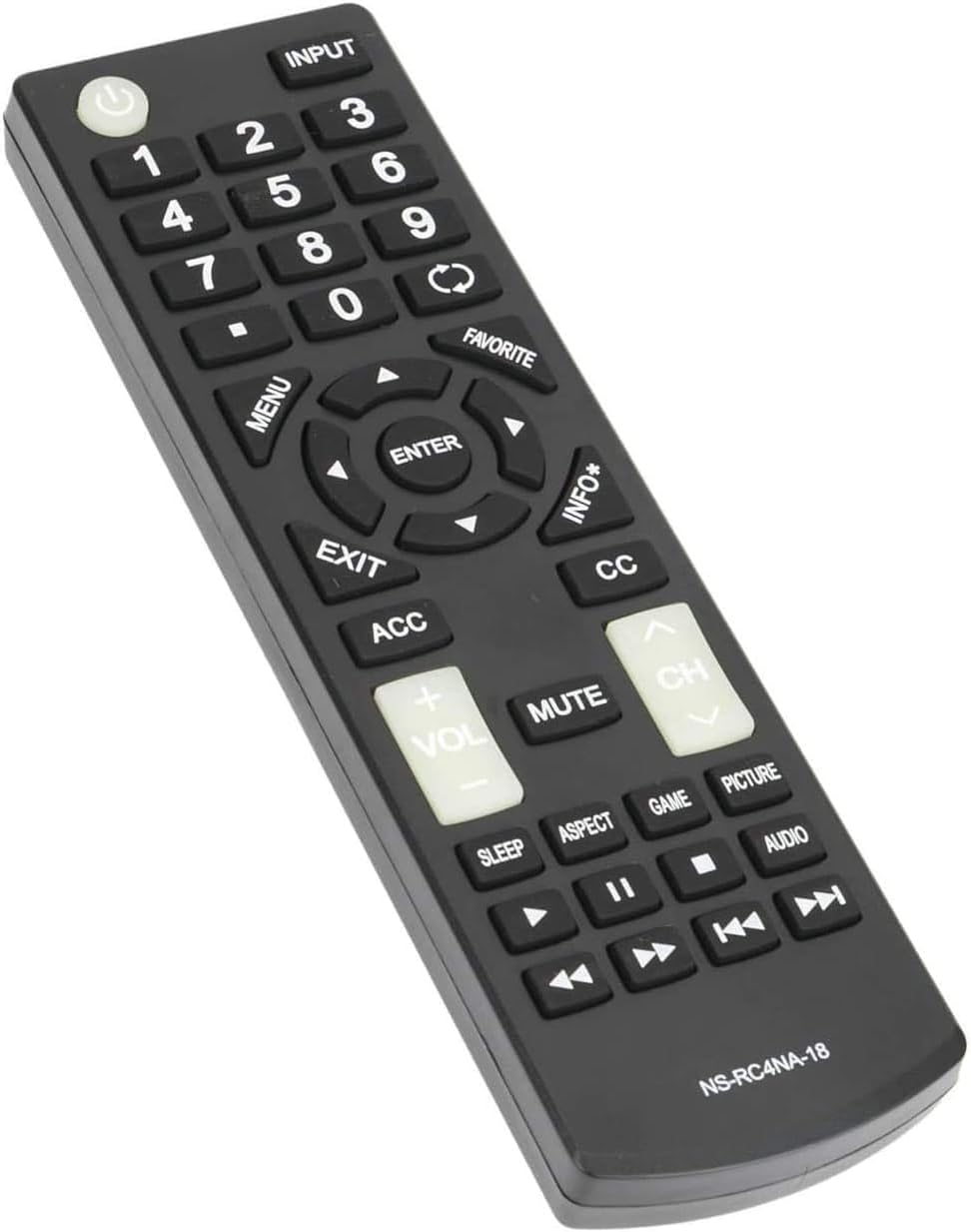
Figure 3.1: Battery compartment with AAA batteries inserted.
3.2 Initial Use
Once batteries are installed, the remote control is ready for immediate use with compatible Insignia TV models. No additional programming or pairing steps are required. Simply point the remote at your TV and begin operating it.
4. Operating Instructions
The Elekpia NS-RC4NA-18 remote control provides full functionality for your Insignia TV. Below are common button functions:

Figure 4.1: Overview of the remote control buttons.
- Power Button (⑁): Turns the TV on or off.
- Input: Cycles through available input sources (HDMI, AV, TV, USB).
- Number Pad (0-9): Directly selects channels or enters numerical values.
- Menu: Accesses the TV's main menu for settings adjustments.
- Navigation Buttons (Up, Down, Left, Right): Navigates through menus and options.
- Enter: Confirms selections in menus.
- Exit: Exits the current menu or on-screen display.
- ACC (Access): Provides quick access to certain features (functionality may vary by TV model).
- CC (Closed Caption): Toggles closed captions on or off.
- Volume (+/-): Adjusts the TV's volume level.
- Mute: Mutes or unmutes the TV's audio.
- Channel (CH +/-): Changes TV channels up or down.
- Sleep: Sets a sleep timer for the TV.
- Aspect: Adjusts the screen aspect ratio.
- Game: Activates or deactivates game mode (if supported by TV).
- Picture: Cycles through picture modes (e.g., Standard, Movie, Vivid).
- Audio: Cycles through audio modes (e.g., Standard, Music, Movie).
- Playback Controls (Play, Pause, Stop, Rewind, Fast Forward, Skip): Controls media playback if connected to a compatible device or USB.
5. Maintenance
To ensure the longevity and optimal performance of your remote control, follow these simple maintenance guidelines:
- Keep the remote clean by wiping it with a soft, dry cloth. Avoid using liquid cleaners or abrasive materials.
- Do not expose the remote to extreme temperatures, direct sunlight, or high humidity.
- Avoid dropping the remote or subjecting it to strong impacts.
- If the remote will not be used for an extended period, remove the batteries to prevent leakage and potential damage.
6. Troubleshooting
If your remote control is not functioning as expected, please follow these troubleshooting steps:
- Check Batteries: Ensure new 1.5V AAA batteries are correctly installed with the positive and negative ends in the right direction.
- Power Cycle Remote:
- Remove the batteries from the remote control.
- Press every button on the remote for 2 seconds to drain any residual power. This also helps to check for stuck buttons.
- Reinstall new batteries into the remote.
- Power Cycle TV: Sometimes the issue may be with your TV or soundbar.
- Unplug the TV from the power outlet.
- Hold the TV's power button (on the TV itself, not the remote) for 20 seconds.
- Plug the TV back in and power it on.
- Obstruction Check: Ensure there are no obstructions between the remote control and the TV's infrared sensor.
- Line of Sight: Make sure you are within the effective range and direct line of sight of the TV's sensor.
If the remote still does not work after performing these steps, please contact customer support for further assistance.
7. Specifications
| Feature | Detail |
|---|---|
| Product Dimensions | 6.5 x 1.8 x 0.6 inches |
| Item Weight | 2.89 ounces |
| Model Number | Elekpia NS-RC4NA-18 |
| Batteries Required | 2 x 1.5V AAA batteries |
| Compatible Devices | Insignia Televisions (LED LCD HDTVs) |
| Color | Black |
| Manufacturer | Elekpia Factory |
| Country of Origin | China |
8. Media Gallery
Below are additional visual aids for your Elekpia NS-RC4NA-18 remote control.
8.1 Product Images

Image 8.1.1: Front view of the remote control.
This image displays the full layout of the remote control, highlighting the power button, number pad, navigation cluster, volume, and channel controls.
Image 8.1.2: Angled view of the remote control.
An angled perspective of the remote, showcasing its ergonomic design and slim profile for comfortable handling.
8.2 Official Product Videos
No official product videos from the seller are available in the provided data for embedding in this manual.
9. Warranty and Support
Specific warranty information for the Elekpia NS-RC4NA-18 remote control is not provided in the product data. For warranty details, technical support, or any inquiries not covered in this manual, please contact the manufacturer, Elekpia Factory, directly through their official channels or the retailer from whom the product was purchased.
Keep your purchase receipt or order confirmation as proof of purchase for any warranty claims.