
1. Introduction
The Hot Wheels id Smart Track Kit offers a unique blend of physical racing and digital gameplay. This system allows users to measure vehicle speed, count laps, and track performance on specially designed tracks. The kit includes two exclusive Hot Wheels id racers, 16 assorted track pieces, and the Smart Portal, enabling a dynamic and interactive play experience.
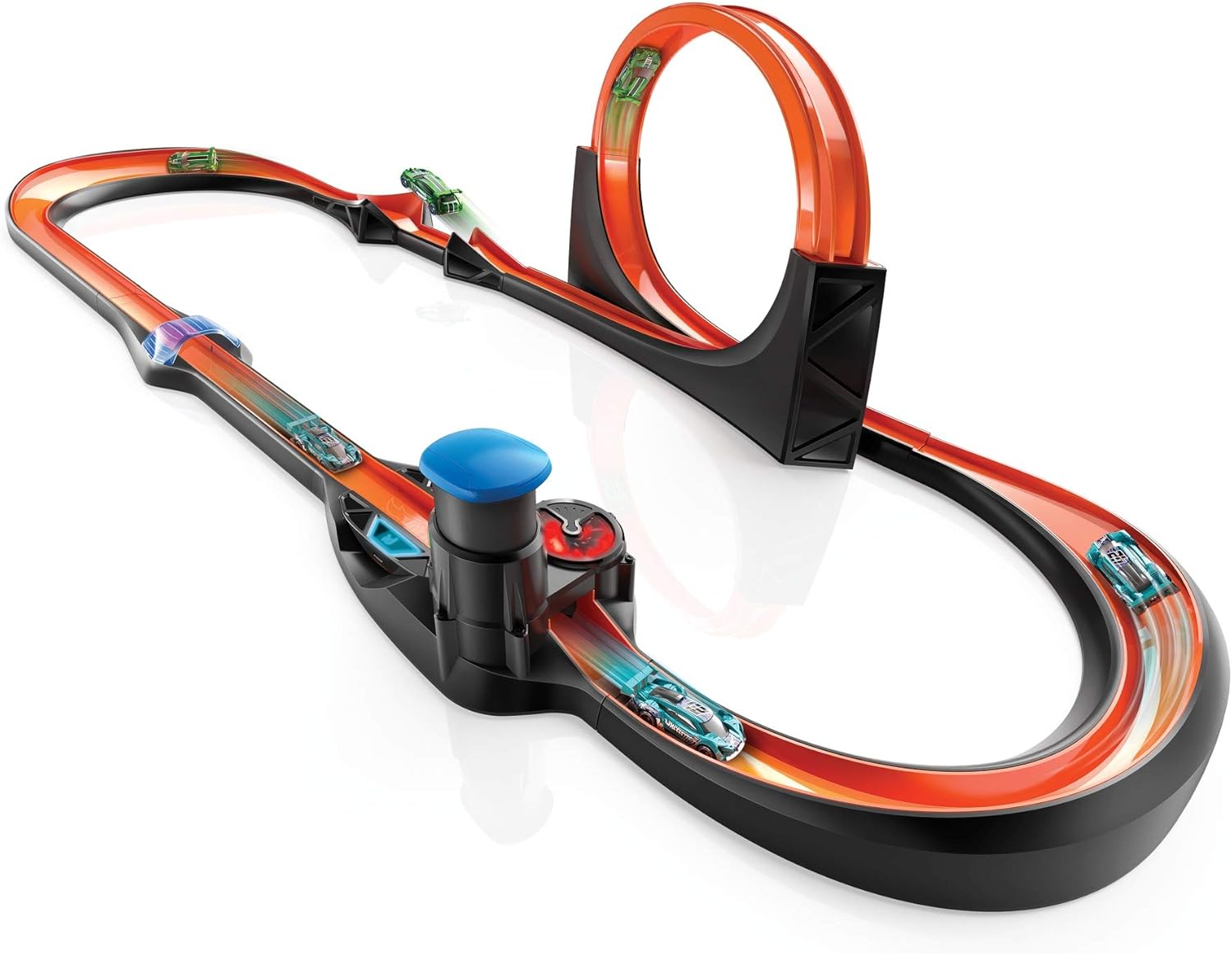
Image 1: The Hot Wheels id Smart Track Kit assembled with cars.
2. Package Contents
Verify that all components listed below are present in your Hot Wheels id Smart Track Kit:
- 1 Hot Wheels id Smart Track Portal
- 2 Exclusive Hot Wheels id Racers
- 16 Assorted Track Pieces (including connectors, curves, straights, ramps, finish line, booster, and loop components)
- 1 Lithium Polymer battery (included)

Image 2: Packaging displaying the kit contents and various track configurations.
3. Setup Instructions
Follow these steps to assemble your Hot Wheels id Smart Track Kit:
- Battery Installation: Ensure the included Lithium Polymer battery is correctly installed in the Smart Portal.
- Track Assembly: Connect the track pieces using the provided connectors. The track pieces are designed for easy snap-together assembly. Refer to the diagrams on the product packaging for suggested layouts, or create your own custom designs.
- Smart Portal Placement: Integrate the Smart Portal into your track layout. The portal is crucial for digital interaction.
- App Connection: Download the Hot Wheels id app on your smartphone or tablet. Ensure your device's Bluetooth is enabled. Open the app and follow the on-screen instructions to connect to the Smart Portal.

Image 3: Demonstrating the connection of track pieces and their digital representation in the app.

Image 4: Examples of various track layouts that can be built with the kit.
4. Operating Instructions
The Hot Wheels id Smart Track offers both physical and digital play modes.
4.1. App Integration and Car Scanning
To unlock the full potential of the Hot Wheels id system, use the companion app:
- Scan id Cars: Place your Hot Wheels id car on the Smart Portal. The app will automatically scan and identify the vehicle, adding it to your digital garage.
- Digital Play: Once scanned, your car's performance data (speed, laps, stunts) will be tracked and recorded in the app. Engage in mini-games and challenges within the app.

Image 5: Scanning a Hot Wheels id car with the Smart Portal and viewing it in the app.

Image 6: The Hot Wheels id app displaying real-time speed and lap data.
4.2. Using the Booster
The powerful booster launches cars at high speeds. To operate the booster effectively:
- Ensure the booster is powered on before placing a car.
- Place the Hot Wheels id car at the booster's entry point.
- Press the booster button to launch the car.
- For optimal performance and to prevent cars from flying off the track, aim to keep the booster's revs in the 'blue zone' as indicated by the app or the booster's lights. Avoid 'redlining' the booster.
4.3. App Play Modes
The app features various play modes:
- Free Play: Experiment with different track configurations and measure car performance without specific objectives.
- Campaign Mode: Complete guided challenges to earn rewards and unlock new content. Challenges may involve specific lap counts, speed targets, or rev limits.
4.4. Offline Play
The Smart Track can be used without a connected smart device. In offline mode, the portal will still track basic information, which will be synchronized with the app once a connection is re-established.
Video 1: Official Hot Wheels id Smart Track - How to Use Guide. This video provides a detailed walkthrough of connecting the app, using the booster, and understanding different play modes.
5. Maintenance
To ensure the longevity and optimal performance of your Hot Wheels id Smart Track Kit:
- Cleaning: Wipe track pieces and the Smart Portal with a dry, soft cloth. Avoid using harsh chemicals or abrasive cleaners.
- Storage: Store the track pieces and cars in a clean, dry place away from direct sunlight and extreme temperatures. Disassemble the track for compact storage if needed.
- Battery Care: If the product will not be used for an extended period, remove the Lithium Polymer battery from the Smart Portal.
6. Troubleshooting
If you encounter issues with your Hot Wheels id Smart Track Kit, refer to the following common problems and solutions:
| Problem | Solution |
|---|---|
| Car not recognized by the app. | Ensure the car is a Hot Wheels id vehicle. Place the car correctly on the Smart Portal. Check app connection and device Bluetooth. |
| Booster not launching cars. | Verify the battery is charged and correctly installed. Ensure the booster is powered on. Do not place cars in the booster before it is running. |
| Cars flying off the track. | Reduce the booster's power by adjusting your pumping technique to stay within the 'blue zone' in the app. Ensure track pieces are securely connected and on a flat surface. |
| "Car Not Allowed" or "Wrong Track Piece" error in app. | For specific challenges, ensure you are using the correct car or track configuration as required by the event. Remove any unneeded track pieces or cars from the portal. |
| App not connecting to Smart Portal. | Check that Bluetooth is enabled on your device. Ensure the Smart Portal is turned on. Restart both the app and the Smart Portal if necessary. |
7. Specifications
- Product Dimensions: 10.24 x 21.06 x 19.09 inches
- Item Weight: 15.92 pounds
- ASIN: B07MX1XZLT
- Item Model Number: GFP20
- Manufacturer Recommended Age: 8 - 12 years
- Batteries: 1 Lithium Polymer battery required (included)
- Release Date: July 12, 2019
- Manufacturer: Mattel
8. Warranty and Support
For warranty information, product support, or to purchase replacement parts, please visit the official Hot Wheels website or contact Mattel customer service. Keep your proof of purchase for warranty claims.
Official Hot Wheels Store: Visit the Hot Wheels Store on Amazon