
Geepas GMS8507BT
Geepas GMS8507BT 2.1 Multimedia Speaker System User Manual
Model: GMS8507BT | Brand: Geepas
Introduction
This user manual provides detailed instructions for the setup, operation, and maintenance of your Geepas GMS8507BT 2.1 Multimedia Speaker System. Please read this manual thoroughly before using the product to ensure proper functionality and safety.

Figure 1: Geepas GMS8507BT 2.1 Multimedia Speaker System, showing the central subwoofer unit and two satellite speakers.
Package Contents
Before proceeding with the setup, please ensure all components are present and in good condition.
- 1 x Geepas GMS8507BT Subwoofer Unit
- 2 x Satellite Speakers
- 1 x Remote Control
- 1 x Audio Cable (e.g., 3.5mm to RCA)
- 1 x User Manual (this document)
Setup Guide
1. Component Identification
Familiarize yourself with the main components of your speaker system.
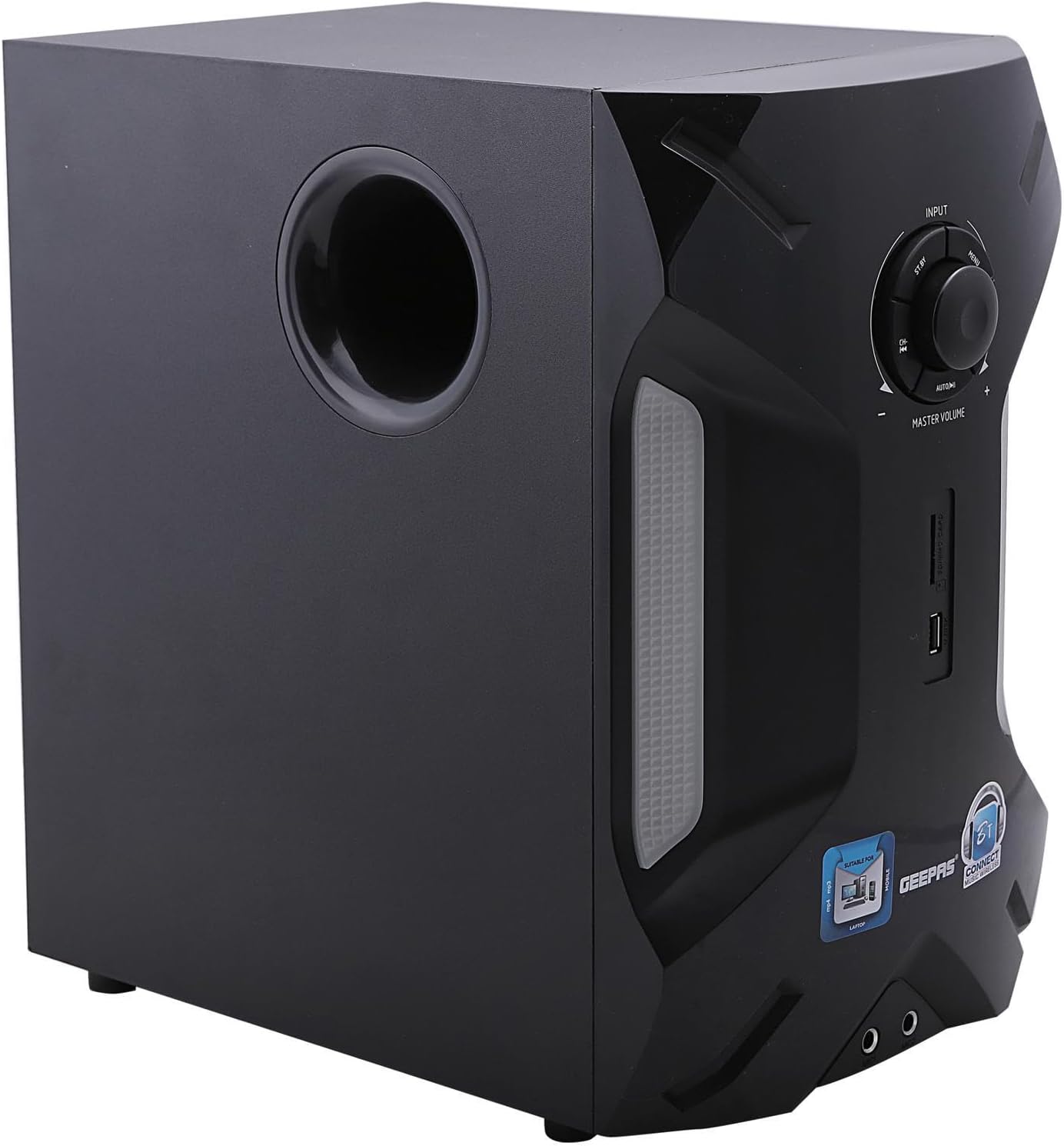
Figure 2: Front panel of the subwoofer, featuring the master volume knob, input selection buttons, USB port, and SD card slot.

Figure 3: A single satellite speaker, designed to complement the subwoofer for a full audio experience.
2. Connection Guide
Follow these steps to connect your speaker system to a power source and audio devices.
- Positioning: Place the subwoofer on a stable surface. Position the satellite speakers to the left and right of your listening area for optimal stereo separation.
- Connect Satellite Speakers: Connect the cables from the satellite speakers to the corresponding output ports on the rear of the subwoofer unit. Ensure a secure connection.
- Connect Audio Source:
- Using 2-Channel Direct (RCA): Connect one end of the provided audio cable (or your own RCA cable) to the "AUDIO INPUT" ports on the subwoofer's rear panel (Figure 4). Connect the other end to the audio output of your device (PC, TV, DVD player, etc.).
- Using USB/SD: For direct playback from USB drives or SD cards, insert them into the respective slots on the front panel of the subwoofer (Figure 2).
- Power Connection: Connect the power cord to the power input on the rear of the subwoofer (Figure 4) and then plug it into a standard electrical outlet.

Figure 4: Rear panel of the subwoofer, displaying audio input ports, satellite speaker outputs, and the power input.
Operating Instructions
1. Power On/Off
Press the POWER button on the front panel of the subwoofer or on the remote control to turn the system on or off.
2. Input Selection
Press the INPUT button on the front panel (Figure 2) or the remote control to cycle through available input modes: Bluetooth, USB, SD, FM Radio, and AUX (2-Channel Direct).
3. Volume Control
Rotate the MASTER VOLUME knob on the front panel (Figure 2) clockwise to increase volume and counter-clockwise to decrease. Alternatively, use the VOL+ and VOL- buttons on the remote control.
4. Bluetooth Pairing
- Switch the speaker system to Bluetooth mode using the INPUT button. The LED display will show "BT".
- On your Bluetooth-enabled device (smartphone, tablet, etc.), enable Bluetooth and search for available devices.
- Select "GMS8507BT" from the list of devices.
- Once paired, the system will indicate a successful connection, and you can play audio from your device.
5. USB/SD Playback
Insert a USB flash drive or SD card containing MP3 audio files into the respective slot on the front panel. The system will automatically switch to USB or SD mode and begin playback. Use the PLAY/PAUSE, PREV, and NEXT buttons on the front panel or remote control to manage playback.
6. FM Radio Operation
In FM mode, press the PLAY/PAUSE button to auto-scan and save available radio stations. Use the PREV and NEXT buttons to navigate between saved stations.
7. RGB Light Function
The speaker system features integrated RGB lighting. The lights will illuminate automatically when the system is powered on, enhancing the audio experience. There is no specific control for the RGB lights; they operate in conjunction with the system's power state.

Figure 5: The speaker system showcasing its dynamic RGB lighting feature during operation.
Maintenance
Proper maintenance ensures the longevity and optimal performance of your speaker system.
- Cleaning: Use a soft, dry cloth to wipe the surfaces of the speakers and subwoofer. Do not use liquid cleaners, aerosols, or abrasive materials, as these can damage the finish or internal components.
- Ventilation: Ensure that the subwoofer's ventilation ports are not blocked to prevent overheating.
- Storage: When not in use for extended periods, store the speaker system in a cool, dry place away from direct sunlight and extreme temperatures.
Troubleshooting
If you encounter issues with your Geepas GMS8507BT speaker system, refer to the following common problems and solutions.
| Problem | Possible Cause | Solution |
|---|---|---|
| No power | Power cord not connected; Power outlet not active; System is off. | Ensure power cord is securely plugged into the subwoofer and a live electrical outlet. Press the POWER button to turn on the system. |
| No sound | Incorrect input mode; Volume too low; Audio cable not connected properly; Device volume too low. | Press INPUT to select the correct source. Increase MASTER VOLUME. Check audio cable connections. Increase volume on your connected device. |
| Bluetooth not connecting | Speaker not in Bluetooth mode; Device Bluetooth off; Device too far; Interference. | Ensure speaker is in Bluetooth mode. Turn on Bluetooth on your device. Move device closer to the speaker. Avoid strong electromagnetic interference. |
| USB/SD playback issues | Unsupported file format; Corrupted files; USB/SD card not inserted correctly. | Ensure files are in MP3 format. Try a different USB drive/SD card. Reinsert the USB/SD card. |
Specifications
Key technical specifications for the Geepas GMS8507BT 2.1 Multimedia Speaker System.
- Model Number: GMS8507BT
- Speaker Configuration: 2.1 Channel Multimedia Speaker
- Speaker Maximum Output Power: 35000 Watts (PMPO)
- Connectivity Technology: Bluetooth, USB, SD, FM Radio, 2-Channel Direct (AUX)
- Audio Output Mode: Surround
- Mounting Type: Tabletop
- Package Dimensions: 45 x 45 x 43.6 cm
- Item Weight: 11.72 kg
- Manufacturer: GEEPAS
- Country of Origin: China

Figure 6: Side view of the subwoofer, highlighting the bass reflex port for enhanced low-frequency sound.

Figure 7: Overview of key features and specifications, including 2 years warranty information.
Note: The image refers to model GMS8507N, which shares similar specifications with GMS8507BT.
Warranty and Support
The Geepas GMS8507BT 2.1 Multimedia Speaker System typically comes with a standard manufacturer's warranty. Please refer to the warranty card included in your package or the product's official documentation for specific terms and conditions. Some regions may offer an extended warranty, such as the 1-Year or 2-Year Extended Warranty by Salama Care, available for purchase separately.
For technical support, service, or warranty claims, please contact Geepas customer support through their official website or the contact information provided with your product purchase.
For more information, you may visit the Geepas Store on Amazon.
Ask a question about this manual
Ask about setup, troubleshooting, compatibility, parts, safety, or missing instructions. Manuals+ will review the question and use this page’s manual context to help answer it.