
Introduction
Thank you for purchasing the AJ-69 V2.0 Portable Bluetooth Speaker. This manual provides detailed instructions for setting up, operating, and maintaining your speaker to ensure optimal performance and longevity. Please read this manual thoroughly before using the product.

Image 1: Front view of the AJ-69 V2.0 Portable Bluetooth Speaker, showcasing its spherical design and illuminated light ring.
Features
- Microphone Mini USB Port: Equipped with an omni-directional high-quality microphone for hands-free calls. The speaker is charged via the Mini USB Port.
- High Quality Sound: Delivers crisp and clear audio output.
- Portable Design: Tiny and lightweight, making it easy to carry.
- Modern Style: Features an orb shape with a cool, modern aesthetic.
- Bluetooth Connectivity: Bluetooth Version 2.0 EDR for wireless audio streaming with a working range of up to 10 meters.
- AUX Audio Port: Includes a 3.5mm audio cable port for wired connections.
- Broad Compatibility: Compatible with MP3, MP4 players, mobile phones, computers, laptops, tablets, iPods, and other devices with audio cable or USB ports.
Package Contents
Please check the package for the following items:
- 1 x AJ-69 V2.0 Portable Bluetooth Speaker
- 1 x 3.5mm Audio Cable
- 1 x Mini USB Cable
Setup
1. Charging the Speaker
Before first use, fully charge the speaker. Connect the supplied Mini USB Cable to the speaker's Mini USB Port and the other end to a USB power source (e.g., computer USB port, USB wall adapter). The charging indicator light will typically illuminate during charging and turn off or change color when fully charged.
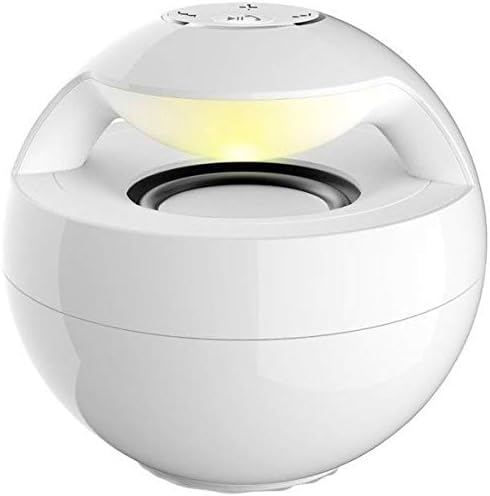
Image 2: Rear view of the speaker, highlighting the Mini USB charging port and the 3.5mm AUX audio input port.
2. Powering On/Off
- To Power On: Locate the power button (usually on the top or bottom of the speaker) and press and hold it for a few seconds until you hear an audible prompt or see an indicator light illuminate.
- To Power Off: Press and hold the power button again for a few seconds until the speaker powers down.
3. Bluetooth Pairing
- Ensure the speaker is powered on and in Bluetooth pairing mode (often indicated by a flashing LED light).
- On your device (smartphone, tablet, laptop), enable Bluetooth and search for available devices.
- Select "AJ-69" or a similar name from the list of found devices.
- Once paired, the speaker will usually provide an audible confirmation, and the LED indicator will stop flashing and remain solid.
- If prompted for a password, enter "0000" (four zeros).
4. AUX Connection
For devices without Bluetooth, or if you prefer a wired connection:
- Connect one end of the supplied 3.5mm Audio Cable to the AUX port on the speaker.
- Connect the other end of the 3.5mm Audio Cable to the headphone jack or audio output port of your device.
- The speaker should automatically switch to AUX mode.
Operating Instructions
1. Audio Playback
- After successful Bluetooth pairing or AUX connection, start playing audio on your connected device.
- Use the volume controls on your connected device or the speaker's integrated controls (if available) to adjust the volume.
- Some speakers may have buttons for Play/Pause, Next Track, and Previous Track. Refer to the button layout on your specific unit.

Image 3: Top view of the speaker, illustrating the control buttons for power, volume, and playback.
2. Hands-free Calls
- When a call comes in while connected via Bluetooth, the speaker will typically ring.
- Press the multi-function button (often the Play/Pause button) once to answer the call.
- Speak into the speaker's built-in microphone.
- Press the multi-function button again to end the call.
- To reject an incoming call, press and hold the multi-function button for a few seconds.
Maintenance
- Keep the speaker away from water, moisture, and extreme temperatures.
- Clean the speaker with a soft, dry cloth. Do not use abrasive cleaners or solvents.
- Avoid dropping the speaker or subjecting it to strong impacts.
- When not in use for extended periods, store the speaker in a cool, dry place and charge it periodically to maintain battery health.
Troubleshooting
| Problem | Possible Solution |
|---|---|
| Speaker does not power on. | Ensure the speaker is fully charged. Connect it to a power source using the Mini USB cable. |
| No sound from speaker. | Check the volume level on both the speaker and the connected device. Ensure the speaker is correctly paired via Bluetooth or connected via AUX. Try restarting both devices. |
| Cannot pair via Bluetooth. | Ensure the speaker is in pairing mode. Turn off Bluetooth on your device and turn it back on. Delete "AJ-69" from your device's Bluetooth list and try pairing again. Ensure no other devices are currently connected to the speaker. Keep devices within the 10-meter range. |
| Poor sound quality. | Move the speaker closer to the connected device to reduce interference. Ensure the audio source is of good quality. Check the 3.5mm audio cable for damage if using AUX. |
Specifications
| Model | AJ-69 (Item Model Number: 2724291970436) |
| Rated Impedance | 4 Ohm |
| Speaker Size | 2 inches |
| Rated Power | 3W |
| Frequency Response | 170Hz~15kHz |
| S/N Ratio | ≥ 78 dB |
| Dimensions | 95 x 95 x 90 mm (Product Dimensions: 9.6 x 11.8 x 11.8 cm) |
| Weight | 216g (Product Weight: 372 g) |
| Bluetooth Version | 2.0 EDR |
| Working Range | 10m |
| Port Type | 3.5mm Audio Cable Port (AUX) & Mini USB Port |
| Connectivity Technology | Wired, Wireless |
| Audio Output Mode | Stereo |
| Mounting Type | Tabletop |
| Compatible Devices | MP3, MP4, mobile phones, computers, laptops, tablets, iPod, Smartphone, Personal Computer |
Warranty and Support
For warranty information and customer support, please refer to the documentation provided at the time of purchase or contact your retailer. Keep your proof of purchase for any warranty claims.


