
1. Introduction
Thank you for purchasing the Olafus OLAFUS-02SK Portable Bluetooth Bike Speaker. This manual provides essential information for setting up, operating, and maintaining your speaker. Please read it carefully before use to ensure optimal performance and longevity of your device.

The Olafus Portable Bluetooth Bike Speaker, model OLAFUS-02SK, is designed for easy attachment to bicycle handlebars, providing audio during rides.
2. Package Contents
- 1 x Portable Speaker
- 1 x Detachable Bike Stand
- 1 x Hook
- 1 x 3.5mm Audio Cable
- 1 x User Guide
3. Product Overview
Familiarize yourself with the speaker's components and controls.
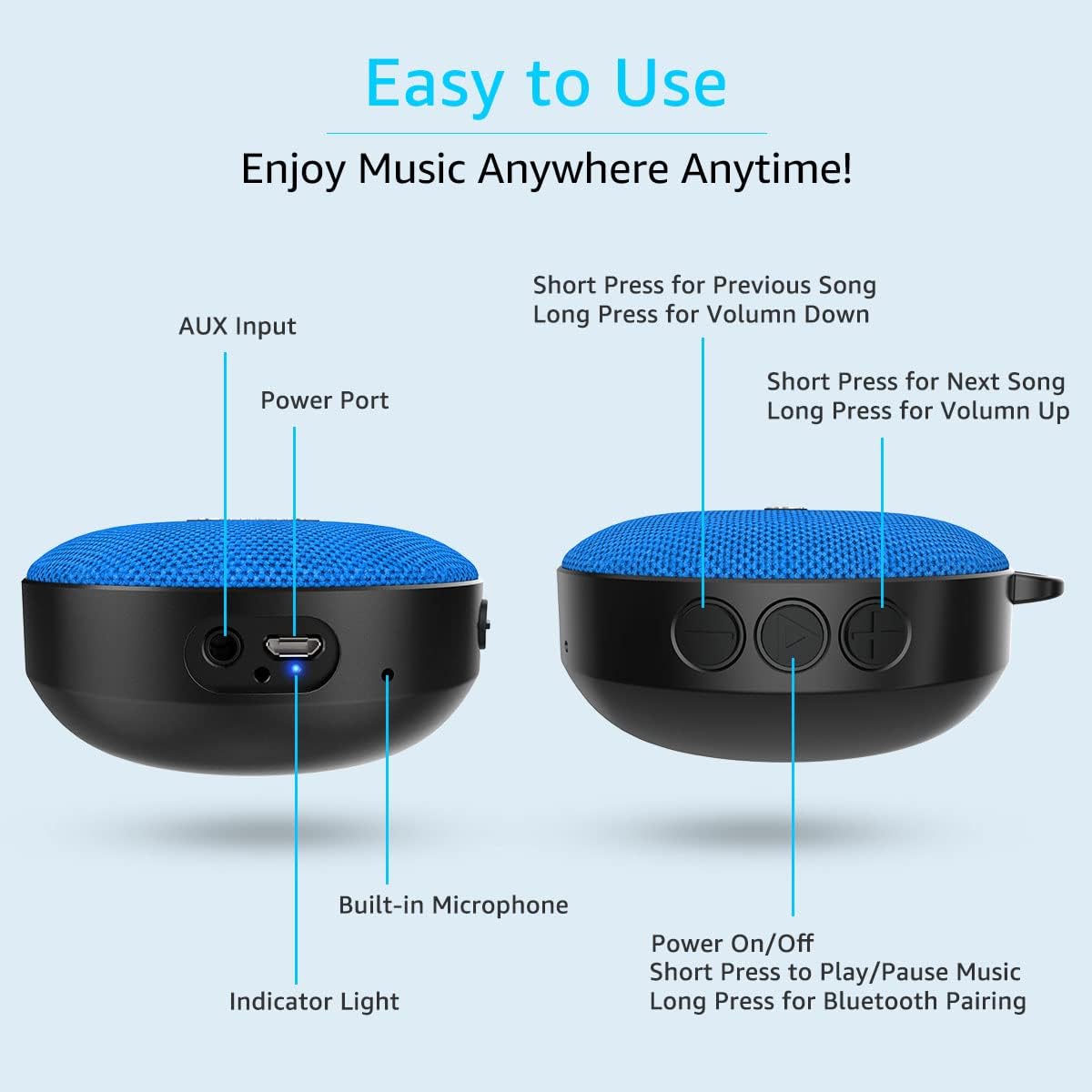
This diagram illustrates the AUX input, power port, built-in microphone, indicator light, and control buttons for power, play/pause, volume, and track selection.
4. Setup
4.1. Mounting the Speaker
- Attach the detachable bike stand to your bicycle handlebars using the provided screw and gripping strips. Ensure it is securely fastened.
- Align the speaker with the bike stand and press it firmly until it clicks into place.

The speaker comes with a detachable bike mount and gripping strips, allowing secure attachment to bicycle handlebars and easy removal.
4.2. Powering On/Off
- To power on, short press the Power On/Off button.
- To power off, short press the Power On/Off button again.
4.3. Bluetooth Pairing
- Power on the speaker. The indicator light will flash, indicating it's in pairing mode.
- On your device (smartphone, tablet, etc.), enable Bluetooth and search for "Olafus OLAFUS-02SK".
- Select the speaker from the list to connect. Once connected, the indicator light will remain solid.
4.4. Wired Connection (AUX Input)
For non-Bluetooth devices, connect the speaker using the supplied 3.5mm audio cable to the AUX input port.
This video demonstrates the installation of the Olafus Bluetooth Bike Speaker on a bicycle and highlights its sound quality during a ride.
5. Operating Instructions
5.1. Music Playback
- Play/Pause: Short press the Play/Pause button.
- Next Song: Short press the 'Next Song' button.
- Previous Song: Short press the 'Previous Song' button.
- Volume Up: Long press the 'Volume Up' button.
- Volume Down: Long press the 'Volume Down' button.
5.2. Call Handling
The built-in microphone allows for hands-free calling when connected via Bluetooth.
- Answer Call: Short press the Play/Pause button.
- End Call: Short press the Play/Pause button.
- Reject Call: Long press the Play/Pause button.
5.3. Waterproof Feature (IP65)
The speaker is rated IP65 waterproof, making it resistant to dust and water splashes. It is suitable for outdoor use and can withstand rain or splashes from a shower or pool.

The speaker is IP65 waterproof, making it suitable for use in various water environments such as showers, pools, and beaches.
5.4. Portability
The speaker's detachable design and included hook enhance its portability for various activities.
- Easily detach the speaker from the bike mount to carry it with you.
- Use the metal hook to hang it on bags, tents, or other suitable locations.

The speaker features a metal hook for easy attachment to backpacks, making it a convenient companion for outdoor activities like hiking.
6. Maintenance
- Cleaning: Wipe the speaker with a soft, damp cloth. Do not use harsh chemicals or abrasive cleaners.
- Storage: Store the speaker in a cool, dry place when not in use. Avoid extreme temperatures.
- Battery Care: To prolong battery life, fully charge the speaker before its first use and recharge it regularly, even if not used frequently.
7. Troubleshooting
- Speaker won't turn on: Ensure the battery is charged. Connect to a power source and try again.
- Cannot pair via Bluetooth: Make sure the speaker is in pairing mode (flashing indicator light). Check that Bluetooth is enabled on your device and that the speaker is within range (10 meters). Forget previous pairings on your device and try again.
- No sound: Check the volume levels on both the speaker and your connected device. Ensure the speaker is correctly paired or the AUX cable is securely connected.
- Poor sound quality: Move closer to your connected device to improve Bluetooth signal. Ensure there are no obstructions between the speaker and your device.
8. Specifications
| Brand | Olafus |
| Model Number | OLAFUS-02SK |
| Connectivity Technology | Bluetooth 5.0 |
| Speaker Maximum Output Power | 100 Watts |
| Audio Output Mode | Stereo |
| Water Resistance Level | IP65 Waterproof |
| Battery Average Life | 10 Hours |
| Battery Capacity | 1200 Milliamp Hours |
| Number of Microphones | 1 |
| Bluetooth Range | 10 Meters |
| Control Method | Touch |
| Compatible Devices | Desktop, Laptop, MP3 Player, Projector, Smartphone, Tablet, Television |
| Specific Uses For Product | Bicycle, Outdoor, Pool, Riding |
9. Warranty and Support
The Olafus OLAFUS-02SK Portable Bluetooth Bike Speaker comes with a limited warranty. For detailed warranty information, product support, or any inquiries, please refer to the contact information provided in the original packaging or visit the official Olafus website.


