
1. Introduction and Overview
The Fender Original Tuner FT-1 is a compact, vibration-based clip-on tuner designed for accurate tuning of various stringed instruments, including guitars, basses, ukuleles, and mandolins. Its intuitive design and clear display make it suitable for musicians of all levels. This manual provides essential information for setup, operation, and maintenance of your tuner.

Figure 1: Fender Original Tuner FT-1, general view.
2. Product Features
- Vibration-Based Tuning Engine: Ensures precise and dependable tuning by detecting vibrations directly from the instrument.
- Bright LCD Screen: Provides clear visibility of tuning information in various lighting conditions.
- 360-Degree Angle-Adjustable Swivel: Allows for optimal viewing from any angle.
- Compact and Lightweight Design: Easily clips onto instrument headstocks without obstruction.
3. Setup
3.1 Battery Installation
- Locate the battery compartment on the back of the tuner.
- Open the compartment cover.
- Insert one CR2 battery, ensuring correct polarity (+/-).
- Close the battery compartment cover securely.
3.2 Attaching to Instrument
The tuner features a padded clip designed to securely attach to the headstock of your instrument without causing damage.
- Gently open the clip.
- Attach the tuner to a suitable, flat surface on your instrument's headstock. Ensure the clip is firm but not overly tight.
- Adjust the tuner's display angle using the 360-degree swivel for optimal viewing.

Figure 2: Tuner attached to a guitar headstock.
4. Operating Instructions
4.1 Powering On/Off
Press and hold the power button (usually located in the center of the control panel) for approximately 2 seconds to turn the tuner on or off.
4.2 Tuning Your Instrument
The Fender Original Tuner uses a vibration sensor to detect the pitch of your instrument.
- Ensure the tuner is powered on and securely clipped to your instrument's headstock.
- Pluck a single string on your instrument. The tuner's display will show the detected note and indicate whether it is sharp, flat, or in tune.
- Adjust the tuning peg of the string until the display indicates the correct note and the indicator is centered, signifying accurate pitch.
- Repeat for all strings.
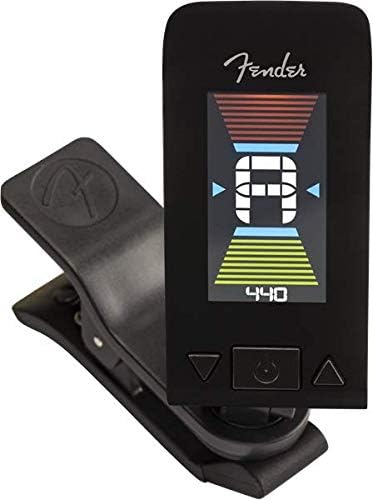
Figure 3: Tuner display indicating a note and tuning status.
4.3 Adjusting A440 Reference Pitch (if applicable)
Some tuners allow adjustment of the A440 reference pitch. If your model supports this, use the arrow buttons (◀ and ▶) to increase or decrease the reference frequency. The standard reference pitch is A=440Hz.
5. Maintenance
5.1 Cleaning
Wipe the tuner with a soft, dry cloth. Avoid using abrasive cleaners or solvents, as these can damage the finish or electronic components.
5.2 Battery Replacement
When the display dims or the tuner becomes unresponsive, it is time to replace the battery. Follow the battery installation steps in Section 3.1.
5.3 Storage
For prolonged periods of non-use, it is recommended to remove the battery from the tuner to prevent battery drain and potential leakage. Store the tuner in a cool, dry place away from direct sunlight and extreme temperatures.
6. Troubleshooting
- Tuner does not power on: Ensure the battery is correctly installed and fully charged. Replace the battery if necessary.
- Inaccurate tuning: Ensure the tuner is securely clipped to the instrument's headstock. Pluck strings clearly and individually. Environmental noise can sometimes interfere; try tuning in a quieter environment.
- Difficulty detecting low notes (e.g., low B string on a 5-string bass): Some clip-on tuners may have limitations in accurately detecting very low frequencies. Ensure the string is plucked firmly and clearly. If issues persist, an alternative tuning method may be required for such specific applications.
- Display is dim or flickering: This indicates a low battery. Replace the battery.
7. Specifications
| Feature | Specification |
|---|---|
| Brand | Fender |
| Model Name | Original Tuner FT-1 |
| Model Number | 239979006 |
| Tuning Method | Vibration Sensor |
| Display | LCD with 360-degree swivel |
| Battery Type | 1 x CR2 Lithium Battery |
| Approximate Height | 2.7 inches (6 cm) |
| Item Weight | 0.002 ounces (approx. 0.05 grams) |

Figure 4: Approximate dimensions of the tuner.
8. Warranty and Support
For warranty information, technical support, or service inquiries, please refer to the documentation included with your purchase or visit the official Fender website. You may also consult the comprehensive User Manual (PDF) for additional details.


