
PIFCO P40013
Pifco P40013 Portable 3-In-1 Air Conditioner User Manual
Model: P40013 | Brand: PIFCO
Product Overview
The Pifco P40013 is a versatile 3-in-1 portable unit designed to enhance your indoor comfort. It functions as an air conditioner, a fan, and a dehumidifier, making it suitable for various environments such as homes, caravans, conservatories, and office spaces up to 30 square meters. This unit features a 9000 BTU cooling capacity, a 24-hour programmable timer, and two fan speed settings. For ease of use, it includes a remote control and easy-glide castor wheels for portable movement.

Image: Front-side view of the Pifco P40013 Portable Air Conditioner, showcasing its compact design and front air outlet.
Important Safety Information
Please read all instructions carefully before using the appliance and retain them for future reference. Always follow basic safety precautions when using electrical appliances to reduce the risk of fire, electric shock, and personal injury.
- Ensure the unit is placed on a stable, level surface.
- Do not block air inlets or outlets. Maintain adequate clearance around the unit for proper airflow.
- Do not operate the unit with a damaged cord or plug.
- Keep children and pets away from the unit during operation.
- Unplug the unit from the power outlet before cleaning or performing any maintenance.
- This appliance uses R290 refrigerant, which is flammable. Ensure proper ventilation and avoid ignition sources.
Product Components
The following components are typically included with your Pifco P40013 Air Conditioner:
- Pifco P40013 Portable Air Conditioner Unit
- Remote Control (requires batteries, not included)
- Exhaust Hose
- Window Venting Kit (adapters and window slider kit)
- User Manual

Image: The remote control for the Pifco P40013, featuring buttons for power, speed, timer, sleep, and mode selection.
Setup Guide
Follow these steps for the initial setup of your portable air conditioner:
- Unpacking: Carefully remove the unit and all accessories from the packaging. Retain packaging for future storage or transport.
- Positioning: Place the air conditioner on a firm, level surface. Ensure there is at least 30cm of space around the unit for proper air circulation. The easy-glide castor wheels allow for convenient movement between rooms.
- Exhaust Hose Installation:
- Extend the exhaust hose by gently pulling both ends.
- Screw one end of the exhaust hose into the designated port at the back of the air conditioner unit.
- Attach the window kit adapter to the other end of the exhaust hose.

Image: Rear view of the Pifco P40013 unit showing the exhaust hose securely attached to the back port.
- Window Venting:
- Open a window or door slightly.
- Insert the window kit adapter into the opening, ensuring hot air is vented outside. For best efficiency, seal any gaps around the window kit to prevent warm air from re-entering the room.
- Power Connection: Plug the power cord into a suitable mains electrical outlet.
Video: An official product video demonstrating the setup and key features of the Pifco P40013 Portable Air Conditioner, including hose installation and movement.
Operating Instructions
Your Pifco P40013 unit can be operated using the control panel on top of the unit or the included remote control.
Control Panel Overview
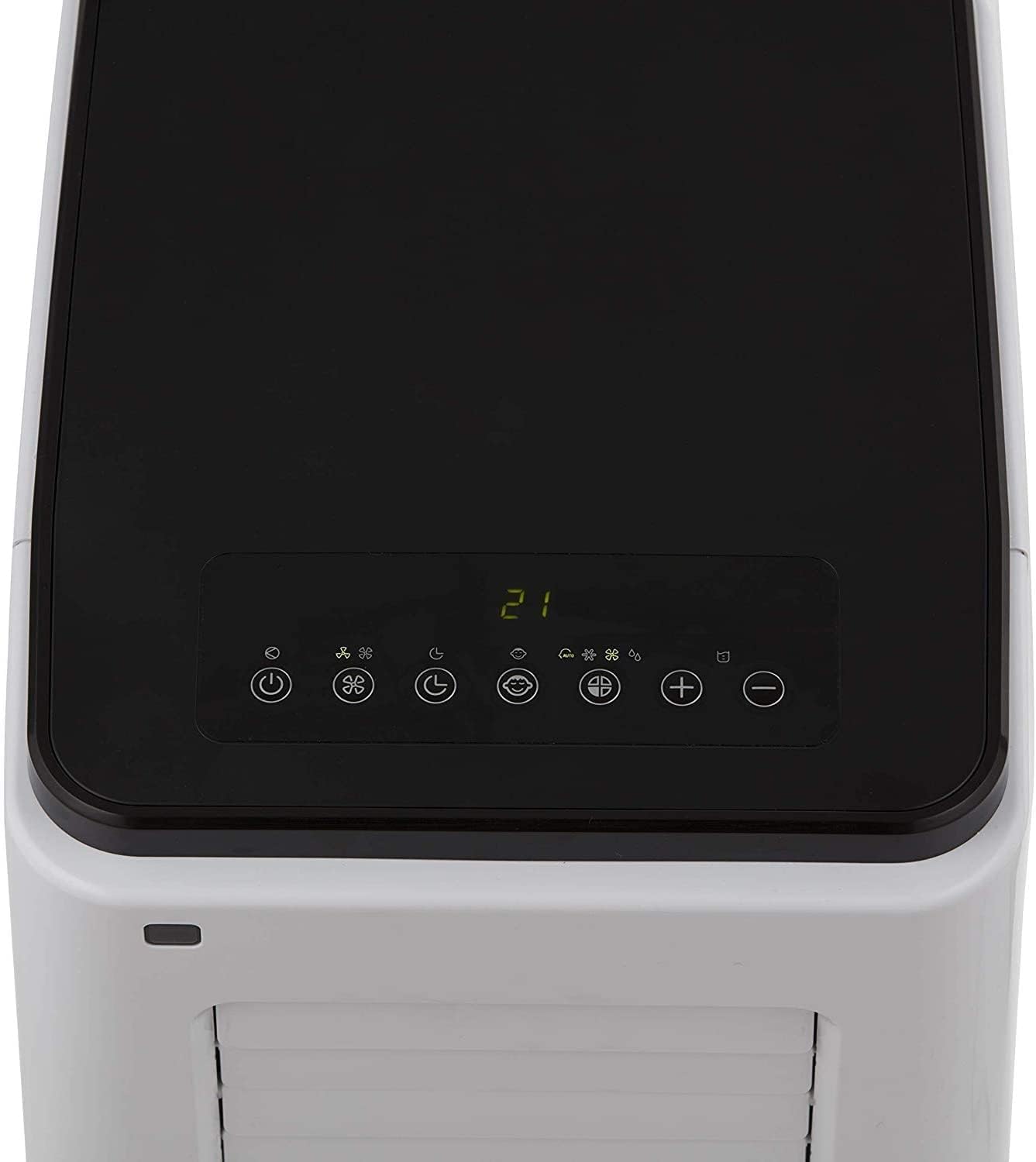
Image: Close-up view of the Pifco P40013's top control panel with digital display and function buttons.
- Power Button (⏻): Turns the unit ON or OFF.
- Speed/Ventilation Button (☸): Adjusts fan speed (Low/High).
- Timer Button (⏱): Sets the 24-hour programmable timer for automatic ON/OFF.
- Sleep Button (👁): Activates energy-saving sleep mode, operating on low speed with minimal temperature variance.
- Mode Button (❄️): Cycles through operating modes: Cooling (Air Conditioner), Fan, and Dehumidifier.
- Temperature Up/Down Buttons (+ / -): Adjusts the desired temperature (18 to 32 degrees Celsius) in Cooling mode.
- Full Tank Indicator: Illuminates when the water tank is full and requires emptying.
Operating Modes
- Air Conditioning Mode:
Select this mode for cooling. Ensure the exhaust hose is properly vented outside. Use the temperature buttons to set your desired room temperature. The unit will automatically adjust its operation to maintain this temperature.
- Fan Mode:
In this mode, the unit circulates air without cooling. Use the speed button to select between low and high fan speeds. This mode is ideal for general air circulation.
- Dehumidifier Mode:
This mode removes excess moisture from the air. The unit will collect water in its internal tank. Monitor the full tank indicator and empty the tank as needed.

Image: Side view of the Pifco P40013, showing the adjustable louvers that allow users to easily direct the airflow.
Maintenance
Regular maintenance ensures optimal performance and longevity of your Pifco P40013 air conditioner.
- Cleaning the Air Filters:
The unit features detachable dual air filters that remove dust, pollutants, and pollen from the air. It is recommended to clean the filters every two weeks or more frequently depending on usage and air quality.
- Unplug the unit from the power supply.
- Gently remove the filter covers and pull out the washable filters.
- Wash the filters with lukewarm water and a mild detergent. Rinse thoroughly.
- Allow the filters to air dry completely before reinserting them into the unit. Do not expose to direct sunlight.

Image: Front view of the Pifco P40013, showing the main air intake grille where filters are located.
- Draining the Water Tank:
When the internal water tank is full, the full tank indicator will light up, and the unit may stop operating in dehumidifier mode. The self-evaporating cooling system minimizes the need for frequent draining in cooling mode, but it may still be necessary.
- Unplug the unit from the power supply.
- Place a shallow pan or tray under the drainage port at the bottom rear of the unit.
- Remove the drainage plug to allow water to flow out.
- Once drained, securely replace the drainage plug.
- General Cleaning:
Wipe the exterior of the unit with a soft, damp cloth. Do not use harsh chemicals or abrasive cleaners.
Troubleshooting
If you encounter issues with your Pifco P40013, refer to the following common problems and solutions:
| Problem | Possible Cause | Solution |
|---|---|---|
| Unit does not turn on. | No power supply; Power button not pressed; Full water tank. | Check power cord connection and wall outlet; Press the power button; Empty the water tank. |
| Unit is not cooling effectively. | Windows/doors open; Exhaust hose not properly vented; Air filters are dirty; Room size too large. | Close all windows and doors; Ensure exhaust hose is securely vented outside; Clean air filters; Confirm room size is within 30 sq m capacity. |
| Unit is noisy. | Normal operating noise; Unit not on a level surface. | Some operational noise is normal; Ensure unit is on a flat, stable surface. |
| Water is leaking. | Drainage plug not secured; Unit tilted. | Ensure drainage plug is tightly closed; Place unit on a level surface. |
If the problem persists after attempting these solutions, please contact customer support.
Specifications
| Feature | Detail |
|---|---|
| Brand | PIFCO |
| Model Number | P40013 |
| Product Dimensions | 15.83 x 12.48 x 30.31 cm (approx. 77 cm height) |
| Item Weight | 28.6 kg |
| Colour | White |
| Cooling Capacity | 9000 BTU (0.75 Tons) |
| Operating Modes | Air Conditioner, Fan, Dehumidifier |
| Temperature Settings | 18 to 32 degrees Celsius |
| Fan Speeds | 2 (Low, High) |
| Timer | 24-hour programmable |
| Refrigerant | R290 |
| Filter Type | Washable |
| Special Features | Sleep function, Remote Control, Auto shut off, Overheating protection, Thermostatic cut off, Easy glide castors. |
| Power Source | Mains Powered (Remote control requires batteries, not included) |
Warranty and Support
Your Pifco P40013 Portable Air Conditioner comes with a 1-year guarantee. You can extend this warranty by an additional 1 year upon product registration. Please refer to the product packaging or the official Pifco website for details on how to register your product.
For technical support, troubleshooting assistance beyond this manual, or warranty claims, please contact Pifco Customer Service. Contact details can typically be found on the product packaging or the official PIFCO website: Visit the PIFCO Store on Amazon.
Ask a question about this manual
Ask about setup, troubleshooting, compatibility, parts, safety, or missing instructions. Manuals+ will review the question and use this page’s manual context to help answer it.