
1. Product Overview
The Transcend TS512GMTE220S is a 512GB M.2 NVMe PCIe Gen3x4 Solid State Drive designed for high-performance computing. It utilizes the PCIe Gen3 x4 interface and NVMe 1.3 standard to deliver fast data transfer speeds, making it suitable for demanding applications and system upgrades. This SSD incorporates 3D NAND Flash memory and a DDR3 DRAM cache for enhanced performance and reliability.
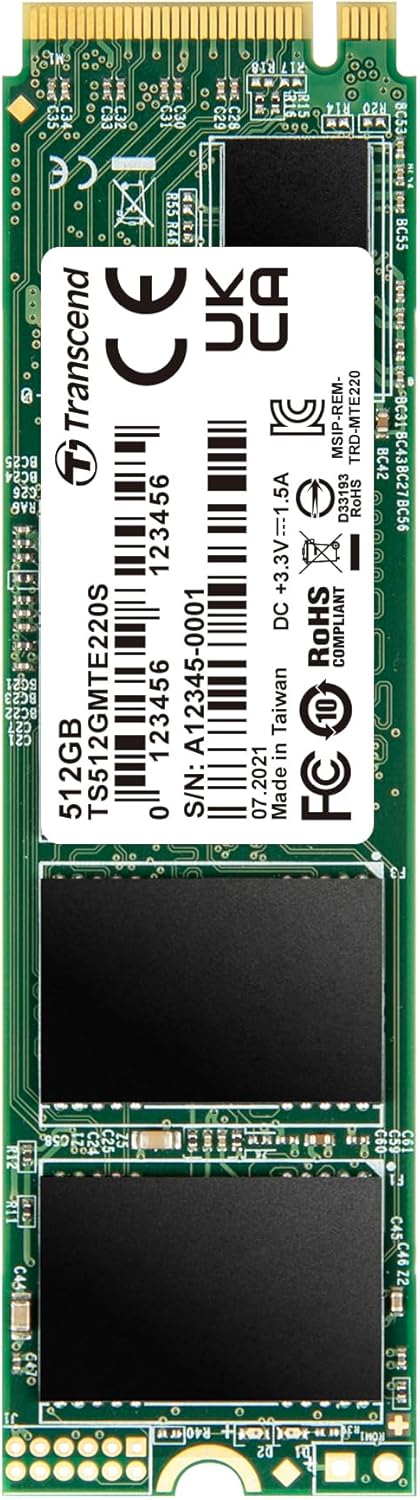
Key Features:
- PCIe Gen3 x4 interface and NVMe 1.3 standard.
- Up to 3,500 MB/s Read and 2,800 MB/s Write speeds.
- 3D NAND Flash memory and DDR3 DRAM cache.
- LDPC (Low-Density Parity Check) coding for data integrity.
- Built-in SLC caching technology for exceptional transfer speeds.
- Dynamic thermal throttling mechanism for stable performance.
2. Understanding PCIe and NVMe
The Transcend MTE220S SSD leverages advanced technologies for superior performance.
2.1. PCIe Interface
PCIe (or PCI Express®) is a high-speed serial computer expansion bus standard. It is a much faster interface than SATA (Serial ATA) for connecting a host computer to solid-state storage devices. PCIe uses lanes, each consisting of one transmit and one receive serial interface, allowing it to meet modern performance requirements.

2.2. NVMe Standard
NVMe (or NVM Express®) is a host controller interface standard specifically designed to address the needs of enterprise and client applications that utilize PCI Express-based solid-state storage. NVMe offers better performance vectors than AHCI (Advanced Host Controller Interface), including scalable bandwidth, increased IOPS (Input/Output Operations Per Second), and reduced latency.

3. Setup and Installation
Installing the Transcend TS512GMTE220S SSD requires a compatible M.2 slot on your motherboard that supports PCIe Gen3 x4 NVMe SSDs. Always ensure your system is powered off and unplugged before beginning installation.
3.1. Pre-Installation Checklist:
- A compatible motherboard with an available M.2 slot (Key M, 2280 form factor).
- A small Phillips head screwdriver.
- An anti-static wrist strap (recommended).
- Your computer's user manual for specific M.2 slot location and installation instructions.
3.2. Installation Steps:
- Power Off: Shut down your computer completely and disconnect the power cable.
- Open Case: Open your computer case to access the motherboard.
- Locate M.2 Slot: Identify an available M.2 slot on your motherboard. It typically has a small screw stand-off nearby.
- Insert SSD: Gently insert the Transcend MTE220S SSD into the M.2 slot at a slight angle. The gold contacts should slide in smoothly.
- Secure SSD: Once fully seated, push the SSD down towards the motherboard and secure it with the small screw provided with your motherboard or the SSD.
- Close Case: Close your computer case and reconnect the power cable.
- BIOS/UEFI Configuration: Power on your computer. You may need to enter your system's BIOS/UEFI settings to ensure the new SSD is recognized and configured as a boot device if you intend to install an operating system on it.
- Operating System Installation/Migration: Install your operating system or migrate existing data to the new SSD.

4. Operating Principles
The Transcend MTE220S SSD is engineered with several technologies to ensure optimal performance and longevity.
4.1. 3D NAND Flash Memory
Unlike planar NAND memory, 3D NAND flash features memory cells stacked vertically in multiple layers. This technology overcomes density limitations of 2D planar NAND, delivering higher levels of performance, endurance, and larger capacities.

4.2. Endurance and Reliability
The MTE220S is engineered with LDPC (Low-Density Parity Check) coding, a powerful ECC (Error Correcting Code) algorithm, to ensure data integrity during transfers and storage. Coupled with high-quality 3D NAND flash chips and a dynamic thermal throttling mechanism, the SSD maintains superior endurance and stability, even under heavy workloads.

5. Maintenance and Software
To ensure your Transcend SSD operates at its best, Transcend provides the SSD Scope software.
5.1. Transcend SSD Scope Software
Transcend SSD Scope is a user-friendly software suite designed to help you maintain the health and optimize the performance of your Transcend SSD. It allows you to monitor the drive's condition, perform diagnostic scans, and manage various settings.

5.2. Key Functions of SSD Scope:
- Status: Displays drive information, S.M.A.R.T. status, capacity used, and wear-out indicator.
- Tool: Includes speed test, secure erase, and diagnostic scan functionalities.
- System Clone: Migrates all data from your original drive to a new Transcend SSD.
- Firmware Update: Updates your Transcend SSD to the latest firmware version.
- Settings: Allows you to enable/disable TRIM, minimize startup software, or start software at Windows startup.
For detailed instructions on downloading and using SSD Scope, please visit the official Transcend website.
6. Troubleshooting
If you encounter issues with your Transcend TS512GMTE220S SSD, consider the following troubleshooting steps:
6.1. SSD Not Detected:
- Check Physical Connection: Ensure the SSD is correctly seated in the M.2 slot and secured.
- BIOS/UEFI Settings: Verify that the M.2 slot is enabled in your system's BIOS/UEFI settings. Some motherboards may require specific configurations for M.2 NVMe drives.
- Driver Installation: Ensure your operating system has the necessary NVMe drivers. Windows 10 and newer typically include native NVMe support.
- Motherboard Compatibility: Confirm your motherboard's M.2 slot supports PCIe NVMe SSDs, not just SATA M.2 SSDs.
6.2. Slow Performance:
- TRIM Enabled: Ensure TRIM is enabled in your operating system. TRIM helps maintain SSD performance over time.
- Firmware Update: Check for and install the latest firmware for your SSD using Transcend SSD Scope.
- System Resources: Close unnecessary background applications that might be consuming system resources.
- Thermal Throttling: Ensure adequate airflow within your computer case to prevent the SSD from overheating and engaging thermal throttling.
- PCIe Lane Configuration: Verify that the M.2 slot is operating at its full PCIe Gen3 x4 speed. Refer to your motherboard manual.
6.3. Data Corruption/Errors:
- Run Diagnostic Scan: Use Transcend SSD Scope to perform a diagnostic scan on the drive.
- Check S.M.A.R.T. Status: Monitor the S.M.A.R.T. status via SSD Scope for any indicators of drive degradation.
- Operating System Integrity: Ensure your operating system is stable and free from malware or system file corruption.
7. Specifications
The following table outlines the technical specifications for the Transcend TS512GMTE220S 512GB M.2 NVMe SSD:
| Feature | Specification |
|---|---|
| Model Number | TS512GMTE220S |
| Digital Storage Capacity | 512 GB |
| Hard Disk Interface | PCIE x 4 |
| Connectivity Technology | USB (for external enclosures, not direct drive interface) |
| Brand | Transcend |
| Special Feature | Portable (when used with compatible external enclosure) |
| Hard Disk Form Factor | M.2 2280 |
| Hard Disk Description | Solid State Hard Drive |
| Compatible Devices | Desktop computers with compatible M.2 slots |
| Installation Type | Internal Hard Drive |
| Read Speed (Max) | Up to 3,500 MB/s |
| Write Speed (Max) | Up to 2,800 MB/s |
| NAND Flash | 3D NAND Flash |
| DRAM Cache | DDR3 DRAM Cache |

8. Quality Assurance
Transcend SSDs undergo rigorous testing to ensure the highest level of quality and reliability. This includes comprehensive tests at all stages of production, covering aspects such as vibration resistance, temperature and humidity tolerance, speed performance, and overall functionality.

9. Warranty and Support
Transcend products are backed by a limited warranty. For specific warranty terms and conditions applicable to your region and product, please refer to the official Transcend website or the warranty card included with your purchase.
9.1. Technical Support:
If you require technical assistance, have questions about installation, or need help with troubleshooting, please visit the official Transcend support website. You can find drivers, firmware updates, FAQs, and contact information for customer service.
- Transcend Official Website: www.transcend-info.com
- Support Page: Refer to the support section on the official website for product-specific assistance.


