
1. Introduction
This manual provides essential instructions for the installation, operation, and maintenance of your A-Tech 4GB DDR3L PC3-12800 1600MHz SODIMM memory module (Model: ATMS345908B12034X1). This module is specifically designed for compatibility with the Siragon MN-50 laptop. Please read this manual thoroughly before proceeding with installation.
Safety Precautions
- Always disconnect the laptop from its power source and remove the battery before installing or removing memory modules.
- Handle the memory module by its edges to avoid touching the gold connectors or the integrated circuits.
- Static electricity can damage electronic components. Discharge static electricity by touching a grounded metal object before handling the module. Consider using an anti-static wrist strap.
- Ensure the memory module is correctly oriented before attempting to insert it into the slot. Forcing it can cause damage.
2. Setup and Installation
Follow these steps to install the A-Tech 4GB DDR3L SODIMM memory module into your Siragon MN-50 laptop.
2.1. Pre-Installation Checklist
- A-Tech 4GB DDR3L SODIMM memory module.
- Small Phillips head screwdriver (if required to open laptop panel).
- Anti-static wrist strap (recommended).
- Your Siragon MN-50 laptop.
2.2. Installation Steps
- Power Down and Disconnect: Shut down your Siragon MN-50 laptop completely. Disconnect the AC adapter and remove the battery.
- Access Memory Bay: Carefully turn the laptop over. Locate the memory compartment cover, usually secured by small screws. Use a Phillips head screwdriver to remove the screws and gently lift off the cover. Refer to your laptop's specific service manual for exact instructions on accessing the memory bay.
- Discharge Static: Before touching any internal components, touch a grounded metal object to discharge any static electricity from your body.
- Remove Existing Module (if applicable): If you are replacing an existing module, gently push apart the small clips on either side of the memory module. The module will pop up at an angle. You can then carefully slide it out of the slot. Store it in an anti-static bag.
- Insert New Module: Hold the A-Tech SODIMM module by its edges. Align the notch on the module with the key in the memory slot. Insert the module at a 45-degree angle into the open slot.
- Secure Module: Once fully seated, gently push the module down until the clips on both sides snap into place, securing the module horizontally. Do not force it.
- Reassemble: Replace the memory compartment cover and secure it with the screws. Reinsert the battery and reconnect the AC adapter.

Figure 1: A-Tech 4GB DDR3L SODIMM memory module sealed in its clear plastic retail packaging. The label indicates compatibility with Siragon MN-50 and highlights the lifetime warranty.

Figure 2: An A-Tech SODIMM memory module being installed into a laptop. The module is shown being gently pressed into an open memory slot, demonstrating the plug-and-play design.

Figure 3: Two A-Tech DDR3 SODIMM memory modules, each individually packaged in clear plastic. The packaging highlights 'Laptop Memory' and 'Non-ECC Unbuffered', along with a 'Lifetime Warranty' label.
3. Operating the Memory Module
Once installed, the A-Tech memory module operates automatically. The laptop's operating system will detect the new memory capacity upon startup.
3.1. Verification
To verify that the memory module is correctly recognized by your Siragon MN-50 laptop:
- For Windows: Right-click on 'This PC' or 'My Computer', then select 'Properties'. The installed RAM amount will be displayed under 'System'.
- For macOS: Click the Apple menu in the top-left corner, then select 'About This Mac'. The memory information will be listed.
- For Linux: Open a terminal and type
free -horcat /proc/meminfo.
4. Maintenance
A-Tech memory modules are designed for durability and require minimal maintenance. Proper handling and environmental conditions ensure optimal performance and longevity.
- Handling: Always handle the module by its edges. Avoid touching the gold contacts or the chips.
- Cleaning: If necessary, gently clean the gold contacts with a lint-free cloth and isopropyl alcohol. Ensure the module is completely dry before reinstallation. Do not use abrasive cleaners.
- Storage: If storing the module, keep it in an anti-static bag in a cool, dry place away from direct sunlight and extreme temperatures.
- Environment: Ensure your laptop operates in a well-ventilated area to prevent overheating, which can affect all internal components, including RAM.
5. Troubleshooting
If you encounter issues after installing your A-Tech memory module, refer to the following common problems and solutions.
5.1. Common Issues and Solutions
- System Does Not Boot / Black Screen:
- Ensure the memory module is fully seated in its slot. Remove and reinsert it, making sure the clips snap into place.
- Verify that the module's notch aligns correctly with the slot's key.
- If multiple modules are installed, try booting with only the new A-Tech module.
- Check your laptop's service manual for specific memory installation requirements or troubleshooting steps.
- Incorrect Memory Amount Detected:
- Confirm the module is fully seated.
- Update your laptop's BIOS/UEFI firmware to the latest version, as this can improve memory compatibility and detection.
- Ensure your operating system is 64-bit to fully utilize more than 4GB of RAM.
- System Instability / Blue Screens (BSOD):
- Run a memory diagnostic tool (e.g., Windows Memory Diagnostic, MemTest86) to check for errors.
- Ensure the module is compatible with your Siragon MN-50 laptop's specifications (DDR3L, 1600MHz, SODIMM).
- If you have other memory modules installed, ensure they are compatible with the A-Tech module (e.g., similar voltage and speed). This module supports both 1.35V and 1.5V operation.
6. Product Specifications
Detailed technical specifications for the A-Tech 4GB DDR3L SODIMM Memory Module (ATMS345908B12034X1).
| Feature | Specification |
|---|---|
| RAM Capacity | 4 GB |
| Memory Type | DDR3L SDRAM (Low Voltage) |
| Form Factor | 204-pin SO-DIMM |
| Speed | 1600 MHz (PC3L-12800) |
| Voltage | 1.35V (Dual Voltage: 1.35V or 1.5V compatible) |
| Error Correction | Non-ECC Unbuffered |
| Rank | 2Rx8 |
| Compatibility | Siragon MN-50 Laptop & Notebook |
| Model Number | ATMS345908B12034X1 |
7. Warranty and Support
A-Tech stands behind the quality of its products.
7.1. Lifetime Warranty
This A-Tech memory module comes with a Genuine A-Tech Brand Lifetime Warranty. For specific terms and conditions of the warranty, please refer to the official A-Tech website or contact customer support.
7.2. Technical Support
If you require technical assistance or have questions regarding your A-Tech memory module, please contact our Toll-Free Technical Support. You can also visit the official A-Tech website for additional resources and support information.
- Official Website: atechmemory.com
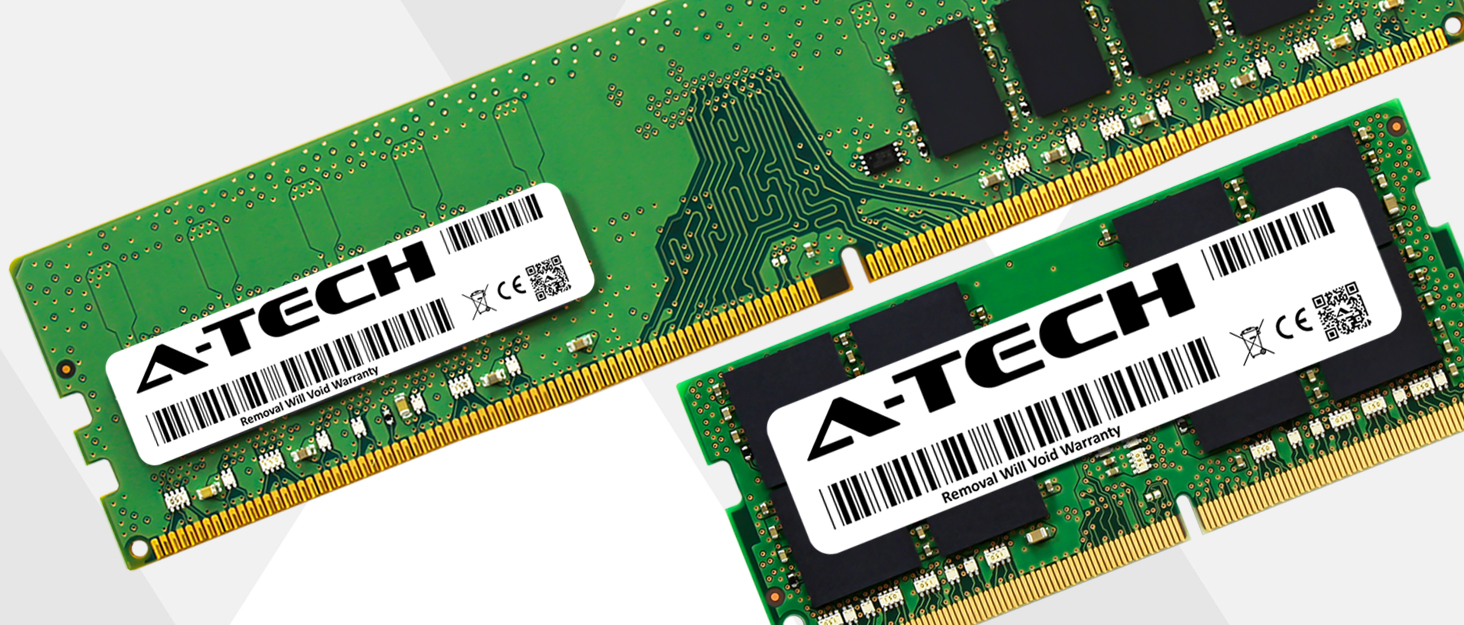
Figure 4: A-Tech DIMM (larger) and SODIMM (smaller) memory modules displayed side-by-side, illustrating the physical size difference. Both modules feature A-Tech branding and barcode labels.