
EPEVER VS3024AU
EPEVER 30A 12V/24V Solar Charge Controller
Model: VS3024AU Instruction Manual
1. Introduction
The EPEVER VS-AU series controller is a common positive, PWM charge controller featuring a built-in LCD display and dual USB ports. Its multiple load control modes make it suitable for a wide range of applications, including solar home systems, traffic signals, solar street lights, and solar garden lamps. This manual provides detailed instructions for the safe and efficient operation of your VS3024AU solar charge controller.
2. Safety Precautions
Please read all instructions and precautions in the manual before installation. Failure to do so may result in damage to the controller, battery, or other components, and may void the warranty.
- Ensure the battery has sufficient voltage for the controller to recognize the battery type before first installation.
- The charge controller is only suitable for regulating solar modules. Never connect another charging source to the charge controller.
- The controller will generate heat during operation. Please install it in a well-ventilated area.
- The controller is designed for indoor use. Avoid exposure to moisture, dust, or direct sunlight.
- Connect the battery first, then the solar panel, and finally the load. Disconnect in the reverse order.
- Ensure all wiring is secure and connections are tight to prevent loose connections and overheating.
- Use appropriate circuit breakers or fuses for the solar panel, battery, and load circuits.
3. Product Overview
3.1 Key Features
- 30A 12V/24V Auto Work, Dual USB design with Max. output 2.4A.
- LCD display for dynamically showing device’s operating data and working condition.
- Three-stage intelligent PWM charging: Equalize, Boost, and Float.
- Supports Sealed, Gel, and Flooded battery types.
- Various electronic protections: PV reverse polarity, Battery reverse polarity, Battery over voltage, Battery over discharge, Battery overheating, Controller overheating, Load short circuit, Load overload.
- Humanized button settings for comfortable and convenient operation.
- UL and VDE certified Nickel plated copper terminals for safe and solid connection.
3.2 Components and Interface

Figure 3.2.1: Front view of the EPEVER VS3024AU Solar Charge Controller, showing the LCD display, Menu and Set buttons, dual USB ports, and terminal connections for solar panel, battery, and load.

Figure 3.2.2: Angled view of the controller, highlighting the heat sink fins on the bottom for efficient heat dissipation.

Figure 3.2.3: A different angled perspective of the controller, providing a clearer view of the terminal block layout and the overall compact design.

Figure 3.2.4: Bottom view of the controller, showing the product label with model number (VS3024AU), voltage (12/24V), and current (30A) information.
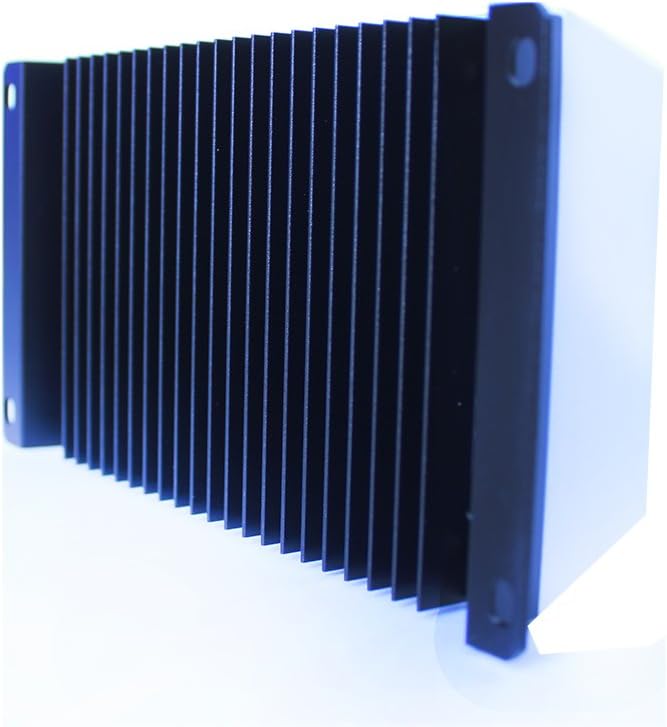
Figure 3.2.5: Side view of the controller, emphasizing the robust heat sink design for effective thermal management during operation.
4. Setup and Installation
4.1 Mounting
- Choose a dry, well-ventilated location away from direct sunlight, high temperatures, and water.
- Ensure there is sufficient air circulation around the controller for heat dissipation.
- Mount the controller vertically on a wall or flat surface using appropriate screws.
4.2 Wiring Connection Order
Follow the connection order strictly to ensure proper and safe operation. Incorrect wiring may damage the controller or other components.
- Connect the Battery: Connect the battery to the controller's battery terminals (+ and -). The LCD will light up.
- Connect the Solar Panel: Connect the solar panel to the controller's solar panel terminals (+ and -).
- Connect the Load: Connect the load to the controller's load terminals (+ and -).
Disconnection Order: Disconnect the load first, then the solar panel, and finally the battery.
5. Operating Instructions
5.1 LCD Display
The LCD display shows various parameters and operating statuses. Use the 'Menu' button to cycle through different display screens.
5.2 Button Functions
- MENU Button: Short press to browse different screens. Long press to enter or exit setting mode.
- SET Button: Short press to increase values or switch options in setting mode. Long press to reset accumulated data.
5.3 Battery Type Selection
The controller supports Sealed (default), Gel, and Flooded battery types. To change the battery type:
- Long press the 'MENU' button until the battery type icon flashes.
- Short press the 'SET' button to select the desired battery type.
- Long press the 'MENU' button again to confirm and exit.
5.4 Load Control Modes
The controller offers multiple load control modes for various applications. Refer to the detailed manual for specific settings and configurations.
6. Maintenance
Regular maintenance ensures optimal performance and longevity of your solar charge controller.
- Periodically check all wiring connections for tightness and corrosion.
- Clean the controller's casing with a dry cloth. Do not use solvents or abrasive cleaners.
- Ensure the area around the controller is free from dust and debris to maintain proper ventilation.
- Inspect the battery terminals for any signs of corrosion and clean if necessary.
7. Troubleshooting
This section provides solutions to common issues you might encounter.
| Problem | Possible Cause | Solution |
|---|---|---|
| No display on LCD | Battery not connected or low voltage; reverse polarity. | Check battery connections and voltage. Ensure correct polarity. |
| Load not working | Load short circuit; overload; battery low voltage; load control mode setting. | Check load wiring and current. Verify battery voltage. Adjust load control mode. |
| PV not charging battery | PV reverse polarity; open circuit; insufficient sunlight. | Check PV connections and polarity. Ensure adequate sunlight. |
| Controller overheating | Poor ventilation; excessive load/PV current. | Improve ventilation. Reduce load or PV input if consistently high. |
8. Technical Specifications
| Parameter | Value |
|---|---|
| Model | VS3024AU |
| Nominal System Voltage | 12V/24V Auto Work |
| Battery Input Voltage Range | 9~32V |
| Rated Charge/Discharge Current | 30A |
| Max. PV Open Circuit Voltage | 50V |
| Battery Type Options | Sealed (Default) / Gel / Flooded |
| Low Voltage Reconnect Voltage | Sealed/Gel/Flooded: 12.6V |
| Low Voltage Disconnect Voltage | Sealed/Gel/Flooded: 11.1V |
| Self-consumption | ≤10mA |
| Temperature Compensation Coefficient | -3mV/℃/2V (25℃) |
| Grounding | Common Positive |
| USB Output | 5VDC/2.4A |
| Overall Dimension | 181 x 100.9 x 59.8mm |
| Terminals | 6AWG (16mm²) |
| Net Weight | 0.55kg |
| Enclosure | IP30 |
| Working Environment Temperature | -25℃ ~ +55℃ |
| Humidity Range | ≤95% (N.C.) |
8.1 Extensive Electronic Protections
- PV Reverse Polarity Protection
- Battery Reverse Polarity Protection
- Battery Over Voltage Protection
- Battery Over Discharge Protection
- Battery Overheating Protection
- Controller Overheating Protection
- Load Short Circuit Protection
- Load Overload Protection
9. Warranty and Customer Support
EPEVER products are manufactured to high-quality standards. For warranty information, technical support, or service inquiries, please contact your authorized EPEVER dealer or visit the official EPEVER website. Please have your product model number (VS3024AU) and purchase details ready when contacting support.
Related documentsVS3024AU


Ask a question about this manual
Ask about setup, troubleshooting, compatibility, parts, safety, or missing instructions. Manuals+ will review the question and use this page’s manual context to help answer it.